|
PS2 Laser Clean 2002 Luke Garfield |
|
This is a tutorial for cleaning the ps2 laser. A very common problem, this is usually what is causing those damn "Disc Read Errors". Before starting anything, discharge static from yourself (touch something grounded or metal). Materials Needed: Small Screwdriver Normal Screwdriver Airduster Its actually quite simple, even for your average Jo. Remember, if your warrenty is up, what do you have to lose? Its 120 bucks to get it to work again from Sony anyway!
|
| Step One: Flip your PS2 upside down. Remove the 10 plates. Under these you will find screws. Remove them. This is for version 1-4. For 5 and 6, there are 8 screws on the bottom and some screws in the expansion bay. You may need to remove the sticker on the back that is used to retain the warrenty. | 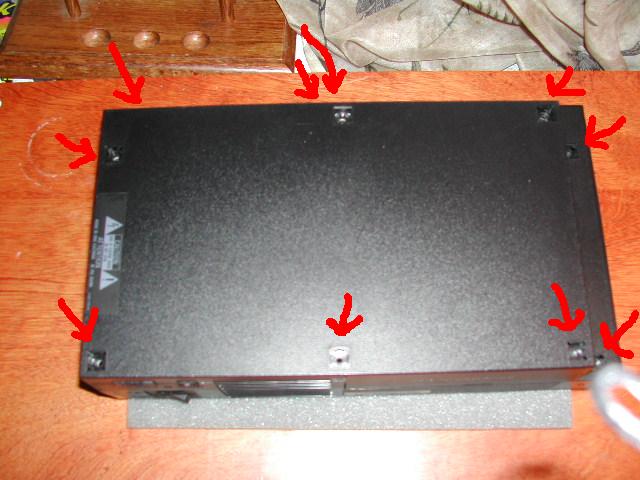 |
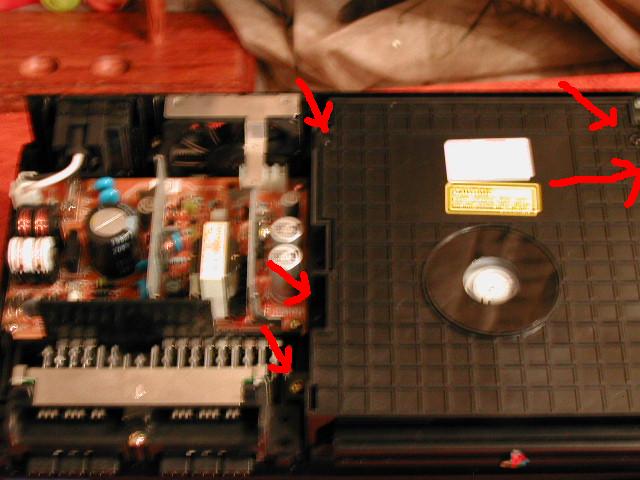 |
Step Two: Flip your PS2, screws removed, over. Remove the top plate. Exercise caution as a bus that connects to the eject/reset buttons is on the side of the cd drive. Loctate the cd drive, then on a Version 1 unscrew the 4 small screws and 1 gold screw. It may be different for other versions, but it will still be simple. Then remove the cover. |
| Step Three: With the cover removed, locate the laser. Using your air duster, clean it. Do not tip the bottle above 40 degrees, liquid will spray out! Also, DO NOT TOUCH with your hands. Only the air! Dust the entire thing out, all around the cd player.Be very thorough. This will prevent you from having to clean it in the future. | 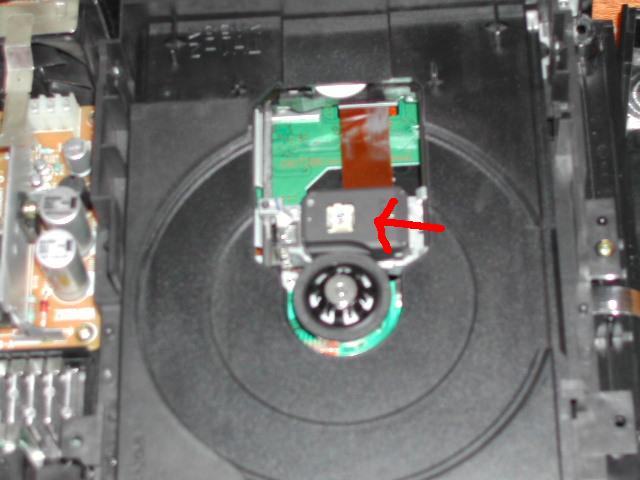 |
|
Then just reassemble your PS2, and everything should be fine! I reccomend dusting underneath the cd tray too, to get rid of all dust. Feel free to reproduce this document, as long as credit is given to the original author. |