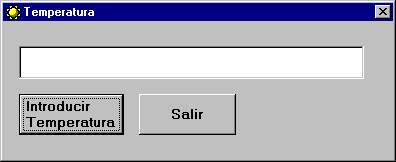
Private Sub CmdSalir_Click()
End
End Sub
Private Sub CmdTemperatura_Click()
Dim Variable As Variant
Do
Variable = InputBox("Introduce una temperatura:")
Loop Until IsNumeric(Variable) 'Si la variable no es numérica se vuelve a repetir
Select Case Variable
'Dependiendo del valor
muestra un resultado
Case 0: TxtMostrar.Text = "Helado"
Case 1 To 10: TxtMostrar.Text = "Frío"
Case 11 To 16: TxtMostrar.Text = "Fresco"
Case 17, 18, 19: TxtMostrar.Text = "Temperatura interior casa en invierno"
Case 20 To 25: TxtMostrar.Text = "Agradable"
Case Is > 25: TxtMostrar.Text = "Calor"
Case Else
TxtMostrar.Text = "Temperatura sin referencia"
End Select
End Sub
Bajate el programa
completo haciendo clic en la imagen 

