1. Introduction
2. The 2 Click Mentality
3. PS and your PC
4. Swing Methods
5. Course Management
6. Club Selection
7. Mouse Sensitivity
8. The Proper Swing
9. Off the Tee
10. The Approach Shot
11. The Short Fairway Shot
12. Fairway Bunker Play
13. Green Side Bunker Play
14. Chipping
15. Putting
16. Closing
Introduction
The Power Stroke swing method has
brought a new realism to the scoring and game play of Links LS. In fact it may have
brought the scoring closer to everyone's real life game and then some! Although this
article is written by me, and the only thing I can talk about concerning PS is the way
that I play the game, it is not about me in any way. I love Link LS and always
have. The PS swing method has brought back a passion for the game that has been lost in
all of the birdies and eagles that are a regular occurrence while playing the
"other" swing method. My only concern is that it is so tough to get
"good" at the PS method that many people will just give up on it before they
have given it a chance. The sole purpose of this article is to put my approach to
the game on paper and let you read it. You may read this page and find absolutely
nothing that helps your game, but hopefully you will read something contained within that
will hit a nerve and you will be able to say "yeah... I need to try that!" or
"yeah... I have been doing that ALL wrong!".
The 2 Click
Mentality
The 2 Click Mentality goes something
like this.... to eagle a hole is a victory... to bird a hole is expected... to par a hole
is a let down... to bogie a hole is a disaster...and to double bogie a hole is a complete
disaster and will cause the rest of your round to suffer greatly...
This is not meant to be a slam
against the 2 click method in any way. I have played 2 click for years and loved
every minute of it. However if you continue to play with this way of thinking when
you are playing PS you will be eaten alive by every course that LS has to offer with the
exception of maybe St. Andrews. Throughout the rest of this page I will refer to the 2
click mentality on different shots and what changes to your thought process must be made
to keep you from having those "blowup holes" that cost us all a nice round.
To sit back and enjoy playing PS
every time you load the game your thought process will have to look something like this...
to eagle a hole is RARE and will cause you to smile from ear to ear... to bird a hole is a
major victory... to par a hole is a victory... to bogie a hole is expected... and to
double bogie a hole is a let down.
PS and your
PC
Regardless of what swing method you
use, Links LS is a demanding game on PC's. There are many things that can help the
performance of the game that you can do as far as upgrading your PC, the biggest
improvement that can be made would be to make sure that you have at least 64 megs of RAM
no matter what size processor you are running. RAM is very inexpensive these days
and will go a long way to making LS play smoother on your PC. The second biggest
improvement that can be made would be a QUALITY video card with at least 4 megs of ram.
These are a couple of things that cost money but there are a few things that can be
done to enhance your systems performance each time you play LS that do not cost money and
although you may think that you cannot notice a difference when playing, they will help.
Reboot your machine each time you
are going to start a round of LS. After rebooting hit Ctrl/Alt/Delete and close all
programs except explorer and systray. This is especially important if you are going
to play a game through a launcher because after you have loaded LS through a launcher and
entered the game the launcher is still resident on your desktop using up precious
resources. Although it may seem like a very small amount of memory being used by
those programs and the launcher it can mean the difference between no mouse lock-ups in a
round and one or two in a round, and that one or two could cost you dearly.
Clean your mouse regularly.
You cannot believe the crud that will get built up on the rollers inside of your mouse in
a very short period of time. Someone in the questionnaire asked me what kind of a
"special" mouse I was using to be able to play PS so well. If anyone finds
a "special" mouse that enhances their game play please buy one for me. :)
My mouse is the same old Logitech Mouseman that I have used for years. I like this
mouse because it is rather large and is shaped to fit very nicely in the palm of the
hand. If you are in the market for a new mouse anyway you might like this one but I
would not suggest going out and buying one if the only reason is that you believe it will
turn your PS game around because it probably will not. The only other suggestion I
have about certain types of mice is to stay away from using a trackball. I have
heard nothing but horror stories from those that are using them. Sorry trackball
users.... that is the only advice I can give you because I have never used one before. :(
One thing that is very deceptive
about playing PS is that it is almost impossible to detect when you have had a mouse
lockup during the swing unless it is a very bad one, but it only takes a slight mouse
lockup to send a shot sailing off into the trees.
Swing
Methods
There are two different PS swing methods.
1. Click... hold the mouse button down throughout the entire swing...let up on the
mouse button at the snap point.
2. Click... let up on the mouse... make the swing.... hit the mouse button at the
snap point on the way back.
I use the latter method... Click... let up on the mouse... make the
swing.... hit the mouse button at the snap point on the way back.
This seemed to me to be the closest thing to what I was accustomed to when
playing 2 click because I am hitting the mouse button at the snap point just like I was
with the 2 click method. However I have had people tell me that the other way seemed
more natural to them because they hold the mouse button down in the 2 click method until
it gets to the distance that they wanted to hit and then let up. The only comment
that I have as far as why I use the one I do is when I played 2 click I could definitely
notice that when letting go of the mouse at the top to set the distance, the drop point
would never drop immediately when I let go. It would always be a couple of marks
past 12 o'clock for me. I do not know if this is just inherent to my system or if
the reaction time for letting up on a mouse button is slower than the reaction time for
hitting down on the mouse button.
You will just have to experiment with what works best for you and feels
natural. If your game is very bad at this point in time and you are looking for
something that might help, try the swing method that you are currently not using for a
while and see what happens.
Course
Management
Course Management.... Imagine those two words for a minute being used in
the context of talking about a computer golf sim. PS has brought a new factor into
the game that must be thought out and applied with every shot.
Lets face it... while playing 2 click 99% of all holes played go something
like this:
The 2 click mentality:
Off the Tee: Reach in the bag... grab the driver... set the marker
at 275 yards regardless of the amount of fairway you have to land on or the number of
bunkers in the area... and rip it.
The Approach Shot: Reach in the bag... grab the appropriate club...
set the marker dead at the pin compensating for the lie and the wind direction... rip it
at the hole... regardless of where the pin may be tucked away or what hazards (bunkers)
may be near.
Playing PS with this kind of an attitude will surely bring nothing but
trouble.
The PS mentality:
Off the tee: Forget the fairway for the moment. Take a look
around the landing area and search out the bunkers, trees, water, and any other hazards
that may be out there ready to grab your ball if you do not hit a perfect tee shot.
After doing this, choose the safest club that will get you the most distance with the
least amount of risk involved if you hit an errant shot off of the tee. If the 3
wood is your safest club then go ahead and use it instead of a smaller one. Did you
notice that I said 3 wood and not driver? You know why? Because I NEVER carry
a driver. More on this later though.
Approach shot: Forget the green for the moment. Take a look
around the green and search out the bunkers, trees, water, and any other hazards that may
be out there ready to grab your ball if you do not hit a perfect approach shot.
After doing this, choose the safest club that will get you closest to the hole with the
least amount of risk involved if you hit an errant shot. Sounds familiar doesn't
it. :)
It would be nice if every green was huge and every pin was just stuck in
the middle of the green and left there. It would also get to be very boring after a
while. For those pins that have been put out there very nicely in the middle of the
green, or in a spot where trouble is not near, fire away at them. However for those
pins that are tucked back in a corner or set off to the side of the green next to a bunker
you MUST play to a safe portion of the green and rely on your putting to get you a bird.
It is much better to have a putt from 30 or 40 feet that you can lag to the hole,
leaving a short putt for par, than it is to have to shot from a bunker and leave the chip
10 to 15 feet away for a tough par putt.
You may look at this section and think "well that's all stupid"
"I play that way anyway and nobody needed to tell me all that". That may
be true... you may play REAL golf like that but is that how you play LS? I have
played LS and Links 386 (2 click) for years and it may be true that on occasion I have not
hit the driver off of the tee because of trouble in the fairway but I don't believe I have
EVER played away from a pin on purpose just because the pin was in a bad spot or there was
a stinking bunker close by! :)
Club
Selection
Personally I could care less what clubs you decide to play with during a
round with one exception... Leave the driver OUT of your bag! The penalty for
a bad shot with a driver is NOT worth the extra 15 to 20 yards that you will get hitting a
driver instead of a 3 wood. The penalty for a bad 2 wood shot is almost as bad as
the driver so I do not play with it either.
Mouse
Sensitivity
In the early stages of playing PS while trying to develop a good
consistent swing you will find that the default setting for mouse sensitivity in LS is
much to slow. You cannot generate enough club head speed with any of the clubs to
get them to hit the distance that they were supposed to go. Play with the mouse
sensitivity settings for a while and try to find a happy medium between the swing you have
developed and the distances the clubs are supposed to be hit. I finally decided on 4
marks to the right of default. This setting along with my natural swing lets me hit
all of my irons the proper distance without a huge effect on badly hit shots and also sets
up well for my putter. However... This setting also caused all of my woods to be
much longer than the suggested distance that LS gives me. The 7 wood travels about
210 to 220 yards... 5 wood from 230 to 240 yards... and the 3 wood from 260 to 280 yards
if I really hit a perfect shot. Is this a bad thing? NO!! All I had to
do was just disregard the distances that LS told me these clubs would go and realize each
time I used them they would fly further. The nice thing about this is that it
allowed me to leave the driver out of my bag and use the 3 wood off of the tee and lose
very little distance.
EVERY person that I have played PS with has told me that their mouse
sensitivity is not set at default, but ALWAYS set to the right of default. Everyone
of them have it set even further to the right of default than I do. This is not a
bad thing in any way. You need to set the mouse up so it is comfortable for you no
matter where that spot happens to be.
Now with all of that being said let me explain why I believe the penalty
for the driver is unusually harsh...
Lets go back to 2 click for a second and think about what happens when you hit way past 12
o'clock and then miss the snap by even just 1 mark. You get an unusually bad hook or
slice which leads to a very bad tee shot. It is no different with PS... If you have
your mouse sensitivity set way to the right of default and you still use the same swing
that you do with the other clubs and miss the snap you will be severely punished.
Leave the driver OUT of the bag!! The best thing that can happen using the driver
off of the tee is that you will have an approach shot that is one or two clubs shorter
than hitting the 3 wood. The worst thing that can happen is that you will find
yourself missing 3 or 4 tee shots with the driver every round and that will certainly lead
to a bogie or worse each time you do.
All I can tell you about how to set up your mouse sensitivity is to play
with it until you have found a happy medium between being able make your normal motion,
still get close to the snap, and also have your clubs traveling the distance that you
like. If that distance is NOT what LS tells you it should be who cares?? As
long as you know each of your clubs potential you will choose the right one for each shot.
The real PGA pro's do not hit each and every club the same distance as each other
so why should PS be any different?
I have also seen a lot of people complaining because they think a few of
the clubs hit way too long. This is not the games fault at all! If you put the
mouse sensitivity at default and hit a perfect shot you will fly these clubs the proper
distance. The problem is that the default setting for the mouse is not used by most
of us because we cannot generate enough club head speed at the default setting.
Every PS player that I have ever talked to tells me that they have their mouse sensitivity
set WAY to the right of default so they can generate enough club head speed to hit their
irons the proper distance. This causes the woods to fly longer than they should but each
player should know that this will happen and adjust their thought process.
The Proper
Swing
I suppose the proper swing is whatever you get comfortable with that
allows you to improve your game with practice. So all I can do here is tell you what
I do each time I hit a shot.
After opening the swing gauge I take a couple of "practice"
swings. Just moving the mouse right and then back left while watching the cursor to
see that it is traveling in a straight line. My arm is positioned so that my wrist is
resting on the edge of my mouse pad... the mouse rests comfortably in the middle of my
hand but the only fingers touching the mouse are my thumb and little finger... I then put
the end of the cursor directly over the center of the club head... click the left mouse
button and let up... then wait for a second before starting the swing to make sure that
all activity coming from my processor has stopped... now... and I think is very
important... I apply a VERY VERY slight downward pressure on the mouse before
starting the swing to insure that all movement of the mouse is being recorded by the
game... the entire swing is created using ONLY the wrist movement... right and then back
left... I start off slowly at first and then accelerate a tiny bit until I get to the back
of the swing and in one motion make the move forward bringing the index finger down on the
left mouse button hopefully at the snap point or very close each time.
Swing Test
Here is a little test to see if you are swinging on a straight plane.
Put your mouse at the left hand corner of the bar below and it will turn blue. Make
your normal stroke back and the forth a few times. If you are moving your mouse on a
perfectly straight plane the line will never turn red.

As I said before you will have to develop your own swing but there are a
couple of things that you can do to help in this process. The most important thing
to remember is that moving the mouse faster does NOT mean getting more club head speed.
A consistent smooth motion will generate a MUCH higher club head speed and help you
keep the mouse on a straight line throughout the swing. One other very important
thing to remember is illustrated in the graphic below...
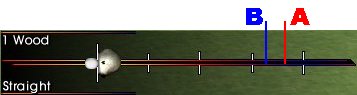
Somewhere around point A in the back swing the club head will start to
decelerate slowly and eventually come to a complete stop. I call this the bungee
cord effect. I am sure this was added to the swing so that you would not draw the
club back and just hit a "brick wall" each time you pull the club back too far.
The problem with pulling your back swing past point A is that when you start your
forward motion the club will "stick" in the "bungee cord" area for a
second and then just like a rubber band it will throw the club forward when it comes out
of the area. This causes you to lose your rhythm when trying to hit the snap and
also causes overspeeding. Somewhere around point B is the perfect spot for ending
your back swing and starting the forward motion. Depending on where you have your
mouse sensitivity set, the motion in your back swing to reach point B can vary from 1 inch
to about 2 1/2 inches. Find a mouse sensitivity setting that will allow you to make
your normal swing, get the club head speed that you need, and not have your back swing
venture into the "bungee cord area".
Off the Tee
Once you have developed a consistent
swing the only thing that you need to do when stepping up to the tee is use common sense.
NEVER flirt with a fairway bunker or water and always choose the safest club
that will get you the most distance with the least amount of risk involved if you hit an
errant shot off of the tee. There are certain times however when the risk is
justified to play a longer club that may not be the safest club to hit. That would
be on some par 5's that are not reachable unless you get enough distance off of the tee.
The reason it might be justifiable on a par 5 is because you can still recover and
shoot a par if you get into trouble, however it is very tough to shoot par on a par 4 if
you hit your drive poorly.
The Approach
Shot
The exact same philosophy should be
applied for the approach shot as for the tee shot. NEVER flirt with a fairway bunker
or water and always choose the safest club that will get you closest to the hole
with the least amount of risk involved if you hit an errant shot. Firing dead at
every pin throughout a round might get you a couple of extra birdies but one errant shot
at a pin tucked in a corner with water nearby will ALWAYS cost you a bogie or worse.
Course Management... Course Management... Course Management...
The Short
Fairway Shot
What I consider the short fairway
shot, or for that matter a short rough shot, is a shot that is 35 to 55 yards away from
the pin. I only use the LW to chip with and can get about 30 yards out of it if I go
to the setup shot screen and pull the club head down a couple of spots and hit it from the
far right hand side of the meter. Hitting a normal LW shot with the club set all the
way to the top of the setup screen will net me around 60 yards. This leaves a
critical area from 35 to 55 yards that a normal LW shot and a chipped LW do not cover.
I find it very tough to slow the speed of my normal swing way down and still be
able to move the mouse along a straight line and hit the snap. So, I use a little
different approach to hitting those nasty short in between distances...
Considering that point B on the
graphic above will net me around 60 yards with the club set all the way up in the setup
screen I use that as a starting point to the various other distances that I need.
Then while making this shot I do not make the swing one continuous motion. I take
the club back to a point that will net me the yardage that I want and completely stop the
swing. After this complete stop I will then move the mouse very quickly toward the
snap point. This makes it a bit tougher to keep the club on a straight plane but
much easier to control the distance. Missing this shot in-out or out-in a few
degrees has very little effect on the hook or slice and missing the snap also does very
little to send the ball off in the wrong direction.
As with all other shots that you
develop you will have to play around with the distances that you will achieve with how you
have your mouse sensitivity set.
Fairway
Bunkers
I hate to admit it but I am a
terrible fairway bunker player. I would like to say this is because I play so safely
off of the tee that I rarely hit into fairway bunkers and that may be true but it is still
no excuse for not going to the practice range and hitting a couple of hundred shots out of
a fairway bunker to get better at it. That being said I have played many online
rounds with Joel Bockelman who is an awesome fairway bunker player and I asked him to
write this section of the page for me.
The first thing to do when your ball finds its way into a fairway bunker
is to not panic! Getting out is easy and getting on the green isn't too difficult.
Remember to play it safe. Aim at the fat part of the green away from the
rough and hazards. Don't go for sucker pins or front pin locations. Always take a
full swing and always use more club than you normally would from the same distance.
I usually take 1-2 more clubs depending on the lie. In the sand, the snap is the
most important factor because it determines how far you will hit the ball and also the
trajectory of the ball. I always try to snap on or just past the intended snap line.
Be aware that snapping before the snap line will result in a "fat" shot
while snapping late will result in a "skinny" or "thin" shot. So
if you are going to snap late, remember to play for more roll like you would from the
rough. My advice is to open a practice session and hit your ball intentionally into a sand
trap. Experiment with different shots and go with what feels comfortable for you.
If you're within 30 yards of the green, go with a blast type shot by hitting the
normal snap or just before. If you want advice on how to play the front lip of a St.
Andrews pot bunker then my advice is this: Take a drop or play it as it lies AT YOUR OWN
RISK!
Joel
Green Side
Bunker Play
Green side bunker play is a
different story for me and VERY easy to master. I spent a LOT of time in practice
mode hitting every kind of shot imaginable trying to find the best results only to
discover that hitting a normal shot is the easiest way to control the distance! I
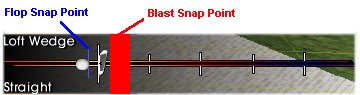
believe you would call this the "blast" shot. Completely forget about the
offset snap point that is used for a "pick" shot. Just a normal shot
trying to achieve a club head speed of around 80 for each club. Here is how the
distances work out for each club for me.
LW = 20 yards
SW = 25 yards
PW = 30 yards
9 Iron = 35 yards
8 Iron = 38 yards
7 Iron = 40 yards
These are normal medium green speed
distances for me. Depending on the green speed I will use a shorter or longer club
or try to hit the ball easier or harder, and you must also take into account the slope of
the lie and the slope of the green after the ball lands. Since you rarely get into a
green side bunker that is more than 40 yards away these clubs should be sufficient.
You will have to find out what your distance is for each of these clubs however because
they will differ from mine depending on your mouse sensitivity and your normal
swing. One thing you need to remember about sand shots is that the snap point that
you hit does NOT effect whether the ball will hook or slice. The only effect that
hitting the snap has is to shorten or lengthen the distance of the shot. This is
very useful when it comes to distances that are not exactly the distance that you hit each
club out of the bunker. By hitting the snap earlier than the regular snap point you
can shorten the distance each club will fly. This comes in very handy for those in
between distances. One other thing that you must NEVER do is to hit the snap past
the normal snap point. If you get to close to the "flop" snap point you
will send the ball flying over the green every time. It is always much better to
take a larger club, and come up way short of the snap point, than it is to try and get too
close to the "flop" snap point.
Chipping
The first thing you will notice
about this section, and all of the other sections for that matter, is that there are no
charts being put up for people to use. The reason for that is because I don't have
one! If I did have one I would not add it to this page because it would be
absolutely useless to you anyway. If you would like to have a chip chart to refer to
while playing, that is probably a very good idea, however the only chip chart that will
ever be perfectly suited for your swing and mouse sensitivity is the one that you create
for yourself.
Chipping is a totally different ball
game when it comes to the way you should swing the club. A normal swing from the tee
or an approach shot is one full motion without a stop or pause throughout. A chip
shot however is much easier to control the distance if you take the club back to the point
in the meter that will get you the distance you want, then completely STOP the club,
making sure that you have dropped the distance marker at the right spot, and then make the
move towards the snap. The toughest thing about chipping like this is keeping the
club on a straight line throughout the forward motion. One thing that does help
however is to take the time to line the club head up dead center with the line on the
swing meter before you start forward.
Putting
Something occurred to me while
thinking about what I wanted to put in the putting section of this page. I was
trying to think of what I did that might have started me out on the right path for playing
PS very well almost from the very beginning.
When I bought Links 386 the first
thing I did before ever hitting a tee shot was go to the putting green for an hour or so
and learn how to putt with this new toy I had. When I bought Links LS (97) the first
thing I did was go to the putting green for an hour or so and RELEARN how to putt with
this new toy I had, and found out that putting with LS97 was tremendously different than
Links 386. When I bought Links LS98 the first thing I did was go to the putting
green and putt for just a few minutes because I discovered that the putting was not that
different from LS97.
With every version of Links that I
have purchased it has always been a "ritual" with me to go to the practice green
first and get comfortable with putting before anything else. With LS99 it was no
different, only this time it was the Power Stroke swing method that I was trying to master
and let me tell you it was and still is VERY tough. But what occurred to me was that
when I first started playing PS I played with the mouse sensitivity settings, trying to
get it set at the proper distances for the marks on the PUTTING swing meter before I ever
hit a tee shot. Although the only reason that I set my mouse sensitivity up for
putting before anything else when I started playing PS was because it was just natural for
me to go to the putting green as a "ritual" that I had started a long time ago,
and not some great great idea that I thought would make me play PS better faster, I truly
believe that because I did start by setting the mouse sensitivity to my preference while
putting first, then developed the rest of my game around that mouse sensitivity, that the
rest of the game was MUCH easier to master. Even when I struggled at first hitting
bad shots trying to get to the greens in regulation I knew I still had a chance to save
par because I had my mouse settings set up perfectly for putting.
I will get to a couple of putting
tips shortly but at this point I must say one thing. If you are new to Power Stroke,
or your game is so horribly bad at this time that you would just like to start over and
try something different, I would suggest that you start at the putting green and get
comfortable with your mouse sensitivity there FIRST and then go out and develop the rest
of your game around that mouse sensitivity. Almost every person that put up a
question on the form page I had on the site asked about putting. Most of those
people also made the comment that they are getting off of the tee and to the greens just
fine but they are truly just LOST when it comes to putting. Why... How can this be..
What is the reason? I will tell you why... We all know that the mouse default
setting in LS is too slow for us to get the proper club head speed to get any distance out
of our normal clubs. So most of us have set it up way to the right of default to
achieve club head speed. That is just fine for the rest of the game but it has a
very bad effect when it comes to putting! You are accustomed to seeing a putting
meter that has 1 foot increments up to 10 feet and then 5 foot increments up to 50 feet
and so on... However now since your mouse sensitivity is set so high for the rest
of your game the marks in the putting gauge are WAY off because you are hitting the putt
so much faster than the default setting. On top of this there is the fact that if
you miss the straight line of the putt even slightly the ball will move drastically in
that direction! Think about these last few paragraphs very hard. They may
change your game around.
Hitting a putt is exactly like
hitting the chip shot that I described earlier. Move your mouse back to the point
that will get you the proper distance and completely stop the swing. Line the club
head up with the center of the line in the meter and pull the mouse through the snap
point. The only difference when hitting a putt is that you do not have to worry
about hitting the snap. Just pull the mouse past the snap point all the way to the
end of the meter. This is actually a very nice feature because it allows you to
concentrate on keeping the mouse along a straight line while putting without the extra
strain of worrying about hitting the snap.
The different green conditions in
LS99 seem to putt almost exactly like they did in LS98. Also the slope arrows seem
to have the same effect in LS99 too. The only difference that I have noticed is that
short putts seem to break a bit when playing PS. Now wait a minute here!! You
just said that the greens putt the same in LS99 and then turned around and said that they
break more while playing PS?? Yep... that's what I said :)... and here is
why... When playing 2 click for years we all learned that we could take out a
major part of the break in a short putt by hitting the putt extra hard. The problem
I had with putting at first with PS is that if I hit the putt harder than needed I might
end up with another putt that was even longer than the first one. So I started
hitting all of my putts a little softer to make sure that if I missed I would have an easy
putt left. Many people asked about help making those shortish putts and the advice I
would give is to either start banging them in again, just like 2 click, or start playing
for the extra break that you will surely get if you try to hit them softer.
Closing
Well... that is pretty much it
for now. I truly hope that you have found something on this page that will help you
improve your PS play and keep you playing PS along with the rest of us that love this
swing method for a long time to come.
I would also like to apologize if
you came here looking for PS charts and were disappointed when you did not find any, but
like I said before the only charts that will do you any good are the ones that you create
yourself with your own swing and mouse settings.
If you came to this page assuming that what you read would change your PS
game around immediately you will probably be disappointed. I truly believe that the only
way to improve at PS is to find a consistent swing and build on it with a LOT of practice.
You also must be willing to suffer through all of those above par rounds until you can
shoot under par consistently. One of the real problems with people who love to play golf
simulations is that they believe that they should master the game within a few short days.
This is not going to happen with PS and that is what makes it so fun to play.
RD