 Peripheral devices include all the
input and output
Peripheral devices include all the
input and output
TOPIC 5.3.: PERIPHERAL DEVICES
Input/output, or I/O, devices allow the user to input data and output it in usable form. I/O describes the transfer of data between main memory and peripheral devices such as disks, printers, modems, keyboards and mice.
Communication between the CPU and such devices is undertaken through an I/O controller, which handles communication for the particular type of device being controlled. Interfaces may control a single device, or a number of devices. These controllers transfer the data in a format acceptable for the device they control. They are attached to the CPU via the computer's buses. Slow devices, such as mice, or those communicating over long distances, such as modems, transfer data a single bit at a time through a serial connection. Faster devices, such as printers, transfer data in larger blocks through a parallel connection, where many bits of data are transferred simultaneously using separate data lines for each bit. Parallel cables are normally used only over short distances as the cables are complex and therefore expensive; also, transferring multiple bits over long distances can result in distortion. Communication with any device needs to be two way, in order that the device can communicate, for example, status positions such as 'not ready' to the CPU, and that the CPU can ask for an instruction to be executed.
A number of mechanisms exist for communication with peripherals, the actual one selected being that most appropriate to the speed of the device and the amount of data to be transferred.
Slow devices, such as a mouse, communicate through a pre-programmed exchange sequence. Programmed I/O allows the CPU to control data transfer by constantly checking whether the I/O controller has completed the task it is currently executing, or is waiting to execute another task. This is known as polling. If the device is ready it flags this condition, and the CPU inspects the flag when it next polls the device.
However polling is not a very efficient use of the CPU, which must waste time checking with devices that could be better used executing other operations. Interrupt handing enables the controller to notify the CPU when it requires a service. The CPU can therefore continue executing a sequence of instructions until an interrupt is generated. It can then choose to suspend operations at an appropriate moment, pushing the current instruction in the program counter onto a stack, and turn its attention to dealing with the request of the I/O device. It executes the instructions the end being signified by a return from interrupt instruction. At this point, the CPU returns to the instruction it was handling before the interrupt occurred. Although more efficient of CPU time, interrupt handling still requires the activity associated with stack operations.
Direct memory access (DMA, as mentioned in the last section) allows the device to access memory directly, bypassing the CPU except for sending instructions regarding the initiation and completion of the transfer, for which purpose it can use interrupts and small programmed I/O transactions. Its use is especially important in cases where large chunks of data are transferred at high speed, for example to the hard disk, or in multi-user systems. The controller oversees the transfer of the block of data allowing the CPU to continue executing instructions whilst this transfer takes place.
PERIPHERAL DEVICES
Peripheral devices include all the
input and output
When these
When they perform their
function
The following peripheral devices
Those that
|
In computing, any item connected to a computer's central processing unit (CPU). Typical peripherals include keyboard, mouse, monitor, and printer. Users who enjoy playing games might add a joystick or a trackball; others might connect a modem, scanner, or integrated services digital network (ISDN) terminal to their machines.
|
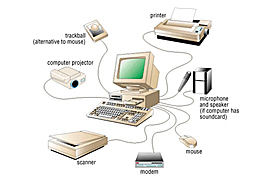 |
Peripheral devices are devices connected to the computer but external in relation to the processing unit. If a peripheral device is disconnected, the computer will still be able to work; only functions performed by this peripheral device will not be available. For example, if you disconnect a keyboard, you would not be able to type in information but you will be able work with the graphical user interface by clicking the mouse. If you remove the hard disk, you will have to start up your computer using floppy disk and you will have to save your data on floppy disks only but the computer will still be working.
Peripheral devices can reside inside the computer case or outside. For example, a mouse, a keyboard, a monitor are always outside the case and they are connected to the computer via ports which are situated on the back of the case. Disk drives are positioned inside the case and they are connected to the motherboard via disk controller cards which are inserted in the expansion slots on the motherboard.
Peripheral devices are classified according to the purpose they serve:
 Input devices are used for data input
Output devices are used for data output
Storage devices are used to store data for long periods of time
Every year new more sophisticated devices appear on the market and prices on
existing devices drop down dramatically.
Input Devices
The purpose of input devices is to translate data and information from human-readable format to electrical impulses.
The most popular input devices are the keyboard and the mouse. We can type in commands using a typewriter part of the keyboard or we can use arrows to highlight items in menus and we press Enter to make a selection. Quicker way of making selection in the menu system is to move the mouse pointer and click the button.
Scanners are devices suitable for entering of graphical information into the computer. Some scanners are able to read text so this way of entering textual information will be much quicker than typing.
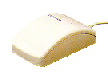
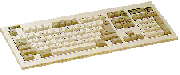
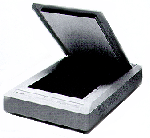
The most common input
devices are the traditional keyboard and mouse. Joysticks
and trackballs are also in common use with personal computers. For large
volume data entry, a key-to-disk system is often used.
KEY-TO-DISK SYSTEM
This is a stand-alone system used solely for entering data in large-scale batch operations. It has the following components:
several VDUs or
keystations;
a dedicated mini or
microcomputer;
a fixed disk drive
where data is stored;
a tape drive onto
which completed batches of data are transferred;
a supervisor's
console.
Using a key-to-disk system, each operator loads the data entry program appropriate to his/her batch of data, and then keys in the data from the source documents. The data is validated by the program as it is being entered, and errors are reported by an audible bleep and an error message on the screen.
When the batch of data has been entered and stored on disk, the source documents are passed to another operator who switches his or her machine to verify mode and keys in the batch a second time. any discrepancies can tehn be checked and corrected.
Completed batches are transferred from disk to magnetic tape, which is then physically taken to the main computer for processing. In some systems the transfer to the main computer is done via a data link instead of using a magnetic tape.
The supervisor's console will record the progress of each batch through the system and also record statistics such as the number of keystrokes per hour and the number of errors made at each station.
OPTICAL CHARACTER RECOGNITION (OCR)
OCR devices are
particularly well suited to applications such as credit card billing systems
where data such as customer account number and amount due is encoded by the
computer on a turnaround document - that is, a document which is produced
by the computer and sent to the customer, who returns the bottom tear - off slip
with their payment.
A clerk checks that
the payment enclosed is the same as the payment due, and manually keys in the
amount paid if it is different.
The machine readable
document is then input tot he computer with no further keying required.
SCANNERS
Scanners come
in a variety of shapes and sizes, from bar-code scanners which scan bar
codes on labels in supermarkets or libraries, to hand-held and page scanners
which scan a complete page, pixel by pixel.
A scanner works by
shining a bright light onto the image being scanned while the scan head moves
from the top tothe bottom of the document at an even rate. As it moves over each
'line' of the image, the scan head collects data by measuring the intensity of
light that is reflected back from the document.
Each scanned line
therefore results in a stream of data which the scanner translates into digital
information, with a certain number of bits representing each tiny area on the
scanned picture. For a black-and-white image, only one bit will be required; for
256 shades of grey, 8 bits will be required.
The resolution of the
scanner is measured in dots per inch (dpi) along the x and y axes; the higher
the resolution, the sharper the image, but the more memory it will occupy.
With appropriate OCR
software, scanned text can be turned into a form that the computer can process,
making this an alternative to keyboard entry for long text documents, or for
forms where hand-printed characters are written in specified boxes.
MAGNETIC INK CHARACTER RECOGNITION (MICR)
MICR is used
mainly by banks for processing cheques. Special characters encoded along the
bottom of a cheque are used to identify the bank number and the customer's
account number.
When the cheque is
processed, the amount is also encoded by a bank operator, using a special ink
containing ferric oxide which can be magnetised during processing.
MICR has several
advantages for cheque processing:
1. speed: over 1000 cheques per minute can be processed;
2. smudged cheques can still be read;
3. the characters are hard to forge.
OPTICAL MARK RECOGNITION (OMR)
An optical mark reader
is a scanning device which can detect marks in preset positions on a special
form.
OMR is frequently used
to score multiple-choice tests and for market research questionnaires.
MAGNETIC STRIPES AND SMART CARDS
Cards with magnetic
stripes are widely used as charge cards, telephone cards, railway tickets etc. A
bank card used for withdrawing cash from an automated teller machine (ATM), for
example, will have encoded in the stripe:
1. the customer's account number;
2. the personal identification number (PIN) in encrypted form;
3. the bank's sort code;
4. the customer's withdrawal limit;
5. the amount withdrawn in the last time period (e.g. day)
To use the ATM, the
customer inserts the card and is then requested to enter the PIN, which is
checked against the encrypted PIN on the card and the PIN held in the customer's
record on the bank's computer.
The customer then
presses a key to indicate the type of transaction desired, and if cash is
required, types in the amount. This is checked against the account balance on
the bank's computer and the information held on the card.
A smart card can hold
more information than a magnetic stripe card and contains a processing chip,
making it extremely hard to forge or duplicate. They may eventually replace
magnetic stripe cards.
Output Devices
The purpose of the output devices is to translate data and information from electrical impulses to human-readable format.
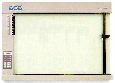
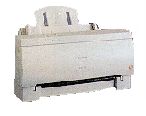
The output device which is necessary for the computer to display messages to the user is a monitor. If we want to keep the copy of the work on paper, we use printers. Plotters are devices that are more suitable for the output of high quality graphics.
VISUAL DISPLAY UNIT (VDU)
A VDU has three basic
attributes: size, colour and resolution. It has its own fixed amount of RAM
associated with it to store the image being displayed on the screen, and the
amount of RAM it has will determine the resolution and the maximum number of
colours that can be displayed.
PRINTER
There are many different kinds of printer, inlcuding the following: -
1. Laser printer.
These printers give
high-quality output are quiet in operation and relatively inexpensive to run,
although they are fairly expensive to purchase. Major running costs include
toner (powdered ink), occasional drum replacement and possibly a maintenance
contract.
2. Inkjet printer.
These are inexpensive
and can give good quality colour images. An inkjet printer would be a suitable
choice for a school to purchase, for example for students projects, posters etc.
The ink is expensive and special paper is required for best results.
3. Dot-matrix printer.
These are among the
cheapest printers, and have the advantage that carbon copies can be produced,
but the quality is not as good and they are noisy.
PLOTTER
Plotters are used to
produce extremely accurate, high-quality drawings in, for example engineering or
architectural aaplications. The two basic types of pen plotter are the drum
plotter and the flatbed plotter, each of which have one or more pens that move
over the surface of the paper under computer control to produce the drawing.