 CPU stands for central processing unit.
TOPIC 5.1.: PROCESSOR COMPONENTS
THE CPU
CPU stands for central processing unit.
This is the real brain of the computer.
All arithmetic is performed here, every program
instruction is interpreted and executed here, and every item to be placed in
memory or retrieved from memory passes through the CPU.
However, the processor would not be much use
without memory in which to hold the data and the programs which process
the data.
The CPU and the main memory of the computer are
located in the same physical unit, which is often referred to as the processor
unit.
INSIDE THE CPU
 A computer consists of the processor, memory,
input and output units.
A computer consists of the processor, memory,
input and output units.
The processor itself consists of two main
components:
1. The Arithmetic-Logic Unit (ALU) in which all arithmetic and logic operations are carried out.
2. The Control Unit, which coordinates the activities taking place in the CPU, memory and peripherals, by sending control signals to the various devices.
In addition, the CPU contains circuitry
controlling the interpretation and execution of instructions.
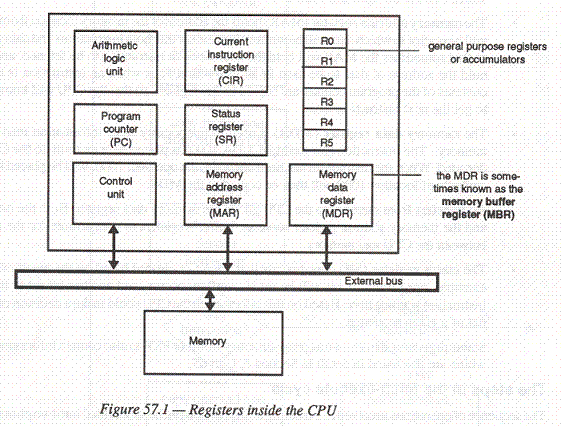
Special storage locations called registers
are included in this circuitry to hold information temporarily while it is being
decoded or manipulated.
Some of these special purpose register are
shown in the block diagram in figure 57.1.
MEMORY
Computer memory, or storage, can be classified
into two main divisions:
o 1. Main Store.
o 2. Backing Store.
Main store, often called ‘storage’, consists of
a large number of electronic circuits. If the computer is opened up a number of
plastic boxes will be found, most of them housing memory circuits – up to two
million in each. It has been predicted that by the end of the century it will be
possible to store over a billion circuits on a chip. This is the only type of
memory that the CPU can use directly, and therefore all information has to go
through main store at some point.
All other types of storage are known as
‘backing store’, or sometimes auxiliary storage, and this includes many
devices ranging from paper cards with holes punched in them to laser-scanned
compact disks, also known as CD ROM (Compact Disk Read Only Memory). By
far the most common types of backing store in use today are magnetic disk and
magnetic tape.
STORING CHARACTERS IN A COMPUTER’S MEMORY
In all modern computers each memory circuit can
be either ON, indicated by a 1, or OFF, indicated by a 0.
A series of eight circuits in the states ON,
ON, OFF, OFF, ON, OFF, ON, OFF can be depicted as: 1 1 0 0 1 0 1 0
Data can be stored in memory character by
character, with each character being represented by a ‘code’ consisting of 1s
and 0s.
Each 1 or 0 is called as a ‘bit’, short for
‘Binary digiT’.
BYTES
Most computers use 8-bits codes to represent
each character.
8 bits together are known as one byte.
This is sufficient to allow a unique code for
all the usual characters with one bit, the leftmost bit, to spare.
The spare bit may be used either as a ‘parity
bit’ or to give an extra 128 characters.
In this latter case, if the spare bit is 0, the
code represents a normal character; if it is 1, the code represents a character
from the extended character set.
When you press a key on the keyboard, the
corresponding 8-bit code is generated and sent to the computer.
When a code is sent to the printer, the
corresponding character is printed.
One byte holds one character.
ASCII CODE
Over the years, different computer designers
have used different sets of codes for representing characters, which has led to
great difficulty in transferring information from one computer to another.
Most personal computers (PCs) nowadays use the
ASCII code (American Standard Code for Information Interchange), but many
mainframe computers use a code called EBCDIC (Extended Binary Coded Decimal
Interchange Code).
PARITY
For each byte of memory, most computers have at
least one extra bit, called as a ‘parity bit’, which is used for error
detection.
A parity bit can detect if one of the bits in a
byte has been inadvertently changed, perhaps because of a chip failure, static
electricity or a voltage fluctuation.
Computers use either even or odd
parity.
In an even parity machine, the total number of
‘on’ bits in every byte (including the parity bit) must be an even number.
Parity is checked each time a memory location
is used.
When data is moved from one location to another
in memory, the parity bits are checked at both the sending and receiving end,
and if they are different or the wrong number of bits is ‘on’, an error message
is displayed.
MEMORY ADDRESSING
The memory of a computer can be thought of a
series of boxes, each containing 8 bits (1 byte), and each with its own unique
address, counting from zero upwards.
The memory capacity of a computer is measured
in thousand-byte units called kilobytes – although strictly speaking one
kilobyte is equal to 1024, or 210 bytes.
For example, a PC with 640K of memory contains
approximately 640,000 bytes but, if we wish to be exact, the actual size is 640
* 1024 = 655 360 bytes.
Memory is also measured in megabytes
(approximately 1 million bytes), or in the case of very large computers,
gigabytes (1,000,000 Kbytes).
These measures can be abbreviated to Kb, Mb and
Gb.
THE DATA BUS AND THE ADDRESS BUS
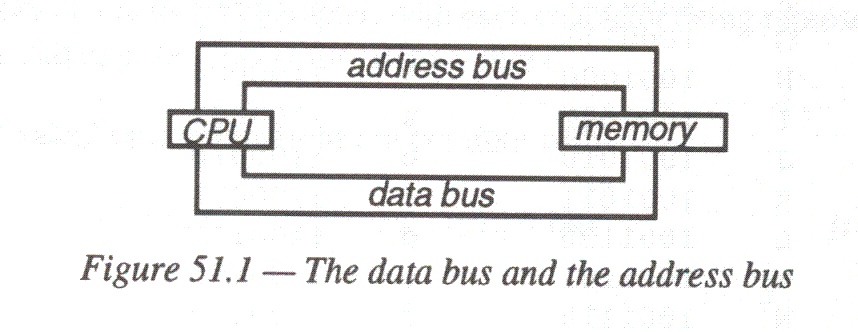
The CPU is connected to main memory by two sets
of wires, or buses.
When the CPU whishes to access a particular
memory location, it sends this address to memory on the address bus.
The data in that location is then returned to
the CPU on the data bus.
Microcomputer buses can typically transfer 16
or 32 bits at a time.
A 16-bit bus, for example, has 16 lines and can
transmit 16 bits simultaneously.
The larger the number of bits that can be
transferred by the bus, the faster the computer can transfer data.
The number of lines in the address bus
determines how many locations can be assessed.
With a 16-bit address bus, the highest location
that can be addressed is 65 535 (1111111111111111 in binary).
In the 1970s when IBM brought out their PC, the
designers thought it extremely unlikely that a PC would ever have more than 1Mb
of memory, and that therefore a 20-bit address bus would be quite adequate.
Unfortunately time was to prove them wrong, and
a major effort had to go into designing new machine architecture to cope with
over 1Mb of memory.
WORD SIZE
The word size of a computer is the
number of bits that the CPU can process simultaneously, as opposed to the new
bus size which determines how many bits are transmitted together.
Processors can have 8, 16, 32 or 64 bit word
sizes (or even larger), and the word size will be one of the factors which
determines the speed of the computer.
The faster, more powerful PCs have 32-bit
processors, and most mainframes have 32-bit words.
Supercomputers may use a 64-bit or 128-bit word
size.
RANDOM ACCESS MEMORY
Memory may be one of two types, known as RAM
and ROM respectively.
RAM stands for Random Access Memory, which
means that any memory location can be directly accessed by referring to its
address.
Data and programs are transferred into and out
of RAM, and the data in RAM is processed according to the instructions in the
program.
There are two types of RAM memory chips:
static RAM and dynamic RAM.
Static RAM retains its information as long as
the power is switched on.
Dynamic RAM chips are smaller and simpler in
design, but generally slower in operation, and the information slowly leaks away
and has to be refreshed by special regenerator circuits in the CPU.
The main memory of most computers uses dynamic
RAM chips, with the more expensive and faster static RAM being used for cache
memory.
Both these types of memory lose all information
as soon as the power is switched off.
MEMORY MAPPING
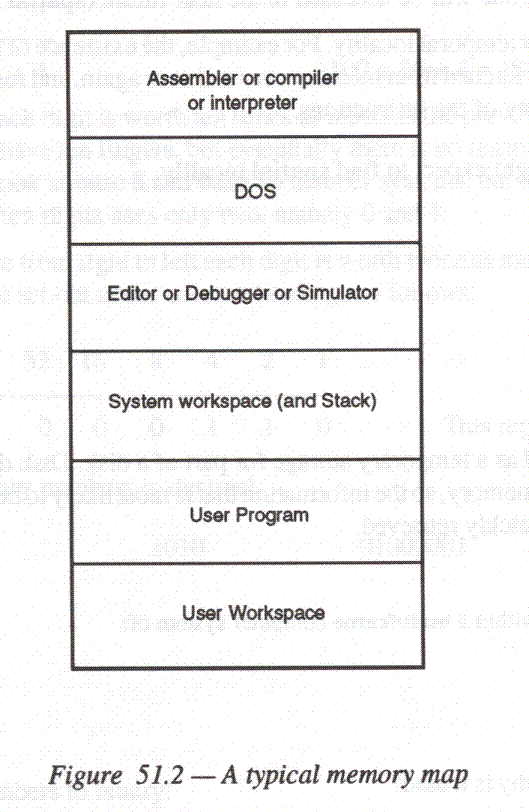
Some RAM is given a special function.
For example, part of RAM is reserved for the
operating system, and some is reserved to hold addresses and parameters used,
say, when calling subroutines.
This is called a stack. This allocation
of memory to different functions is referred to as memory mapping, and a
typical memory map for a microcomputer is shown in figure 51.2.
READ ONLY MEMORY
ROM (Read Only Memory) retains
information even when the power is switched off, but the information has to be
permanently recorded into the circuits when the chip is manufactured, and cannot
be changed.
ROM is used to store some of the
operating system commands, and the instruction set of the computer.
In special purpose computers used in video
recorders, washing machines and cars, the program instructions are stored in
ROM.
It is also possible to buy Erasable
Programmable Read Only Memory Chips (EPROM), which can be cleared by subjecting
them to ultraviolet light, and then reprogrammed.
CACHE MEMORY
A cache is a small fast memory usually
between 1Kb and 256Kb, too expensive to be used for the whole of RAM that acts
as an intermediate store between the CPU and the main memory, and is used to
improve the overall speed of the computer.
Cache memory can return data to the CPU faster
than main memory because:
o It is closer to the CPU;
o It may use a dedicated control bus;
o It may use higher-speed components;
In systems which use cache memory, the most
active portions of a program are kept in cache, from where instructions and data
can be retrieved faster than ordinary RAM.
Computers using cache memory are exploiting two
principles:
o An instruction or item of data that has been accessed once is likely to be accessed again the near future. (This is known as temporal locality).
o If an item (instruction or data) is addressed at a given memory location, it is likely that other items with addresses near to this one will be accessed in the near future (spatial locality).
There are good reasons to expect temporal
locality. For example, the existence of loops in a program means that the same
instruction swill have to be fetched from memory over and over again, and
furthermore the data that is operated on may well be the same in many of the
instructions.
Cache memory can also be used as a temporary
storage for part of a disk.
Disk drives are mush slower at storing and
retrieving information than memory, so the information that is most likely to be
required next from disk is stored in cache from where it can be quickly
retrieved.
RESOURCE: P M Heatcote, [A Level Computing, 3rd. Edition], Letts Educational Ltd., 1996.