HELP ME!!!
With
Super Puzzle Fighter 2 Multi-Player
Introduction
This game is a Multi-Player version of the Single Player version. That is based on a game that is extremely addictive and I am currently obsessed with. I know it's not as good as what it is based on, but I had to make it�
Contents
SPF2M - Client Program
First Glance
When you first run the Game you'll be meet by two Input Boxes.
The First Input Box will ask you for the IP Address of a Server. Don't worry if you don't have one as you can create a Server from the File Menu (See Menu). The IP Address 127.0.0.1 is a special IP that is always your own computer and should also work across Network (though I can't confirm this).
The Second Input Box asks you for the Player Name you wish to use; I think that's clear enough�
After this you might be in a game, depending on the state of two things may occur:
1. You'll be Observing
2. You'll be meet by the Screen to Init the Next Match. Here you will have to press the Ready Button. To Prompt the Start of the next Fight. If you are the only player, you will not be able to do this until there is another player in the game. Also the game will not start until you have both click the Ready button.
After this you should be able to start playing the game See the Game Play Section for more Information�
Menu
- File
- Connect To Server
- This will allow you to change Server. It also disconnects you from the server you are currently connected to.
- NOTE - If you are going to make your own server. Do not click this button before you have set-up the server, as you will be added to it twice. Which could cause problems, though you can kick people form the server.
- Disconnect From Server
- This will disconnect you from the server you are currently connected to
- Create Server
- This will run the Server program, if it is in the same directory as the Client program
- Exit
- This will disconnect you from the Server you are currently connected to and of course close the program
- This may take a few moments, so be patient
- Show
- Attack Pattern
- This will show the Attack Pattern you are currently using
- You can change it by using the Left + Right click of the Mouse
- Once you are happy will it, click the Apply button to Use it (Apply it�)
- Chat
- This will show the Chat Room
- It also Displays message from the Server and the Program
- Type you messages in the Bottom bar and press enter to send it
- It can also be resized
- Player List
- This will show the Player List
- Which Contains all players in the Game
- It also shows the number of matched everyone has Lost and Won
- It can also be resized
- Sound Option
- This will show the Sound Options, which you can use to
- Change the Sound Effect & Background Music
- And Mute the Back Ground Music
- Note: Only *.wav file are aloud
- Help
- Do I really have to explain this??
- If it not there it because I plan to make a Web Page Help file that run with in the program, which might not exist yet�
Game Play
- Controls
- Up Arrow = Rotates the Gems Anti-Clockwise
Left Arrow = Moves the Gems Left
Right Arrow = Moves the Gems Right
Down Arrow = Moves the Gems Down
Terminology
- Gems

- The Coloured Curved Squares/Rectangle
- Destroyer Gems

- The Coloured Circles (bet you don't know what they do)
- Gem Grid
- Is Area in which you Gem are bound to the big rectangle on either side of the screen
- A Turn
- It complete when you Gems (8) hit the bottom of you Gem Grid or Land on Top of Gems already inside you Gem Grid
- Chains
- When you connect two or more Gems of the same colour together it creates a Chain
- Combos
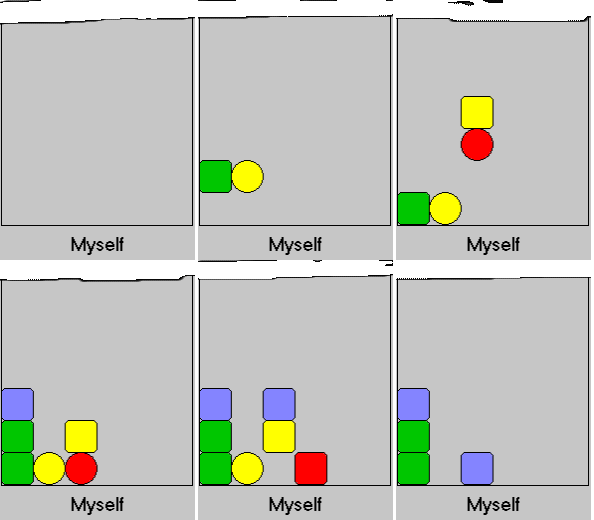
- Are obtained when you destroy more that one chain or gem in a turn and they boost you Power Significantly
- Power
- Power is accumulated at the end of each turn. It comes from destroying gems (placing a Destroyer Gem next you a Gem of the same colour). It is used to Defend incoming attacks ('INCOMING!!').
If you power is greater than the Incoming Attack from you opponent then the remaining power left will be used as an Attack. Otherwise you power will be used to reduce the Power of the Enemies Attack.
- INCOMING!!
- This displays the number Gems that are waiting to be dropped when you end you turn
Objective
Tactically Destroy Gems to hold of you opponent's attack and to create attacks of you own. To make sure that you are not the one that gets overburdened with gems. In other words having a full screen of Gems.
Game Over
A game is over when on of the two players has their middle column of the Gem Grid filled to the top with Gems.
This then activates the Game Over Screen or Next Match Initialiser. The Loser is then sent to the end of the Player List and a new opponent is drawn.
- Game Over Screen / Next Match Initialiser
- This Displays the winner of the Last Round
The Next Combatants
Whether they are Ready or Not
And a button to acknowledge that they are Ready
High Scores
You'll notice that in between the Two Gem Grid there are Three 'Frames' that are labelled High, Best and Current. These contain statistics on the Game Play.
- The Current Frame
- Holds Score of the Players and also Current Chains & Combos for their turn, which is used to calculate their Power and Score
- The Best Frame
- Holds the players best Chains and Combos for the match they are currently playing
- The Highest Frame
- Holds the Highest Score, Combo, Chain the Client has seen whilst play the game. It also shows the name of the person who holds that record
Server
The Server is the Server. All you can do with it is Kick People from the game. Though it should display your IP Address, which others will require to connect to the Game you are Serving.
FAQ
Since no one has asked me any question about this, since I haven't even published it yet. I don't see how this can be a FAQ� So it probably a quick stop for people who can be bothered to read what I have already written, which doesn't make sense...
- What are the Requirements?
- Not high, you'll see why
Windows Operating System
DirectX8 or higher
Developed on a PII350MHz, 16Mb Graphics Card
Connection to the Internet or a Network, though you don't really need them...
- What ever happen to 1?
- Well what this game is based on was a very Addictive Puzzle Game, which was based on the Street Fighter 2 Turbo characters and some Darkstalkers characters and that's why they called it Super Puzzle Fighter 2 Turbo (X not Turbo in Japan). As this is base on the Game Play of that Puzzle Game I called it SPF2M (Multiplayer). That's why it has a 2 and 1 a one. I know too much...
- What are the controls?
- Arrow Keys
- What am I supposed to do?
- Match up the Colours
- How comes loads of Gem just appeared on my opponents Gem Grid?
- You attacked him and that the way it is. And I don't what to think about getting those fancy effects on both players.
- Why am I not supposed to Click Connect to Server too many times before the server is actually up?
- It doesn't really matter. It just means that you get cloned when the Server goes up. Which mean the Server will have to kick him.
- What is with my Clone or that Guy that doesn't click the Ready button or say anything?
- It's either they crashed so they didn't send a message to the server to delete them from the game or the thing I mentioned above
- What should I do if something weird happens?
- Inform me, See acknowledgements to do that. As it might be something I missed when testing this or something that is meant to happen
- How long did this take to make?
- About 10 days, which is long enough to make my head explode, if I have to think about it anymore. I really needed to do some more Cogitating on this one though I think I've got it right. It just that I am Mind F**ck*d right know (just after finishing it) it that feeling that you get after doing an difficult Exam and your feels like it ways a ton or maybe it's just hot in here.
- What is this base on and where can I get it?
- What I think is the most addictive game of all time Capcom's Super Puzzle Fighter 2 Turbo. There is a PC, PSX, GBA, MAME Arcade, and Java Demo version of it. I have the MAME & GBA versions as well as the link for the Java Demo. So now you might know how to get it.
- What you been up to lately?
- Beside making this and learning Java. Absolutely nothing. I still out of work, money, life and excitement. Please help me I'm so bored...
Acknowledgements
Well I say Acknowledgements it not really Acknowledgements I just my contact details and maybe some other stuff...
[email protected]
http://www.geocities.com/lord_modem