Like
computers, cars and PDAs, cell
phones started out as purely functional pieces of
technology, but quickly evolved plenty of fun frills to keep
their users entertained. Today's phones have built-in video
games, specialized background pictures, switchable faceplates
and, of course, customizable ringtones.
A ringtone version of your new favorite song does serve
some purpose, of course -- it lets you distinguish your own
phone's ring from other phones ringing around you -- but more
than anything else, it's a chance to add personality to
technology.
In this edition of HowStuffWorks,
we'll see what ringtones are all about, and we'll find out how
you can add new tunes to your phone (if it's compatible). As
we'll see, it's incredibly easy to find and add a song you
like and load it up.
Ringtone Basics
If you've read How Cell
Phones Work, you know the central "brain" of a cell phone
is a small microprocessor.
Just like the microprocessor in a computer, this unit controls
everything that the cell phone does, working from information
stored in the phone's memory.
At its core, a ringtone is simply a computer program stored
on the cell phone's memory chip. This program's sole purpose
in life is to tell the microprocessor what the phone's speaker
system should do when the phone's receiver picks up an
incoming call.
Ringtone-capable phones already have a range of notes
stored in memory (that is, they include information on speaker
vibration frequencies that will produce particular
tones). The ringtone program only has to tell the
microprocessor which of these notes to play, in which order
and at what speed. By adjusting these variables, the
microprocessor can play an infinite number of ringtones.
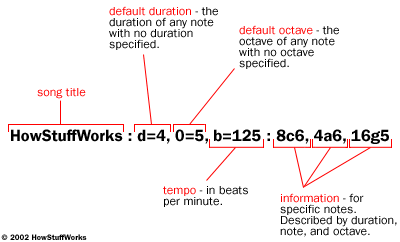
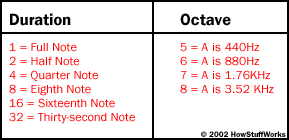
The clearest example of this sort of programming language
is the Ringing Tone Text Transfer Language (RTTTL)
format, developed by Nokia. Here's a typical section of RTTTL
code, with a description of what each bit means.
In order to enable a ringtone on your phone, you just have
to get the appropriate program into the phone's memory. In the
next section, we'll look at the different ways you can do
this.
Getting a Tone
The first step in adding a
ringtone to your phone is finding one that you like.
Generally, this means checking out one of the dozens of
ringtone sites on the Internet (see the links
section) and picking a good one that's compatible with
your phone model. Some sites charge for the use of their
ringtones, to cover song royalties, among other things, and
some sites provide tones for free. A lot of older songs (such
as classical pieces) have been around long enough that their
copyright
has expired -- they've entered the public domain, so they're
free for anybody to use.
Once you've found a ringtone you like, you just have to get
it into your phone's memory. There are a number of different
ways to do this, depending on your particular phone model. The
three major ways to add a new ringtone are:
- Load the ringtone program into the phone from a
computer, via a data cable.
- Send the program to the phone over the airwaves.
- Type the program into the phone directly, using the
keypad.
Phones may use one particular method exclusively, but a lot
of phones have multiple options. Check your instruction manual
to find out what your phone can do.
If you have the right phone, software and computer
configuration, loading ringtones through a data link or
infrared interface may be the simplest option, but it
requires some work and expenditure to set everything up
initially.
A more popular method is to send the new ringtone to your
phone over the airwaves. This approach originated with
Nokia, but other manufacturers have since added this
capability to their phones. The basic idea is to send the
phone a special sort of text message that contains the
program for the ringtone -- in most phones, this is done using
either Short
Message Service or Enhanced
Messaging Service technology.
Nokia
originally developed Short Message Service to send short text
messages between phones. Later, Nokia and Intel created
smart messaging, a special protocol for sending
functional, non-text information through SMS. Basically, a
"smart" SMS message is coded to allow the equipped phone to
recognize it as a graphic, ringtone, etc.
The most common method for transferring ringtones over the
airwaves is to visit a ringtone Web site, pick out a tone,
enter your phone
number and let the site administrators send the message to
your phone directly. Alternatively, you can use an SMS
gateway site to send a specific message to the phone
yourself. This means finding the code for the ringtone you
want, finding it in the appropriate format (Nokia
binary format, for example) and copying it at as a smart
message.
Cell phones with a melody composer let you type in
ringtones directly. The easiest way to use this feature is to
find the appropriate "keypress sequence" for a tune on the
Web. This sequence will tell you which buttons to press on
your phone, in composer mode, to program the ringtone you want
(check your instruction manual for details on your phone's
composer mode). Of course, for the ringtone to work, the
sequence has to be in the right format. Fortunately, you can
find tons of sequences online for most phone models.
As cell phones evolve, ringtones will get more complex as
well. Already, some phones are boasting polyphonic
ringtone capability, meaning the phone can play more than
one note at a time, allowing for richer, harmonized tunes.
Some new phones let you record songs and voice messages for
ringtones yourself. Many of these models also let you assign
different ringtones to different incoming numbers, so you know
who's calling you without even looking at your phone. Before
long, ringtones will have graduated from an extraneous thrill
to an essential phone feature.
For details on various ringtone formats, as well as
hundreds of available ringtones online, check out the links on
the next page.
Lots More Information!
Related HowStuffWorks
Articles
More Great Links