Home Networking Blues - (A quick guide to setting up ICS on Windows XP computers)
1) To set up my home LAN, I needed 2 Ethernet Cards up and running on the to-be "Host" computer. Unaware and unfortunately, I bought a new ethernet card with a chipset (Realtek) similar to the one I already had in my computer! In an effort to configure them, I tried about every trick in the book (changed IRQ, changed PCI slots, etc.) the Collission LED (red in color) on the card just wouldn't go off. The drivers installed well but the card didn't function at all. An "Acquiring Network Address" message perpetually showed in the status column of the network connections window.
2) After frustratingly trying about everything with the software (OS, Drivers, IRQ), I got my lancard replaced with another brand (D-Link) and Voila !!! both of them are happy now, together like a newly wedded couple! an "easy" promising LAN ahead (or is it!, read through).
3) Using the network setup wizard on my Host (Windows XP Pro) computer, I enabled ICS (Internet Connection Sharing) on the network adapter that I used to connect to the internet. The firewall was enabled on this adapter and everything except "TCP/IP Protocol were disabled".
4) My Lan is functional now
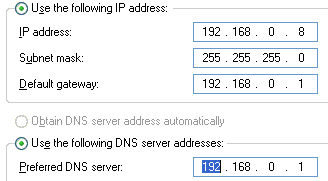
with the host computers' internal IP set to "192.168.0.1" and
all the client computers that connect to the hub set to "192.168.0.2" onwards.
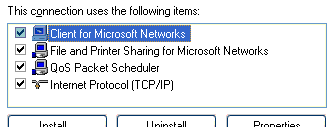
The following network items were enabled on the LAN adapter.
5) Remember to set the Gateway and Primary DNS of the client(s) to the Internal IP of the Host. Which is always "192.168.0.1".
6) I was able to explore shared files on the networked client from the host computer and also from other client computers, but none of the client computers could open shared files on the host computer. After googling several articles on the net, I discovered that it was some worm/trojan patch that I had run some time ago that had toggled a registry key. Thats why when the other clients tried accessing the host, all they would get was "You might not have permission to use this network resource". Therefore changing the value in HKLM\SYSTEM\CurrentControlSet\Control\Lsa\restrictanonymous key to hexadecimal "0" resolved the issue.
NOTE: It is important that you enable a firewall on the adapter that communicates with the internet because the computer might be prone to vulernabilities after the value in the above key is disabled.