ACTIVITY 1
(CREATING VEGGIE MAN)
Pictures you need:

Sample Output:
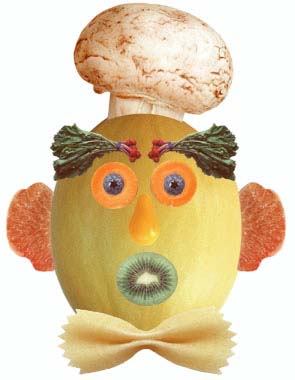
Procedure:
- Open the Adobe Photoshop and the pictures you will need.
- For the head, use the elliptical marquee tool or the magnetic lasso tool to select it. Drag the selected object to your working space.
- To select the eye, use the elliptical marquee tool or the magnetic lasso tool. Drag the selected object to your working space. Duplicate the object by going to the Layer Palette.
\
- For the eye balls, do the procedure you just did to make your eyes.
- For the eyebrows, there are two ways:
- Use the lasso tool to select then drag it to your working space and duplicate the object.
- Use the rectangular marquee tool to select it then drag it to your working space. Select the white spaces using the magic wand tool then press delete.
- For the mouth, use the elliptical marquee tool or the magnetic lasso tool to select it.
- Drag the selected object to your working space.
- For the ear, nose and tie, use the lasso tool to select then drag it to your working space.
You are now finish