
Lisa's Graphics
Adding Text To Blank Blinkies With Image Magick

This tutorial is written for WebTv users as well as computer users that do not have Paintshop Pro
What you will need:
The Blinkie:

Image Magick Studio: Click Here
This tutorial is pretty easy. If you find anything confusing feel free to email me.
Go to Image Magick and load the blinkie
You will see File Name and URL
Filename (Browse) are for computer users that have the image saved to their computer.
If you have the image saved to your computer just hit browse to upload the image.
URL- This is for Webtv Users or computer users that do not have the image saved.
In this box you would add the url of the image
In this case it would be:
http://www.geocities.com/lisasgraphics/blinkie/blank016.gif
With either method hit the View button to load your image.
The blinkie will be loaded and now it's time to add your text to it.
Choose Annotate from the menu
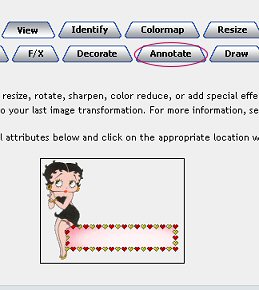
Let's take the fist part.
Offset and Gravity:
Offset: This number is how far to the Right you will want your text to be.
Gravity: This is where you want your text to be located.
For blinkies I choose Center. And for this blinkie I'm setting it at +10 +35
That is 10 pixels to the right and 35 pixels down.
With other blinkies you may have to play with the numbers to get it centered but remember this general rule.
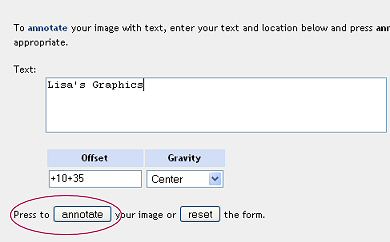
Don't Press Annotate Just Yet!
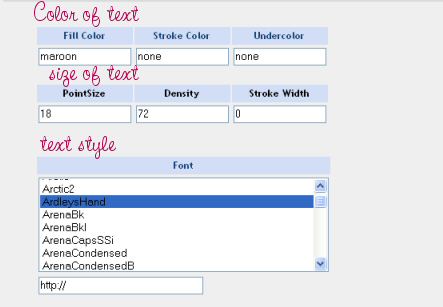
Fill Color: This is the color you would like your text to be
Point Size - This is the size of your text. The larger the number the bigger the text
Font: This is the style of your text- You can use what they offer or you may upload a URL of a font of your choice.
When you have your text placed just as you like hit the annotate button and you will see
the following screen.
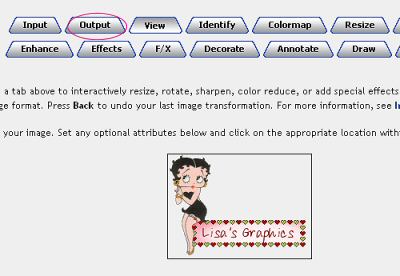
Now choose Output to save your image.
You will see this screen. Everything is filled out for you so you can just click the Output button.
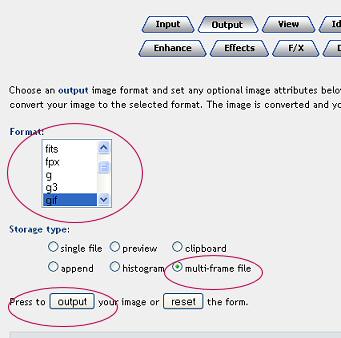
You have two choices:
You can click your finished image and save it to your computer or you can upload it to your webpage server.
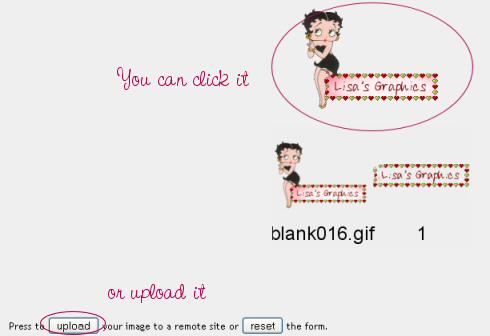
Here is an example if you were uploading it to tripod:
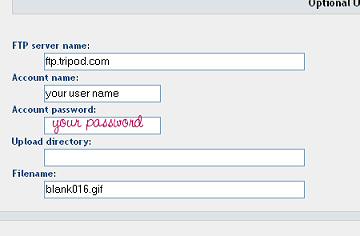
That's it :-)
Main Menu