what is your message?
Choose a topic.
If you can't narrow your theme down to a single topic, maybe you need more then one web site.
Once you have a topic--stay with it!
NOTE: If your site has articles or essays, it is a VERY good idea to write them in a word processor so you can spell check them before adding the HTML tags.
Web Structures
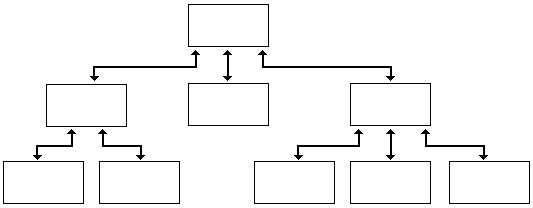
Sequential or Linearis when each page, starting with the home page continues in order, like a book. This is used for instructional pages and data based pages.

Hierarchical is when the home page is the "top" of the site, and other pages branch out from that page, and may contain more branches of their own. This is the most common type of site.
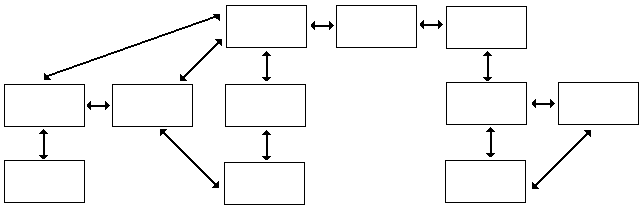
Web structure is when pages are linked as needed, but no page--not even the home page has priority over any of the others.This is used when information does not really go in a pedicular order, so the user can read it in any order that they want.
Starting a web site:
footer
Headers contain information that does not change often or possibly an advertisement. The title can be part of the heading on the page. The body is the main information. The footer contains contact information or a navigational bar if you are part of a webring.
One of the ways to make sure your page has everything in the right place is to create a template in HTML without the images or text yet in place, but everything in its proper order, so all you have to do is insert the data.
Example template:
< html >
< head >
< title > window title here < / title >
< / head >
< body >
< p>
The body of the web page, text, images, appear here.
< /p >
< / body >
< / html >
NOTE: The < p > tags begin and end paragraphs. the end tag < / p > is optional, but some versions of HTML may require it. the < p > makes a 2 line break. It is nearly exactly to putting two < br >'s.
Font
Without any formatting, the web page will appear in the default font-- that is the font that is set on the computer.
A Sans Serif font (sans means 'without' in Latin) contains straight lines and circles without any extra lines or curves.
Serif fonts have curves or bubbles or extra lines.
Arial is a sans serif font and Times New Roman is an example of a serif font.
To specify a font use the tags < font > and < / font >. To specify the typeface of the font, such as Times New Roman, Courier, Heletiva, etc, you type:
< font face=put font face name here > text < / font >
NOTE: Users work on different systems, so unusual and special fonts are risky and probably won't work on many computers.
Make a page that alternates between ariel and time new roman using the < font face=> < / font > command
< font face=Ariel > Here is one< /font >< p >
< font face=Times New Roman > Here is two< /font >< p >
< font face=Arial > Here is three< /font >< p >
< font face=Times New Roman > Here is four< /font >< p >
Save file and test.
You can also specify serif, sans serif, or monospace for the font name.
The headline command tags make headlines at the top of the page and automatically add a break at the end so you do not have to use a < p > or < br >. The headlines range from one to six, the smaller the number, the larger the headline.
< h1 > Huge< / h1 >
< h2 > Big< / h2 >
< h3 > Large< / h3 >
< h4 > Medium< / h4 >
< h5 > Small< / h5 >
< h6 > Tiny< / h6 >
|
Regular Font size.
Use the font tag command to change the font size. Type < font size= #> text here < / font >. There are 7 sizes, the smaller the number, the smaller the font.
< font size=1 > smallest< / font >< p >
< font size=2 > smaller< / font >< p >
< font size=3 > small< / font >< p >
< font size=4 > average< / font >< p >
< font size=5 > medium< / font >< p >
< font size=6 > big< / font >< p >
< font size=7 > large< / font >< p >
|
You can merge font commands together, for example:
< font face=Impact size=7 > Average Impact Font< / font >< p >
A < basefont > can be stated in the body to set the entire page to a certain sized font. It is also used later for color and other attributes
NOTE: Programers wince when they see underlines text on a web page. generally underlines are reserved for hyperlinks,and when underlining is used on non-linked text, users waste time attempting to click the non-existent link.
Extra command tags:
< strike > Strike out< / strike>
H< sub >2< /sub > = H20
2a< sup >8< / sup > = 2a8
< tt > typewriter :monospaced without font tags < / tt >
Main Page/Previous Lesson/Next Lesson