My last article was all about getting my Yopy and
making sure it worked. Now that I had the unit, I needed to figure out
what I could do with the unit. In order to do anything, I needed to hook
the unit up to my notebook. I managed to hook the Yopy to the notebook
using the serial cable that came with the yopy. The yopy had a getty
running at 115200 so I used minicom to test the connection to the yopy.
It gave me a login prompt so
I logged in as root to take a look around.
The filesystem is a slimmed down version of a standard Linux filesystem.
About half of the 32 Megs of flash is used by Linux. Almost all of the 16
Megs of RAM are used by the processes running, although I'm sure that can
be slimmed down a bit. For instance, one of the running processes was
crond - and it had no jobs configured to run. (Do I really need a
crond daemon running on my pda - which could be off when a process
would be configured to run?) In fact, running
crontab -e (which should allow me to edit my cron jobs) complains
that vi doesn't exist on the system. It appears that no one actually
uses crontab on the yopy or this would have been discovered,
but I guess that's why it's a developer's release.
Once the connection to the yopy was verified using minicom, I wanted to
hook the yopy up to my network. I started up the pppd on the notebook to
connect to the yopy via the serial port. The connection was established
and the yopy was on the network. I managed to ftp and telnet to the
Yopy without a problem since those are two of the services it's configured
to listen to. No webserver running on the Yopy, although I'm tempted to
compile apache for it...
Here's a quick telnet into the yopy system showing files in the /etc
directory and the socket connections.
[brain@sharp brain]$ telnet 192.168.100.97
Trying 192.168.100.97...
Connected to 192.168.100.97.
Escape character is '^]'.

Linux 2.2.14-yopy3 (yopy) (1)


yopy login: root
[root@yopy /root]# cd /etc
[root@yopy /etc]# ls
HOSTNAME      fstab         ld.so.conf    ppp           shells
W             group         localtime     profile.d     skel
adjtime       host.conf     modules.conf  protocols     sysconfig
bashrc        hosts         mtab          rc.d          syslog.conf
battery.conf  inetd.conf    pam.d         refdate       version
cron.d        initlog.conf  passwd        resolv.conf
cron.hourly   inittab       pcmcia        securetty
crontab       ioctl.save    pcmcia.conf   security
esd.conf      ld.so.cache   power         services
[root@yopy /etc]# netstat
Active Internet connections (w/o servers)
Proto Recv-Q Send-Q Local Address           Foreign Address         State
tcp        0    126 192.168.100.97:telnet   192.168.100.11:1025     ESTABLISHED
tcp        0      0 192.168.100.97:telnet   192.168.100.11:1128     ESTABLISHED
Active UNIX domain sockets (w/o servers)
Proto RefCnt Flags       Type       State         I-Node Path
unix  1      [ ]         STREAM     CONNECTED     591    @00000022
unix  1      [ ]         STREAM     CONNECTED     320    @00000012
unix  1      [ ]         STREAM     CONNECTED     631    @00000025
unix  1      [ ]         STREAM     CONNECTED     243    @00000007
unix  1      [ W ]       STREAM     CONNECTED     312    @0000000f
unix  1      [ ]         STREAM     CONNECTED     273    @00000009
unix  1      [ ]         STREAM     CONNECTED     301    @0000000c
unix  1      [ ]         STREAM     CONNECTED     299    @0000000b
unix  1      [ W ]       STREAM     CONNECTED     632    /dev/log
unix  1      [ W ]       STREAM     CONNECTED     592    /dev/log
unix  1      [ ]         STREAM     CONNECTED     321    /tmp/wserver
unix  1      [ ]         STREAM     CONNECTED     313    /tmp/wserver
unix  1      [ ]         STREAM     CONNECTED     302    /tmp/wserver
unix  1      [ W ]       STREAM     CONNECTED     300    /dev/log
unix  0      [ ]         STREAM                   294
unix  1      [ W ]       STREAM     CONNECTED     274    /dev/log
unix  1      [ W ]       STREAM     CONNECTED     244    /dev/log
[root@yopy /etc]# exit
Connection closed by foreign host.
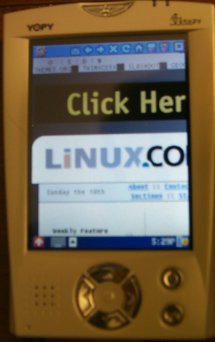
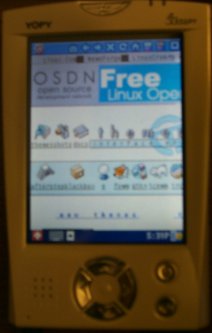
Once the ppp connection is established, the yopy's web browser can be used
to surf the internet. Although the screen is quite small, the graphics and
text show up quite well, although these pictures doesn't capture the crispness
of the graphics.
The browser has some
bugs in it since some web sites (slashdot, linuxtoday) refused to even
render in the browser and it had to be killed because it stopped responding.
Most sites did show up just fine,
although the viewing area is quite small and the navigation of web sites best
viewed in 800x600 is painful on the relatively tiny screen.
Input to the Yopy can be made through either a popup keyboard or using
graffiti. The graffiti on the Yopy understood my handwriting better than
the Palm, but I'm more of a popup keyboard person so didn't use the graffiti
all that much.
Of course, the big reason I wanted the Yopy was to do some development.
I started to go through the documentation and source on the CD to figure
out what the Yopy can do. The Yopy
ships with w-windows library on the development CD. W-windows is not the same
W-windows that is the precursor to X-windows, rather, it is a lightweight
graphics interface library designed for portable devices.
There is also a wt toolkit library which utilizes the W-windows,
which seems to be similar to GTK+ in that they have widgets that can
be used to develop applications on the yopy.
Both W-windows and the wt-toolkit can be
compiled and run on x86 Linux, but I needed some additional libraries
(libGGI, libGII) to get the x86 compile working. The cool thing is that
the demo and sample code that comes with w-windows compiles and runs on the
x86 and on the Yopy without any modifications.
The Yopy version just has to be cross compiled and
ftp'd over to the Yopy. In fact, one of the example programs on the
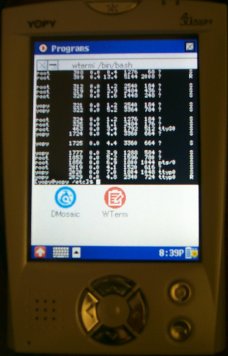
development kit CD is a w-term
application (just like xterm) that can be used on the yopy. The picture
shows the w-term application up on the Yopy running bash.
There's something really geeky about having a pda running bash and being
able to telnet from the Yopy.
Anyway, back to hacking the Yopy.
You can send your comments and questions to [email protected] and I hope
to answer them in the next few days as I continue to hack the Yopy.
 Once the ppp connection is established, the yopy's web browser can be used
to surf the internet. Although the screen is quite small, the graphics and
text show up quite well, although these pictures doesn't capture the crispness
of the graphics.
Once the ppp connection is established, the yopy's web browser can be used
to surf the internet. Although the screen is quite small, the graphics and
text show up quite well, although these pictures doesn't capture the crispness
of the graphics.
 Of course, the big reason I wanted the Yopy was to do some development.
I started to go through the documentation and source on the CD to figure
out what the Yopy can do. The Yopy
ships with w-windows library on the development CD. W-windows is not the same
W-windows that is the precursor to X-windows, rather, it is a lightweight
graphics interface library designed for portable devices.
There is also a wt toolkit library which utilizes the W-windows,
which seems to be similar to GTK+ in that they have widgets that can
be used to develop applications on the yopy.
Both W-windows and the wt-toolkit can be
compiled and run on x86 Linux, but I needed some additional libraries
(libGGI, libGII) to get the x86 compile working. The cool thing is that
the demo and sample code that comes with w-windows compiles and runs on the
x86 and on the Yopy without any modifications.
The Yopy version just has to be cross compiled and
ftp'd over to the Yopy. In fact, one of the example programs on the
development kit CD is a w-term
application (just like xterm) that can be used on the yopy. The picture
shows the w-term application up on the Yopy running bash.
There's something really geeky about having a pda running bash and being
able to telnet from the Yopy.
Of course, the big reason I wanted the Yopy was to do some development.
I started to go through the documentation and source on the CD to figure
out what the Yopy can do. The Yopy
ships with w-windows library on the development CD. W-windows is not the same
W-windows that is the precursor to X-windows, rather, it is a lightweight
graphics interface library designed for portable devices.
There is also a wt toolkit library which utilizes the W-windows,
which seems to be similar to GTK+ in that they have widgets that can
be used to develop applications on the yopy.
Both W-windows and the wt-toolkit can be
compiled and run on x86 Linux, but I needed some additional libraries
(libGGI, libGII) to get the x86 compile working. The cool thing is that
the demo and sample code that comes with w-windows compiles and runs on the
x86 and on the Yopy without any modifications.
The Yopy version just has to be cross compiled and
ftp'd over to the Yopy. In fact, one of the example programs on the
development kit CD is a w-term
application (just like xterm) that can be used on the yopy. The picture
shows the w-term application up on the Yopy running bash.
There's something really geeky about having a pda running bash and being
able to telnet from the Yopy.
