
 |
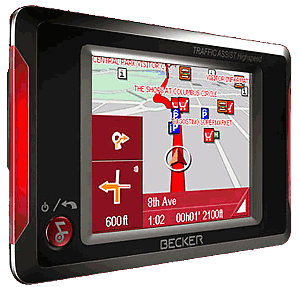
I purchased a Becker Traffic Assist Highspeed 7934 on August 1, 2007. It is my first GPS unit. I wanted a reliable, user-friendly and inexpensive device, and I am delighted with my Becker, which I call “Becky” (because of the female voice). After considering units from a number of different manufacturers (Bushnell NAV500, Dual XNav 3550, FineDrive FD400, GPSmile52, Lowrance 250c, Magellan 3000T, Mio C310, NavMan iCN 330, Pharos 135 and more), I selected the Becker as the best combination of quality, features and (most important to me) price. It’s got just about everything you could want in a GPS unit. The only exceptions are text-to-speech, definable POIs, and a list of directions for review; those features just aren’t available for less than $400 or so. The Becker costs $200 at Office Depot (although I got mine for $120 on eBay!). The Becker 7934 has everything I want and need. Good quality NAVTEQ map
data preloaded with all of North America (including Alaska, Hawaii and
Puerto Rico), easy-to-use interface, and plenty of options to make the
unit work the way I want. |
|
I think what impresses me most is how quickly the unit acquires a GPS lock, how quickly the map updates during driving, how quickly the unit calculates a new route when you take a wrong turn (or try a new shortcut!), and the fact that with all of the maps loaded you still have 500 MB free for MP3s and pictures. You can also listen to MP3 (or WMA) files while navigating (or after you reach your destination!). I’ve found that the sound quality is excellent, but the volume just isn’t loud enough if you have the windows open. There is a headphone jack, but wearing headphones while driving is a no-no! Perhaps an FM transmitter to send the music through my car’s stereo would be a good idea. |
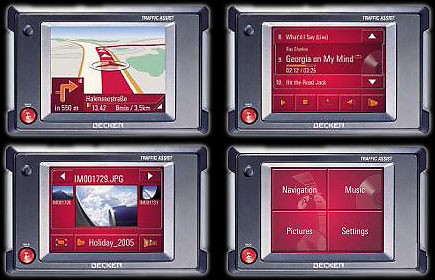 |
While driving, the maps are clear, the turns are easily seen, and the voice prompts give you plenty of time (turns are announced 2 or 3 times to give you plenty of room to get into the proper lane). You get your choice of 2D or 3D maps, and I still can’t decide which I prefer (you can quickly and easily switch between them if you like). You also get the option of displaying your speed and altitude, along with an indication of North. Also, maps can be displayed along your line-of-sight, or with North always up. You are free to zoom in and out during navigation, but the unit itself does a great job of automatically zooming depending on your speed (slower speeds zoom in, to allow you to see more detail).
There are plenty of “points of interest”, and it's easy to find those near your current location, or at any location you specify (so you can set them as your destination). As with any GPS unit, however, the POIs are only as good as the map data, and are always going to be a bit out-of-date. You have been warned.
Seemingly unique to Becker units, the GPS antenna is built-in to the housing itself – there is no little plastic thing sticking out of the back. Maybe not a major deal, but if you want to carry this unit with you while walking or travelling, it sure makes it easier to slip into a pocket. The unit is about the size of a decent calculator (and not much heavier).
I should also add that there is an undocumented “backdoor” that allows you to access Windows CE directly. I haven’t done anything with this yet, but I assume that I could install programs onto the SD card, and run them, thereby turning my Becker Traffic Assist into a Windows-compatible touchscreen pocket PC!
I highly recommend the Becker Traffic Assist Highspeed 7934.
UPDATE (August 31, 2007): I’ve found that although there is a backdoor to let me access WindowsCE, I haven’t been able to successfully install or run anything! I have poked around and changed a few of the images (just for fun), but I guess this GPS unit won’t magically turn into some sort of Nintendo-clone! It’s still the best $200 GPS unit around!
My one wish-list item would be automatic screen dimming (based on the time). While there is a dimmer night mode, it takes a few screen presses to switch back and forth. Having the unit automatically select the dim mode after 8:00 pm would be really nice (and I assume, really easy for the programmers).
Still can’t figure out why they bothered with the silly “mood lights”
on the sides!