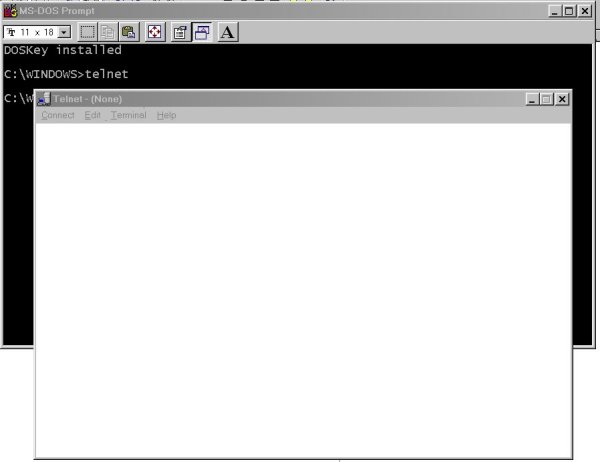
- type "telnet" (Without the quotes) and hit enter
- Alternatively you can just type "telnet:" and hit enter into the "Location" or "Address" text box at the top of your browser
- a telnet application opens up (Unless you have installed another telnet
application you should get the MS Windows default telnet client as shown in
the image below.)
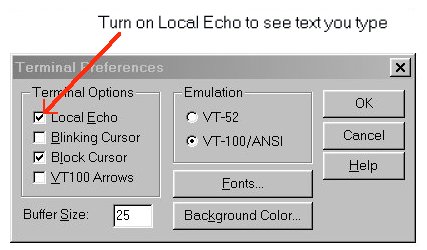
- Before we go further you should check that the "Local Echo" setting is
on from "
- Go to "Terminal" Menu
- choose "Preferences"
- Your preferences should look like those below.
http://irapp.morehead-st.edu:80/hello.html
- Connect to
irapp.morehead-st.eduon port80(recall that port 80 is the default web server port)- Go to Connect menu
- Choose "Remote System" item
- Fill in "Host Name" with, well the host name,
irapp.morehead-st.eduand the port with the port value:80as shown in the picture below.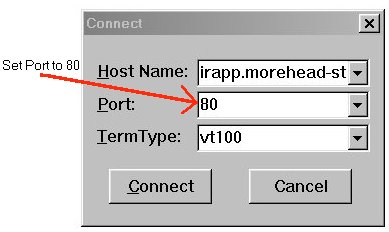
- Click the "Connect" Button
- You will now be at a command prompt in the telnet window and connected to the server.
- The server is now patiently listening over the open connection for you to send an HTTP method so it knows what you want it to do.
- We'll use the most common HTTP Method, the
GETmethod. Issue the request line:GET /hello.html HTTP/1.0
hit 2 hard returns - After you send the 2nd return the server knows you are done with your request line and any header details you were going to send. The server will now process your request and return the result.
- Finally the server closes the connection. (So you might have to move
the little connection closed confirm box to see the full response. Don't
click on the "OK" or the screen will clear.)
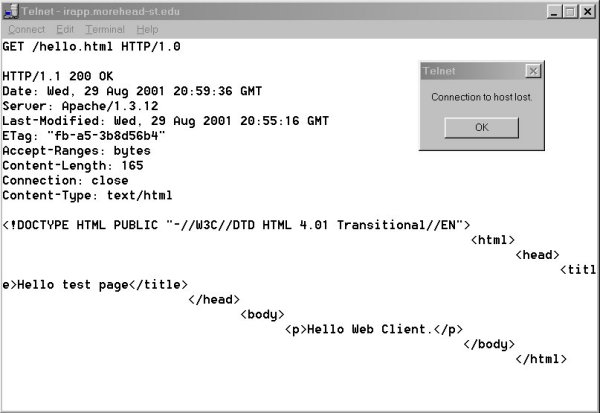
(The output looks funny scrolling across the screen because UNIX systems, on which this server runs, uses a different end-of-line sequence than PCs do. So you are seeing a line feed but no carriage return after each line.) - Examine the results. This is exactly what would be sent to your browser if you accessed http://irapp.morehead-st.edu/hello.html except your browser would have processed the returned HTML and displayed the text marked-up.
- Now try to connect to the server again, this time instead of
requesting the whole document just request the header.
HEAD /hello.html HTTP/1.0 - Note the Last-Modified-Date field. Try your Get method again but this
time include a If-Modified-Since Field to tell the server you dont want
the document unless it has been updated,i.e. is newer than a certain date.
GET /hello.html HTTP/1.1If-Modified-Since: Thu, 03 Aug 2001 10:10:10 GMT
type return twice
-
Next lets look at what your browser did when it retrieved this document
http://people.morehead-st.edu/fs/s.wymer/cis625/assignments/HTTP_exercise.htmlyou are viewing now.- The output from this page is a little long you might want to turn on
Logging:
- Go to "Terminal" Menu
- choose "Start Logging"
- choose a location and filename for your log and remember it for later.
- Connect to people.morehead-st.edu on port 80 (Follow the instructions from the last exercise for connecting to a new remote host.)
- issue the command:
GET /fs/s.wymer/cis625/HTTP_exercise.html
      HTTP/1.0
hit 2 hard returns - The results will scroll by and be captured to the log file you specified.
- You will get the confirmation box telling you that the connection was dropped.
- Click OK
- Stop Logging
- View the Log file in any editor (Like Notepad) to see the results.
- The output from this page is a little long you might want to turn on
Logging:
http://147.133.1.21:8021/hello.htmli.e.- telnet to
147.133.1.21on port8021and - issue the command:
GET /hello.html HTTP/1.0 - What HTTP response code did you get?
- What does this response mean?
- Try linking to the same site with your browser. What happened?
- telnet to
http://147.133.1.21:80/nopage.html- What HTTP response code did you get?
- What does this response mean?
http://147.133.1.21:80/cgi-bin/envhtml.pl- (You'll get a long response from this one so better capture it to a log)
- Try it in a browser and you'll see a catalog of HTTP environment settings which come from both the server you are accessing and the client you are using. (Can you tell which are from the client and which are from the server? Look up the associated HTTP statements and see if you can find out.)
http://216.115.108.245:80/index.html- What does this response mean?
- Try the URL in your browser and see if you can figure out what the HTTP Header statement "Location" does.