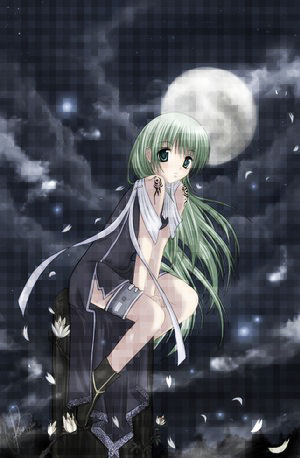
First, open an image you want to put the effect on. I chose some really cute looking anime.
Next, Go to Image --> Decrease Color Depth --> 2 Colors (1 bit) and use these settings...
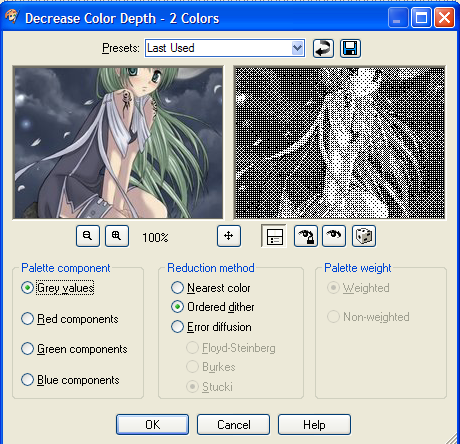
You're image now looks kind of funky, but it's supposed to. I decreased my color depth for many of my images.
Now, right-click your image and click "copy" from the drop down menu. Go to Edit-Undo Decrease Colors to 2. (Or click the backwards arrow)
Now right click your image and click "paste as new layer."
Next, go to Effects--> Distortion Effects--> Pixelate. Use these settings..
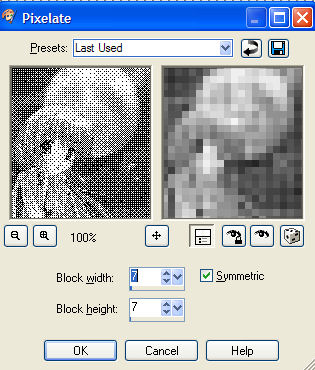
You can adjust the size of the boxes any way you like, but I chose 7 x 7
Lastly, go to Layers--> Properties. And again, use these settings...
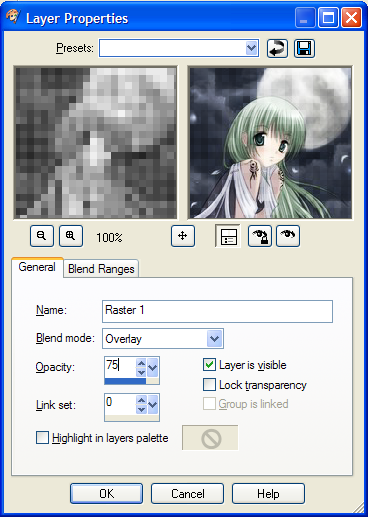
And you're done! I hope this tutorial was some help.
Back--
