Playing with Tubes
The tubes are great in PSP but just start off playing around with what you have, there are thousands you can download from the internet and you can even make them yourself which i am sure you will when you realise what you can do with them
This is just to show you where they
are and what you can do with them
Click the new image icon on the top left
 this window will appear
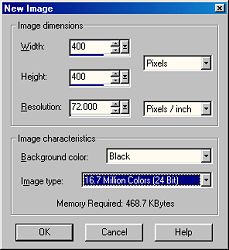
always make sure your image is 16.7 million colours and 24 bit, you can make it whatever size you want and whatever colour background you want
Click OK
Select the tube tool
 from the left hand tools menu
the tool options palette will appear
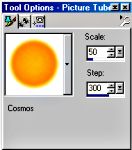
if you click inside the window on the orange ball or whatever may be the default on your computer you will see all the tubes that are available
Click on one to select it
Move back to your image and left click anywhere on it and the pic will appear, click again and you will get another one
Sometimes it will be the same on or if there are several ones in a tube you will get a different one each time
if it in the wrong place use CTRL + Z to remove it and do again
If its too big go back to the tool options window and reduce the number in the scale window
If you want to add a different one go back to the window, click inside the window showing the tube and select another
Play around and save one or two see what you can make, open a pic of your own and add something to it
The beauty of tubes is there is no cutting out and copy and pasting and all the tubes are transparent backgrounds
|
|
|
|
Original |
Cloud and Sparkle are both a tube |