|
The published writing of LESLIE ROGALSKI
|
||
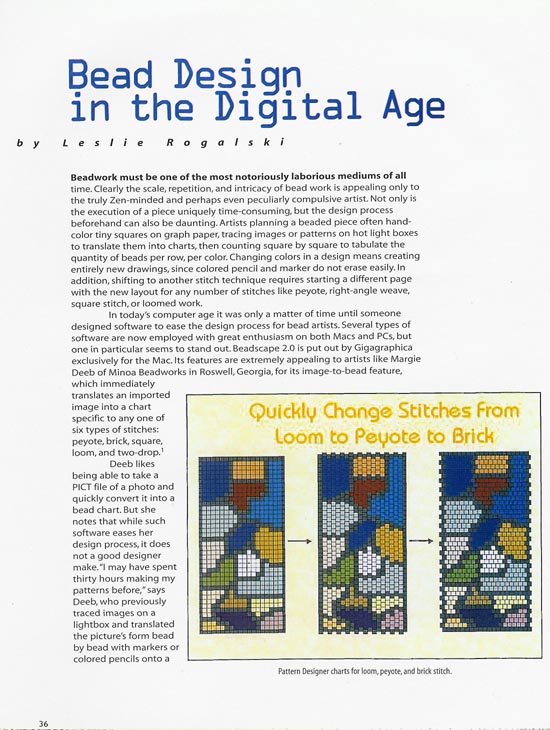 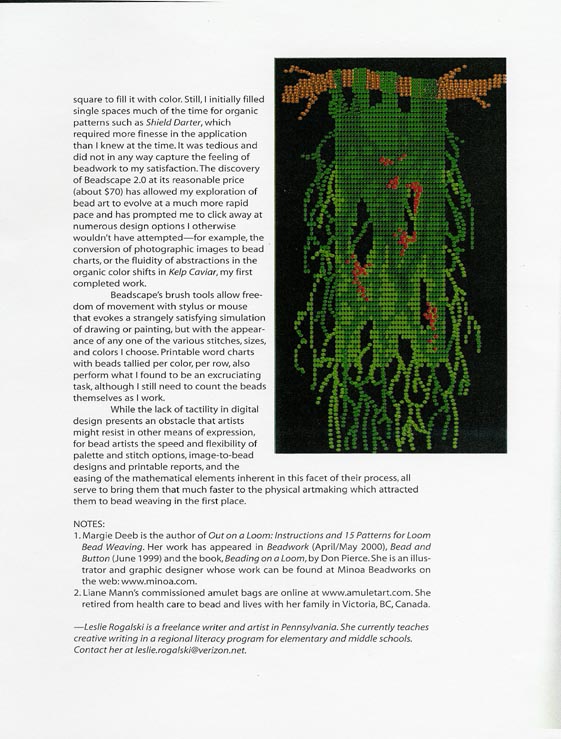
by Leslie Rogalski The Surface Design Journal, Spring 2003 Beadwork must be one of the most notoriously laborious mediums of all time. Clearly the scale, repetition and intricacy of bead work is appealing only to the truly Zen-minded and perhaps even peculiarly compulsive artist. The design process is as daunting as the execution of the work itself. Bead artists generally hand-color tiny squares on graph paper, tracing designs on hot light boxes to translate them into charts, then counting square by square to tabulate the quantity of beads per row, per color. Completely new charts must be created to accommodate major changes in color since marker and colored pencil don�t erase easily. A new chart is also needed to view a design with a different stitch, since each stitch uses a different layout of grid chart. In today's computer age it was only a matter of time until someone designed software to ease the design process for bead artists. Several types of software are now employed for bead design on both Macs and PCs. Beadscape 2.0 by Gigagraphica is currently only for the Mac. Extremely appealing to artists like Margie Deeb of Minoa Beadworks, from Roswell Georgia, for its image-to-bead feature, Beadscape quickly translates an imported image into a chart for any one of six types of stitches: peyote, brick, square, loom, two-drop and two-drop. Deeb likes being able to take a PICT file of a photo and quickly convert it into a bead chart. These charts make it easier for other artists like Frieda Bates of New Mexico to help execute the actual pieces for Deeb's books on bead work. Although Bates uses a cross stitch application called Pattern Maker to convert her own photographic images to a graph suitable for loomed work, she continues to hand color most of her designs. But Deeb notes that while such software eases her design process, it does not a good designer make. "I may have spent 30 hours making my patterns before," says Deeb, who previously used the hand-colored graph paper and lightbox method. "Now I may spend only fifteen hours." Also, software cannot interpret everything the way an artist might want. After an image is translated into a bead chart, individual bead color and position must often be changed bead by bead to get exact results. Still, as artist Liane Mann of Victoria, B.C. comments, the time saved is well worth it. Mann first switched from using colored pencil on graph paper to the PC based Bead Pattern Designer with Auto Bead. She liked BPD for basic designing but found the picture-to-pattern system limited in palette and application. As Mann's custom bead portraits became more in demand, she eventually bought an iMac just to use Beadscape 2.0. Artists considering software should review features according to their operating systems and creative desires. Consider allowances for changing bead size, color and type, stitch and grid variations, and converting images to bead graphs. Beadscape features tubular offset and an extensive color palette which includes seeds, cylinders, rounds, bugles, and other shapes in several sizes and bead surfaces. Its "free" layer permits a great variety of bead sizes, shapes and stitches including adding fringe within a single piece. Beadcellar's Pattern Design Software for PC matches the complete line of Toho and Miyuki beads and offers very friendly spreadsheet text charts. Both programs also offer a convenient shopping list of materials tallied by gram, inch or tube, and most programs offer text pages with bead counts by color. Although Beadscape 2.0 offers among its printable charts a realistic mode that simulates the reflective surface of many beads, artists should remember that no digital image can recreate the way real beads will appear in an actual piece, or display the way colors look against each other. The artists mettle remains challenged to visualize ahead to the actual, final piece. Prior to my own purchase of Beadscape 2.0 about 3 months ago I used a Mac application called Illustrator 8.0 to graph beadwork. I digitally fill areas with color, then "locked" areas into groups in order to easily change groups without separately clicking on each square to fill it with color. Still, I initially colored spaces one by one. The discovery of Beadscape 2.0, at its reasonable price of about $70, has allowed my exploration of bead art to evolve at a much more rapid pace and has prompted me to click away at numerous design options I otherwise wouldn�t have attempted, such as the conversion of photographic images to bead charts, or the fluidity of abstractions like the organic color shifts in "Kelp Caviar," my first completed work. Beadscape's brush tools allow freedom of movement with stylus or mouse that evokes a strangely satisfying simulation of drawing or painting, and with the appearance of any one of the various stitches, sizes and colors I choose. Printable word charts with beads tallied per color, per row, also perform what I found to be an excruciating task, although I still need to count the beads themselves as I work. While the lack of tactility in digital design presents an obstacle artists might resist in other means of expression, for bead artists the speed and flexibility of palette and stitch options, image-to-bead designs and printable reports, and the easing of the mathematical elements inherent in this facet of their process, all serve to bring them that much faster to the physical art-making which attracted them to bead weaving in the first place. Leslie Rogalski is a freelance writer and artist in PA. Previously published in The Surface Design Journal writing about fiber artist Michele Marcuse, she currently teaches bead stitching at ubead2 in Wayne, PA. She also teaches creative writing in a regional literacy program for elementary and middle schools. Contact her at [email protected]
Notes: Liane Mann's commissioned amulet bags can be seen online at www.amuletart.com. She retired from health care to bead and live with her family in Victoria, B.C., Canada. Frieda Bates lives and works in Artesia, New Mexico. Best known for her loomed work, she has been featured in leading bead magazines. http://www.pvtnetworks.net/~fbates. Survey said� Beadscape 2.0 (MAC) $69.95 + S/H www.gigagraphica.com/Beadscape Artists liked: picture to bead feature for scans and digital art; graphs for peyote, brick, loom, square and tubular offset; bead options of seed, cylinder, bugles and other bead types of various surfaces including opaque, lustre, ceylon, matte, etc; "free" layer allows variations in bead size within single piece; palette up to 675 colors; selection tools enable instant color changes; easy to use drawing tools; zoom tool; chart options include "realistic" mode that simulates look of actual beads. Artists didn�t like: Locked rulers. Gigagraphica was unresponsive. Suggested buying from distributor s like http://www.blessedbeads.com/software.htm Bead Cellar Pattern Designer 1.0 (PC) $89.95 + S/H. www.beadcellar.com Artists liked: patterns for up to 9-drop peyote, brick and loom work; picture to bead conversion; palette matches manufacturer Toho and Miyuki colors; easy spread-sheet beading "maps"; printable materials shopping list; very friendly customer service. Artists didn�t like: squared-off, graph paper type charts. Bead Pattern Designer 1.0 (PC) $95+S/H and AutoBead 1.0 $39.95+S/H Combo pack for both $129.97 www.blessedbeads.com/software Artists liked: peyote, brick and loom capabilities; design rotation feature; instant color changes; printable bead count by color. Artists didn�t like: high price; cumbersome interface for image to bead feature; limited directions for AutoBead, limited color palette. Unreviewed : Bead Creator (PC) $69.95+S/H http://beadcreator.com Primarily an image to bead program. Bead Wizard (PC) $50 + S/H www.beadwizard.com Stitch Painter (PC and Mac) $80 + S/H www.cochenille.com/stitch.html For beading, cross stitch, knitting, crochet and other fiber arts. Pattern Maker (PC) $60 to $120 www.hobbyware.com/pm.htm Cross stitch software applicable to loomed bead work.
Read more about being a craft professional in Leslie's web column
| ||