Musical Instrument Digital Interface
Over recent years the term M.I.D.I. has
become increasingly familiar to musicians and computer users.
There was a time when it was only really of interest to those who
made music, but with the increaing proliferation of the personal
computer, and its growing multimedia capabilities M.I.D.I is
becoming a tool for consumers of music too, particularly across
the internet.
Read on to learn everything you would ever
want to know about M.I.D.I or return to my frontpage by clicking HERE
What do you want to know?
What Is M.I.D.I?
A
Bit Of History
Connecting
M.I.D.I. Equipment
Is
This Message For Me?
So
Where Does The Computer Fit Into All This Then?
Never
Mind The Quality, Count The Notes.
Don't
All Talk At Once!
Is There
Anything Else You Need To Tell Me?
M.I.D.I. Files,
Schmiddy Files
Do I
Need A Synth Then?
What
Is M.I.D.I.?
Having asked the question its probably easier to start by looking
at what M.I.D.I. isn't!
The first possible surprise is that M.I.D.I. isn't a sound file
format. It doesn't carry the same sort of information as a .WAV
or .AIFF file for instance.
.WAV files contain digital recordings of real sounds, similar, in
a way, to recordings stored on a CD. M.I.D.I. files don't contain
this sort of information at all.
M.I.D.I. is actually a control system. A M.I.D.I. file contains instructions
to perform particular commands.
Back to the top
Frontpage
A
Bit Of History
The M.I.D.I. protocol was developed by musical instrument
manufacturers in order to make the connection of different models
and makes of instrument easier. Until this point it was
difficult, for instance, to play one synthesiser from the
keyboard of another. This meant that layering sounds was
difficult, and that in order to have access to a wide variety of
sounds the keyboard player had to be surrounded by synthesisers.
M.I.D.I. was devised as a Universal Control System,
in other words, a way of one synthesiser controlling another,
irrespective of the make and model of either. At its simplest
level, when a note is pressed on the master keyboard in a
M.I.D.I. setup, it will transmit an instruction to the
instruments that are connected to it saying "play this
note", and the receiving instrument(s) will respond.
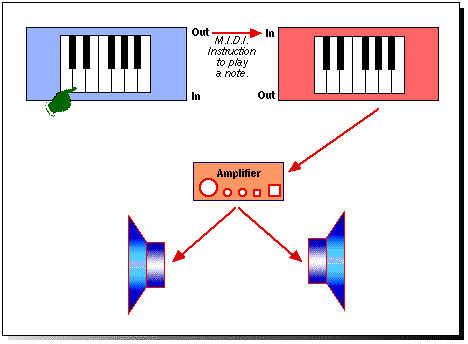
So, a M.I.D.I. file simply contains the instructions for a
receiving instrument. It transmits these instructions in the form
of numbers, and in this way it allows musical instruments to talk
to each other. It is an interface. This, of course, is
where the term M.I.D.I. comes from, since it stands for:
Musical Instrument
Digital Interface
One of the first results of the development of M.I.D.I. was the
removal of keyboards from synthesisers. This began the
proliferation of the M.I.D.I. Module. These
usually come in the form of 19" rack mountable boxes (such
as the Emu Vintage Keys, or Novation Bass Station)
so that they can be easily integrated into music studios, but can
actually take all sorts of shapes and sizes.
Back to the top
Frontpage
Connecting
M.I.D.I. Equipment
So, how do the master keyboard and another keyboard or M.I.D.I.
module fit together?
M.I.D.I. information is transmitted down M.I.D.I. cables. These
are fitted with M.I.D.I. plugs, which come in the shape of the
5-pin DIN plug. Chosing these as connectors wasn't a particularly
bright idea since, unlike XLR's for instance, input and output
connectors are identical, and there is no standard for 5-pin DIN
wiring. A 5-pin DIN lead is therefore not always necessarily
suitable for use as a M.I.D.I. lead. On top of this the
connectors themselves aren't always robust.
A M.I.D.I. master keyboard will have M.I.D.I. sockets - usually
hidden on the back where you can't see them during normal use.
The M.I.D.I. instructions leave the keyboard from the M.I.D.I.
Out socket, travel down the M.I.D.I. cable, and are
received at the module's M.I.D.I. In socket.
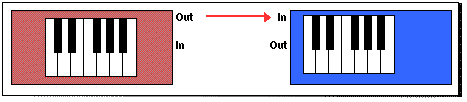
This enables one keyboard to send
instructions to another keyboard, or module, but what happens if
there is more than one device which needs to be controlled?
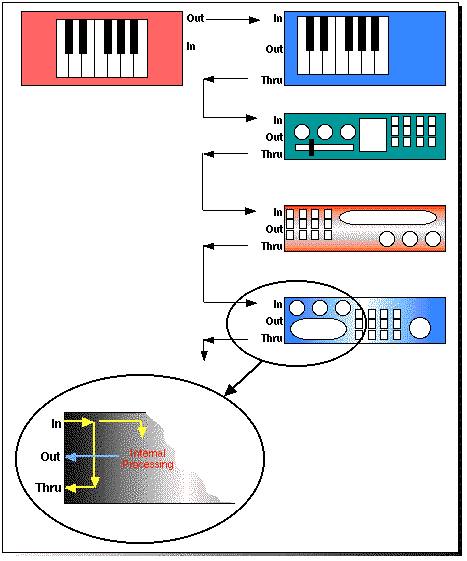
The M.I.D.I. data needs to be passed from the first receiving
module to the second. This is done via the M.I.D.I. Thru
socket which simply echoes what is received at the M.I.D.I. In.
Note that the information isn't passed along the chain
via the M.I.D.I. Out socket which only transmits information that
is originated by the instrument to which it belongs. This method
of connecting M.I.D.I. devices is called Daisy Chaining:
Back to the top
Frontpage
Is
This Message For Me?
Let's suppose that the first receiving module in the chain is set
to play a piano sound, and the second is set to play a brass
sound. It would be helpful if the devices could distinguish
between information which is targetted at each other, so that the
piano sound could be played independently of the brass.
This is done through the use of M.I.D.I. Channels.
Every instruction transmitted by the mother keyboard is
identified as being on a particular M.I.D.I. Channel. Meanwhile
the receiving modules are set to respond on their own M.I.D.I.
Channels (these can be the same if desired). When an instruction
arives at the module, the device will only follow the instruction
if the message's transmit channel (TX)
corresponds to its receive channel (RX).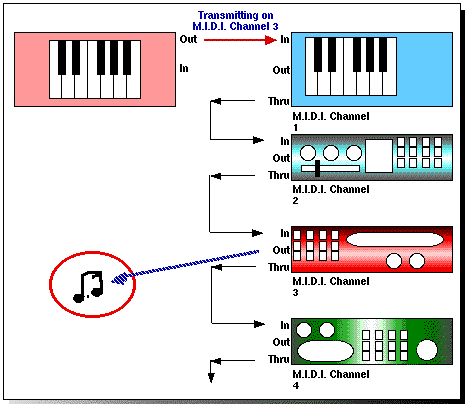
There are 16
M.I.D.I. channels within MIDI protocol, however, some hardware
devices allow multiple streams of M.I.D.I. data, and the affect
of hundreds of M.I.D.I. channels can be achieved. Be aware
though that the number of actual channels is still just 16 - the
hardware (in combination with the Software) simply redirects data
to more than one M.I.D.I. This allows (for instance) two devices
to each receive a full compliment of 16 channels, giving the
impression of 32 channels at work, but no instrument can be set
to receive on M.I.D.I. channel 17!
Back to the top
Frontpage
So
Where Does The Computer Fit Into All This Then?
Although the original idea was to allow one keyboard to control a
number of sound sources (in the form of other synthesisers or
M.I.D.I. modules) it wasn't long before computers started to be
incorporated into the M.I.D.I. chain.
It was bound to happen, since M.I.D.I. involves instruments
communicating by using a string of binary digits, and the one
thing that computers can do is store and manipulate binary
digits.
Although there are all sorts of computer programmes designed to
store and manipulate M.I.D.I. data, the most common is the Sequencer.
This is a programme which records and manipluates M.I.D.I.
instructions, commonly called Events. Note that
a M.I.D.I. sequencer doesn't record sounds (although the issue is
getting somewhat confusing with the arrival of programmes which
integrate M.I.D.I. sequencing with Hard Disk Recording).
Ok. so, remembering that the
sequencer only records the instruction eminating from a M.I.D.I.
instrument will enable you to avoid one of the most common
difficulties afflicting M.I.D.I. newbies. Here's the scenario:
Fledgling M.I.D.I. musician
Jon-Mitchell Jam-Jar buys himself a computer, complete with a
M.I.D.I. sequencer. Having read up on some of the classic
synthesisers of the past 20 years he equips himself with a Yamaha
DX7. He hooks up the M.I.D.I. cables correctly, and boots up his
sequencer. He's ready to go.
He starts by recording a hypnotic repetitive bass part which he's
very happy with. He now wants to add a string part over the top.
He changes the sound on the DX7 so that its now playing a lush
approximation of the London Symphony Orchestra, but ...... Oh No!
The bass part is now being played by violins. "I've
recorded my bass part into the computer"
he says, "but its not playing back
properly".
Of course, now that you know what a
M.I.D.I. sequencer actually is you'll realise the mistake he's
making. The computer and sequencer are simply recording M.I.D.I.
instructions and not the sounds produced by the keyboard. When
the sequencer plays the recorded data back it re-transmits the
instructions, just as the original keyboard would when it was
played in the first place.
The computer is doing the job of a mechanised keyboard player. In
fact, in many ways it is simlar to the old pianolas, or
player-pianos, which played music according to holes punched in a
roll of paper. The sequencer punches the computerised equivalent
of holes in the paper. Without the sound producing mechanism the
holes are just ....uhm... holes. If Jon wants a bass sound and a
string sound playing at once he'll either need two
modules/synthesisers, with one sound each, or a device that is
capabale of playing more than one sound at once, on more that one
M.I.D.I. channel (more of this in a bit).
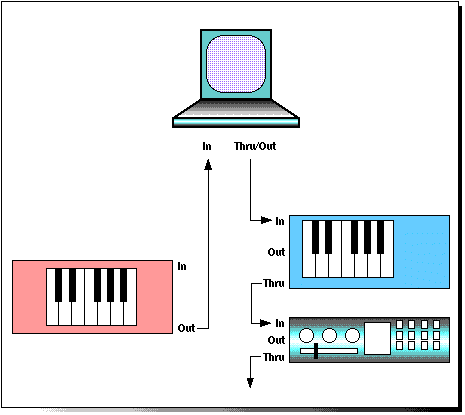
There are a couple of
things to notice from the diagram above. Firstly, the master
keyboard is connected so that it can send M.I.D.I. data to the
computer, but is no connection to its M.I.D.I. In. This means
that the computer can't "play" the master
keyboard. This is a common scenario since many master M.I.D.I.
keyboards are in fact "dumb", featuring no sound
generating hardware themselves, but rather being devoted solely
to producing M.I.D.I. instructions. The alternative is to use a
genuine synthesiser for both roles.
The second thing to note is that the computer only has two
M.I.D.I. connections. One is the M.I.D.I. In which receives
instructions from the master keyboard. The other is a M.I.D.I.
Out/Thru, which covers both functions. This is because
when the master keyboard is being played it is necessary to
retransmit the instructions arriving at the M.I.D.I. In to the
following modules, but when the M.I.D.I. data is being replayed
from the sequencer the computer itself needs to originate the
data.
Back to the top
Frontpage
Never Mind The
Quality, Count The Notes.
As the use of M.I.D.I. has developed so have the demands placed
on the sound modules and synthesisers themselves. As described
earlier, in order to construct complete arangements using a
M.I.D.I. sequencer you'd need to provide enough sound sources for
the sequencer to play. When M.I.D.I. was first introduced this
would mean having a separate instrument for each sound that you
wanted. However things have thankfully moved on since then.
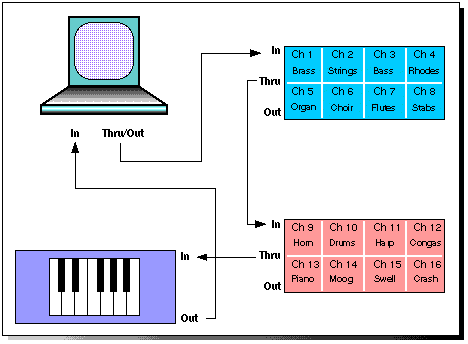
Today's synthesisers and modules effectively consist of a number
of individual sound sources within one box, each of which is
capable of playing a different sound source on a different
M.I.D.I. channels. These devices are known as Multi-Timbral,
literally capable of playing many tones. Devices will vary in the
number of different tones that they can play at once, having
different numbers of Multi-Timbral Parts. My
Ensoniq ESQ1 synthesiser, which is rather dated in terms of
facilities, is 8-Part Multi-Timbral. These days
it is most common for devices to be provided with 16-part
multi-timbrailty. There is a logic behind this number, since if a
module has one M.I.D.I In socket then the maximum number of
individual M.I.D.I. channels that can be addressed is 16. Further
multi-timbrality would therefore be wasted.
Devices also vary in the
number of notes or voices that can be played at once. Note that
is different from multi-timbrality. Just consider this scenario.
An 8-part multi-timbral device has a piano sound assigned to part
1, on M.I.D.I. channel 3 (it is often possible to assign part
numbers and M.I.D.I channels independently), and a string sound
to part 2 on M.I.D.I. channel 5. You record an 8 note piano chord
which is transmitted by the sequencer to the module on M.I.D.I.
channel 3. You then record a string melody which is transmitted
to the module on M.I.D.I. channel 5, but the device actually
only has 8 voices. Two things may happen, depending on how
the device assigns voices. Either the strings will not sound, or
they will steal notes from the piano part.
The number of notes that are available overall is given by the
unit's Polyphony. My ESQ1 is not only 8-part
multi-timbral, it is also 8-note Polyphonic.
Current devices are generally at least 16-note polyphonic, though
28 and 32 notes are very common, and 64-note polyphonic devices
such as the Alesis QS6 are increasingly
available. Early multi-timbral devices, like the Yamaha
FB01 required the user to specify the number of notes
that each part was to have available, but today's units tend to
assign voices dynamically, changing the number of voices used
depending on what is being played at any one time.
Back to the top
Frontpage
Don't All Talk At
Once!
In the diagram on the
previous page you'll notice I've shown the master keyboard with a
cable attached to its M.I.D.I. In. This is required if the master
keyboard is in fact a synthesiser with its own in built sounds
rather than a dumb controller.
With the cable attached to the M.I.D.I. In the sequencer will be
able to send instructions back to the master keyboard in order
for it to generate its own sounds in response.
This causes a problem though.
If the keyboard isn't connected to any other M.I.D.I. devices,
and a key is pressed on its keyboard, we want the key to cause
the sound generator in the synthesiser to play the corresponding
note. If this didn't happen then it wouldn't actually be possible
to play the synthesiser as a stand-alone instrument, which of
course it is.
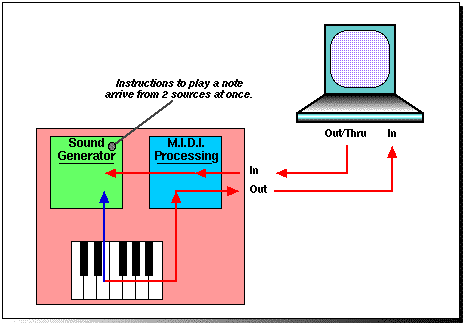
When the keyboard is connected to the computer, the sequencer
programme will re-transmit the received information, which will
eventually be received back at the synthesiser's M.I.D.I. In.
In short, the synthesiser will be receiving instructions from two
places at once. This can result in two identical notes being
played using the same sound, or if the targets for the two
instructions are different, then unwanted sounds may play
inappropriate parts. Either result halves the polyphony.
Just in case the problem isn't quite clear, here's a diagram
which may help:
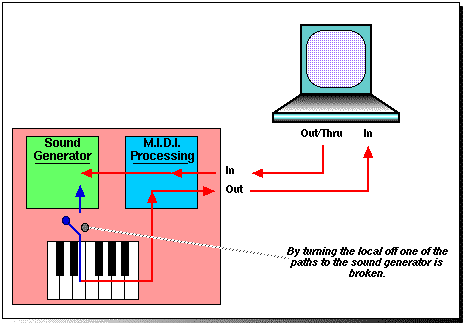
There are is a solution to this problem.
In fact there is more than one, but I'll only look at the best,
which breaks the connection between the sound generating part of
the synthesiser and the keyboard. This is acheived by turning Local
Off on the synthesiser. This may be easy or difficult
depending on the complexity of the synthesiser concerned. The
Alesis Quadrasyth for instance has a reference to Local Off in
its manual, but the controls used to acheive it aren't called by
that name, and are rather confusing. On the other hand the Kawai
KC20 has a simple page where Local can be turned on or off
Of course, leaving Local Off makes things
simpler when working with a sequencer, but you'll need to
remember to turn it back on again when you use the synthesiser as
a stand-alone instrument. If you find the keyboard doesn't
generate any sound in this situation, its probably worth checking
that Local has been turned back on.
Back to the top
Frontpage
Is
There Anything Else You Need To Tell Me?
When a key is pressed on the master
keyboard, and instruction is sent to any receiving device to play
the corresponding note, but there are other sorts of information
besides the note numbers that need to be transmitted and
received. For instance, it is possible for Programme
Changesto be sent via M.I.D.I.
In addition, the speed, or velocity at which the key is pressed
is used to convey how hard the note was struck, whilst movement
of the pitch bend and modulation wheels can be transmitted via
M.I.D.I.
This sort of information comes under the heading of M.I.D.I.
Controller Data, some of which is pre-defined as being
volume data, or pan data, and some which can be defined by the
user so that the receving instrument may map the data to an
unspecified parameter.
What the receiving instrument will do with the incoming
controller data is determined by that instrument, not by the
transmitting device, so that if you were playing a keyboard on
which full downwards pitch bend only produced a shift of a
semi-tone, you may find that the receiving instrument shifted its
pitch by an octave, unless it was set up to respond in the same
way.
When the transmitting device sends a M.I.D.I. message it begins
by saying what sort of message it is. Each of the controller
types is numbered, so that if the receiving isnstrument receives
a message labelled as Controller 7 it knows that this will be
intended to set the instrument's volume.
Most instruments should conform to the controller assignments
shown here:
| Control Number |
Function |
| 0 |
Undefined |
| 1 |
Modulation Wheel |
| 2 |
Breath Controller |
| 3 |
Undefined |
| 4 |
Foot Pedal |
| 5 |
Portamento Time |
| 6 |
Data Entry MSB |
| 7 |
Main Volume Control |
| 8 |
Balance |
| 9 |
Undefined |
| 10 |
Pan |
| 11 |
Expression Controller |
| 12-15 |
Undefined |
| 16-19 |
General Purpose Controls |
| 20-31 |
Undefined |
| 32-63 |
LSB For Controls 0 to 31 |
| 64 |
Sustain Pedal |
| 65 |
Portamento |
| 66 |
Sostenuto |
| 67 |
Soft Pedal |
| 68 |
Undefined |
| 69 |
Hold 2 |
| 70-79 |
Undefined |
| 80-83 |
General Purpose Controls |
| 84-90 |
Undefined |
| 91 |
External Effects Depth |
| 92 |
Tremelo Depth |
| 93 |
Chorus Depth |
| 94 |
Celeste Depth |
| 95 |
Phase Depth |
| 96 |
Data Entry Increment |
| 97 |
Data Entry Decrement |
| 98 |
Non-Registered Parameter MSB |
| 99 |
Non-Registered Parameter LSB |
| 100 |
Registered Parameter MSB |
| 101 |
Registered Parameter LSB |
| 102-120 |
Undefined |
| 121-127 |
Channel Mode Messages |
M.I.D.I. Files,
Schmiddy Files
Once people started creating sequencer files it became obvious
that they would want to exchange them, either because they were
working with other M.I.D.I. musicians, or because they simply
wanted to play their work to other people.
There were problems though. Firsltly, a file recorded using one
sequencer program couldn't be played by another sequencer
program, and secondly, although it was possible to embed
intructions to change programmes within sequencer files, the
sounds that were attached to various programmes within different
synthesisers didn't necessarily bare any relation to each other.
The first difficulty was overcome by the development of M.I.D.I.
files. These are sometimes referred to as MIDIs, or .MID files.
These allowed sequences to be transported between different
software setups.
The second problem was more difficult though.
It was solved by the development of a standard by which sounds
were assigned to the 128 available programme numbers, so that, in
short, when the original composer determined that a part should
be played by a trumpet, it would be played by a trumpet when
loaded into someone else's system.
The standard allocation of sounds is called General
M.I.D.I., or GM.
This standard is somewhat frowned upon within the professional
music making world, since it is seen partly as a way of dictating
to M.I.D.I. musicians what sounds they should use, but also
because it is lumped together as a close relative of the one
finger auto-accompaniment found on many home keyboards.
Having said that, it is undoubtedly a very useful way of ensuring
that M.I.D.I. Files sound close to the way they were intended. Of
course, an Akai piano won't sound the same as an Ensoniq piano,
but at least piano parts will be played by pianos when GM is
used.
The standard sound allocation for GM sounds applies to all
M.I.D.I. channels ecxept M.I.D.I. Channel 10. More of
this in a minute. On all other channels the sounds are allocated
to programme numbers as follows:
| Prog. No. |
Instrument |
| 1 |
Grand Piano |
| 2 |
Bright Acoustic Piano |
| 3 |
Electric Grand Piano |
| 4 |
Honky Tonk Piano |
| 5 |
Electric Piano 1 |
| 6 |
Electric Piano 2 |
| 7 |
Harpsichord |
| 8 |
Clavi |
| 9 |
Celesta |
| 10 |
Glockenspiel |
| 11 |
Music Box |
| 12 |
Vibraphone |
| 13 |
Marimba |
| 14 |
Xylophone |
| 15 |
Tubular Bells |
| 16 |
Dulcimer |
| 17 |
Drawbar Organ |
| 18 |
Percussive Organ |
| 19 |
Rock Organ |
| 20 |
Church Organ |
| 21 |
Reed Organ |
| 22 |
Accordion |
| 23 |
Harmonica |
| 24 |
Tango Accordion |
| 25 |
Acoustic Guitar (Nylon) |
| 26 |
Acoustic Guitar (Steel) |
| 27 |
Electric Guitar (Jazz) |
| 28 |
Electric Guitar (Clean) |
| 29 |
Electric Guitar (Muted) |
| 30 |
Overdriven Guitar |
| 31 |
Distortion Guitar |
| 32 |
Guitar Harmonics |
| 33 |
Acoustic Bass |
| 34 |
Electric Bass (Finger) |
| 35 |
Electric Bass (Pick) |
| 36 |
Fretless Bass |
| 37 |
Slap Bass 1 |
| 38 |
Slap Bass 2 |
| 39 |
Synth Bass 1 |
| 40 |
Synth Bass 2 |
| 41 |
Violin |
| 42 |
Viola |
| 43 |
Cello |
| 44 |
Contrabass |
| 45 |
Tremelo Strings |
| 46 |
Pizzicato Strings |
| 47 |
Orchestral Harp |
| 48 |
Timpani |
| 49 |
String Ensemble 1 |
| 50 |
String Ensemble 2 |
| 51 |
Synth Strings 1 |
| 52 |
Synth Strings 2 |
| 53 |
Choir Aahs |
| 54 |
Choir Oohs |
| 55 |
Synth Voice |
| 56 |
Orchestral Hit |
| 57 |
Trumpet |
| 58 |
Trombone |
| 59 |
Tuba |
| 60 |
Muted Trumpet |
| 61 |
French Horn |
| 62 |
Brass Section |
| 63 |
Synth Brass 1 |
| 64 |
Synth Brass 2 |
| 65 |
Soprano Sax |
| 66 |
Alto Sax |
| 67 |
Tenor Sax |
| 68 |
Baritone Sax |
| 69 |
Oboe |
| 70 |
English Horn |
| 71 |
Bassoon |
| 72 |
Clarinet |
| 73 |
Piccolo |
| 74 |
Flute |
| 75 |
Recorder |
| 76 |
Pan Flute |
| 77 |
Blown Bottle |
| 78 |
Shakuhachi |
| 79 |
Whistle |
| 80 |
Ocarina |
| 81 |
Lead 1 (Square) |
| 82 |
Lead 2 (Sawtooth) |
| 83 |
Lead 3 (Calliope) |
| 84 |
Lead 4 (Chiff) |
| 85 |
Lead 5 (Charang) |
| 86 |
Lead 6 (Voice) |
| 87 |
Lead 7 (Fifths) |
| 88 |
Lead 8 (Bass & Lead) |
| 89 |
Pad 1 (New Age) |
| 90 |
Pad 2 (Warm) |
| 91 |
Pad 3 (Polysynth) |
| 92 |
Pad 4 (Choir) |
| 93 |
Pad 5 (Bowed) |
| 94 |
Pad 6 (Metallic) |
| 95 |
Pad 7 (Halo) |
| 96 |
Pad 8 (Sweep) |
| 97 |
FX 1 (Rain) |
| 98 |
FX 2 (Soundtrack) |
| 99 |
FX 3 (Crystal) |
| 100_____ |
FX 4 (Atmosphere)___ |
| 101 |
FX 5 (Brightness) |
| 102 |
FX 6 (Goblins) |
| 103 |
FX 7 (Echoes) |
| 104 |
FX 8 (Sci-Fi) |
| 105 |
Sitar |
| 106 |
Banjo |
| 107 |
Shamisen |
| 108 |
Koto |
| 109 |
Kalimba |
| 110 |
Bagpipe |
| 111 |
Fiddle |
| 112 |
Shanai |
| 113 |
Tinkle Bell |
| 114 |
Agogo |
| 115 |
Steel Drums |
| 116 |
Woodblock |
| 117 |
Taiko Drum |
| 118 |
Melodic Tom |
| 119 |
Synth Drum |
| 120 |
Reverse Cymbal |
| 121 |
Guitar Fret Noise |
| 122 |
Breath Noise |
| 123 |
Seashore |
| 124 |
Bird Tweet |
| 125 |
Telephone Ring |
| 126 |
Helicopter |
| 127 |
Applause |
| 128 |
Gunshot |
Back to the
top
Frontpage
Under the GM standard,
M.I.D.I. Channel 10 is reserved for percussion sounds, and a
system for allocating sounds to particular notes is specified
too:
| Note No. |
Note Name |
Sound |
| 35 |
B1 |
Acoustic Bass Drum |
| 36 |
C1 |
Bass Drum 1 |
| 37 |
C#1 |
Side Stick |
| 38 |
D1 |
Acoustic Snare |
| 39 |
D#1 |
Hand Clap |
| 40 |
E1 |
Electric Snare |
| 41 |
F1 |
Low Floor Tom |
| 42 |
F#1 |
Closed Hi-Hat |
| 43 |
G1 |
High Floor Tom |
| 44 |
G#1 |
Pedal Hi-Hat |
| 45 |
A2 |
Low Tom |
| 46 |
A#2 |
Open Hi-Hat |
| 47 |
B2 |
Low Mid-Tom |
| 48 |
C2 |
High Mid-Tom |
| 49 |
C#2 |
Crash Cymbal 1 |
| 50 |
D2 |
High Tom |
| 51 |
D#2 |
Ride Cymbal 1 |
| 52 |
F2 |
China Cymbal |
| 53 |
E2 |
Ride Bell |
| 54 |
F#2 |
Tambourine |
| 55 |
G2 |
Splash Cymbal |
| 56 |
G#2 |
Cowbell |
| 57 |
A3 |
Crash Cymbal 2 |
| 58 |
A#3 |
Vibraslap |
| 59 |
B3 |
Ride Cymbal 2 |
| 60 |
C3 |
High Bongo |
| 61 |
C#3 |
Low Bongo |
| 62 |
D3 |
Mute Hi Conga |
| 63 |
D#3 |
Open Hi Conga |
| 64 |
E3 |
Low Congo |
| 65 |
F3 |
Hi Timbale |
| 66 |
F#3 |
Low Timbale |
| 67 |
G3 |
High Agogo |
| 68 |
G#3 |
Low Agogo 2 |
| 69 |
A4 |
Cabasa |
| 70 |
A#4 |
Maracas |
| 71 |
B4 |
Short Whistle |
| 72 |
C4 |
Long Whistle |
| 73 |
C#4 |
Short Guiro |
| 74 |
D4 |
Long Guiro |
| 75 |
D#4 |
Claves |
| 76 |
E4 |
High Woodblock |
| 77 |
F4 |
Low Woodblock |
| 78 |
F#4 |
Mute Cuica |
| 79 |
G4 |
Open Cuica |
| 80 |
G#4 |
Mute Triangle |
| 81 |
A5 |
Open Triangle |
General M.I.D.I. also
specifies that:
The receiving instrument
should be 16 note polyphonic across M.I.D.I. channels 1 to 9, and
11 to 16.
The receiving instrument should be 8 note polyphonic on M.I.D.I.
channel 10.
All 128 program numbers should be implemented.
Controllers 1, 7, 10, 11, 64, 121 and 123 must be implemented
(these are described on the previous page).
Back to the top
Frontpage
Do I
Need A Synth Then?
Because they simply contain
instructions to play a musical note, rather than digitised
recorded audio, M.I.D.I. files are relatively small, and
therefore provide a relatively easy way of providing a soundtrack
to the World Wide Web, or CD ROM based multimedia software.
Many web pages now include embedded M.I.D.I. files, and computer
games provide a musical accompaniment through M.I.D.I.
Of course, not everyone who wants to listen to music in this way
has a M.I.D.I. equiped keyboard at their disposal. Luckily they
don't need one.
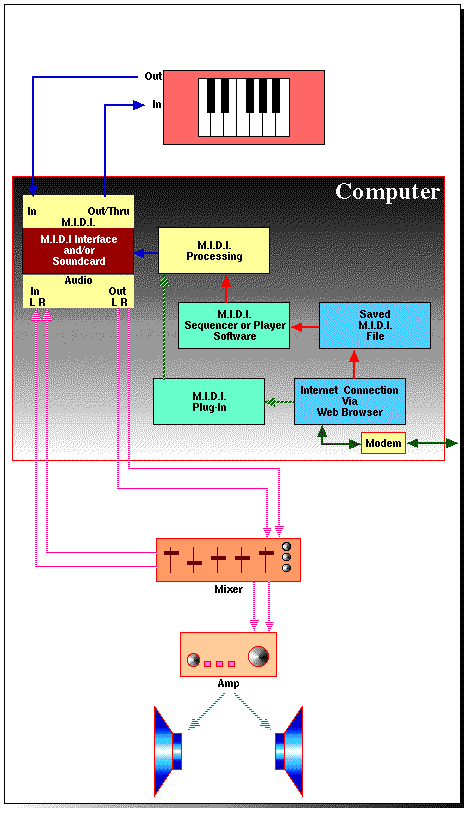
Although M.I.D.I. files which are played via an internet
connection can be routed through a M.I.D.I. interface to an
external device, it is also possible to have them played by a
M.I.D.I. device housed inside the computer itself. The quality of
the device and its method of operation will depend on the
computer, along with the additions that have been made to it, but
generally, M.I.D.I. based music is an accepted facility that
computers now provide.
In the case of PCs (IBM compatibles/Windows and Intel based
machines), the M.I.D.I. processing hardware is usually housed
along with the audio hardware on the computer's soundcard. This
may simply offer the sounds themselves along with an output port
to enable connection to a stereo system, or to external speakers.
Alternatively, the soundcard may offer M.I.D.I. Ins and Outs,
enabling the connection of a keyboard and receiving devices.
Apple Macs are already
equiped with sound generating hardware, and include a software
addition called Quicktime Musical Instruments, as part of the
system software. This is effectively a basic GM synthesiser which
will not only play M.I.D.I. files from within other programs, but
may also be accessed by a sequencer as an instrument.
If you visit a web page with an embedded M.I.D.I. file you'll be
able to play it as you look at the page, as long as you have a Plug-In
which can process the M.I.D.I. data and send it to a M.I.D.I.
equiped soundcard or to Quicktime Musical Instruments.
If you download and save a M.I.D.I. file you'll be able to play
it with a variety of software when you're off-line. There are
many shareware M.I.D.I. file players available, my Mac favourite
is Arnold's M.I.D.I. Player, or if you have a sequencer program
you could load it onto there and play it on a GM synthesiser.
Back to the
top
Frontpage
And Finally...
If you're a musician M.I.D.I. will provide you with a way of
getting your ideas to your ears (and hopefully to other
people's), and if you're a music consumer M.I.D.I. will provide
you with a way of hearing other people's work. There will be
times when you won't know whether you're listening to a M.I.D.I.
or an audio file. That's the way it should be. Just enjoy the
music. But at least you now know something about how it all
works.
Back to the top
Frontpage
