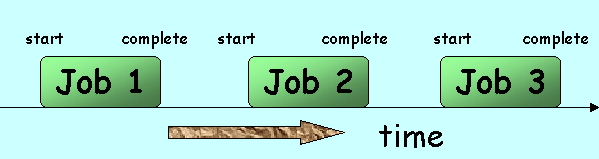
Fig 2
Batch processing is not the most suitable for ‘long’ programs or processes that involve a large volume of data. Once the data are submitted, the computer may be left running overnight without human interaction. A disadvantage of the system is that the output may not return for hours or even days. It is also inefficient if the CPU has to wait while each job is being read in.
Nowadays, punched cards have gradually been replaced by other storage medium such as magnetic disk. However, the operating systems of the peripheral devices are still slow compared with that of the CPU. To overcome this problem, a technique known as spooling is sometimes used (see Fig 3).
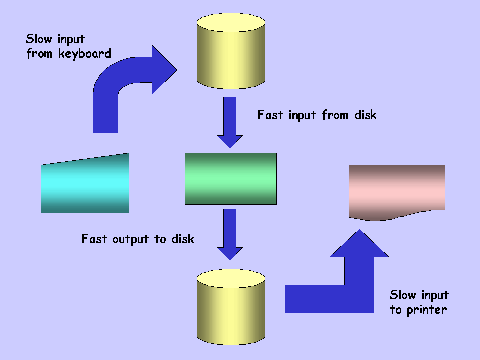
Fig 3
Spooling is a method in which input or output data are temporarily stored on the backing storage media. Spooling evens out delays due to slow input or output devices.
For example, a slow printer will hold up a CPU. However, of the operating system first writes the output on disk file, this takes less time than printing directly. The CPU is free to do other jobs while the printing is done in the background.
 As mentioned above, the processing speeds
have became so fast that the input and output devices cannot keep up. While the speed and
capacity of peripherals are also improving, this equipment has a built-in handicap of
involving mechanical devices. Whenever moving parts are involved, there are limitations in
speed. As a result, the industry turned its attention to utilizing better the recourses of
the processor.
As mentioned above, the processing speeds
have became so fast that the input and output devices cannot keep up. While the speed and
capacity of peripherals are also improving, this equipment has a built-in handicap of
involving mechanical devices. Whenever moving parts are involved, there are limitations in
speed. As a result, the industry turned its attention to utilizing better the recourses of
the processor.
With multiprogramming (also called multitasking), the CPU can handle a number of different jobs at the same time. Of course, the CPU cannot do two things at time same time. However, the OS can make use of the time during which a task is waiting for input/output operations. So, as the rest of the system is handling the input and output requirements of the task, the CPU works on another program (see Fig 4).
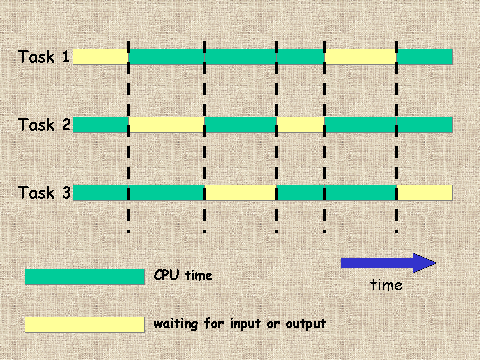
Fig 4
Now, the CPU is no longer limited to working on one task at one time. By making use of ‘idle time’, the capacity of a given computer increases enormously.Both batch and interactive jobs may also be run in a multiprogramming environment. Requests from an interactive job are usually dealt with at higher priority while a batch job can cope with longer delay.
 order words, the CPU is not in use for most of the time.
Time sharing system is another answer to
utilizing better the CPU of the computer. In a time sharing system, telephone lines to the
central computer (see Fig 5) connect hundreds of terminals. In this example, each user is
given a time slice of 1/100 s to interact with the CPU. The size of the time slice will
depend on the system. The users are served in sequence.
The operating system determines whether a user needs any CPU time. If he does, the OS will allocate a time slice. If there are a hundred users, a time slice will be available every second. Hence, each users thinks he has sole of computer. Use of the CPU by terminals is considered as interactive processing.
As many users are using the system at the same time, it is also known as a multi-access system. This system also supports multiprogramming.

Consider the following examples:
1 anti-missile defence system
2areoplane landing control system
In these examples, if the computer did not respond fast enough, the consequences could be disastrous. In these situations, data must be processed immediately. We say that the computer must respond in real time. It is called real-time processing. The computer system is usually dedicated to a single application.
