
GFX
Tutorials
|
|
|
|
|
|
|
|
|
|
|
|
|
|
|
|
|
|
|
|
|
| How to create a cartoon effect for your images | ||||||||||||||||||||
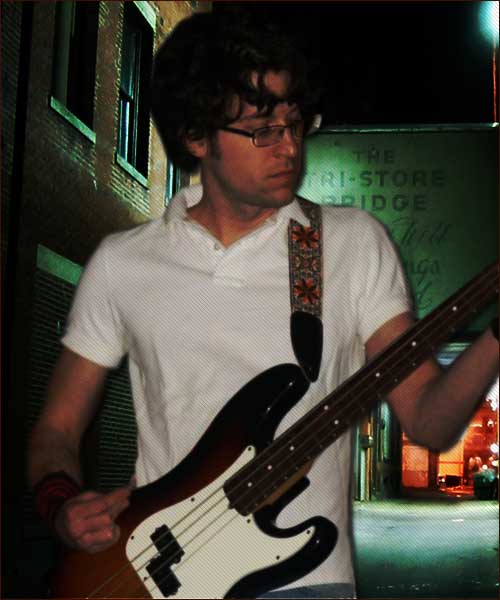
| Start off with your image you've selected, I'm using the one below, feel free to also use it. | ||||||||||||||||||||
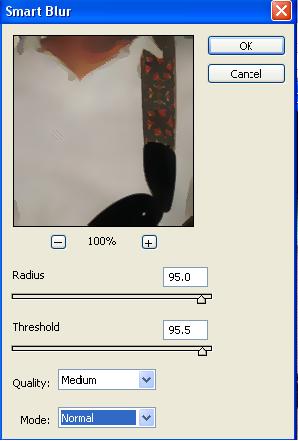
| Now with your image go filter>blur>smart blur... and use the settings below. | ||||||||||||||||||||
|
||||||||||||||||||||
|
||||||||||||||||||||
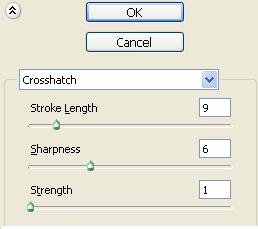
| Your image is now slightly cartoony but not quite, now go filter>brush strokes>crosshatch to using the settings below. | ||||||||||||||||||||
|
||||||||||||||||||||
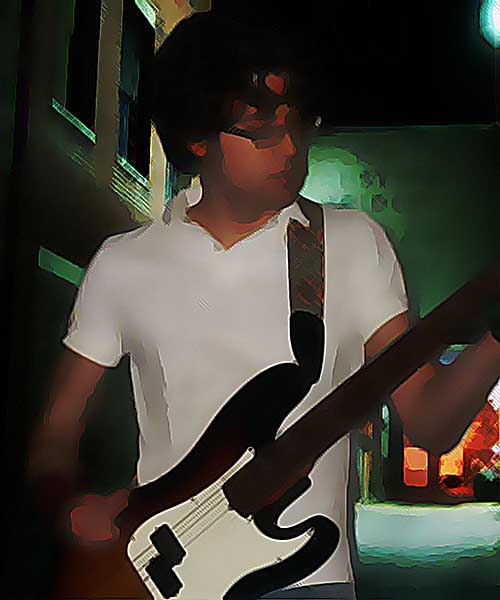
| You should now have a complete cartoon effect on your image and should have something that looks like... | ||||||||||||||||||||
|
||||||||||||||||||||
| Home GFX Tutorials |
||||||||||||||||||||