
Swing into the action of our 50th Anniversary weekend celebration by "linking up" with fellow alumni and friends for a friendly game of golf on Saturday, October 20th beginning at 11:00 a.m.
Enjoy the fresh air, lively reminiscing and the sounds of creaking bones as we take a walk down memory lane and the fairways of the Diablo Hills Golf Course.
This is a very informal gathering of golfers with a wide range of abilities. Whether you're Tiger Woods or "in the woods", with your shots, we'd love to see you there.
Tee times will start at 11:00 a.m.
Contact Daren Henderson (see below) to arrange for your preferred pairings or let us match you up with someone; from your class, the class of your choice or someone with no class!

Event Details
Make your reservations by or before September 30th, 2001, as space is limited!
Please use the "registration/membership application" that directed you to this site, (Or download the form below).
to indicate the number of players you are paying for and send your payment along with the application. (You will receive prompt confirmation of your payment, player requests and assigned tee time, via email or phone.)
The cost, per player, is $75.00 which includes: Eighteen holes of golf, a mandatory power cart and "lunch to go" including: A delicious sandwich, chips, cookie and a soda.
(No alcohol is permitted and all additional beverages must be purchased on site)
Date: October 20, 2001
Time: 1st Tee time is 11:00 a.m. (Join us early to say hello)
Location: Diablo Hills Golf Course
1551 Marchbanks Drive
Walnut Creek, CA 94598
(Located off Ygnacio Valley Road across from John Muir Hospital and just West of Heather Farms Park)
To visit the Diablo Hills Golf Course website Click Here
There are some nice pictures of the course on the "Pics Page" of the site.
To see a map of the event location click the button below!

For questions regarding the Golf Day only,
email Daren Henderson at:
[email protected]
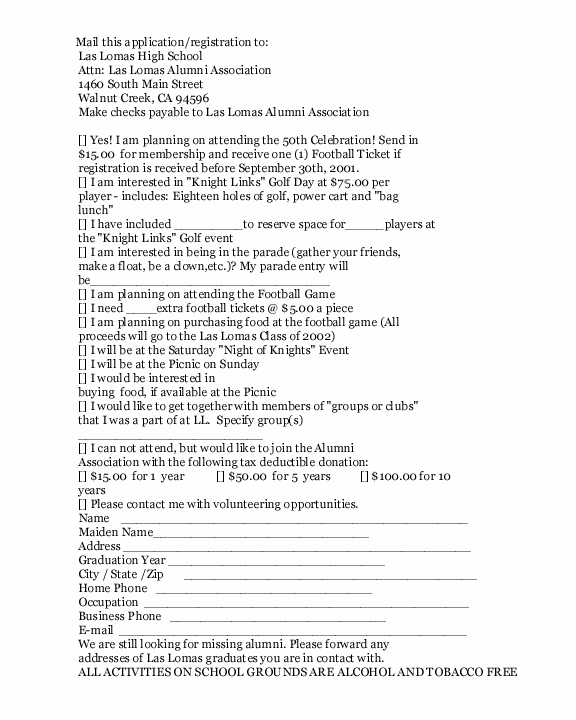
The form is a jpg image.
~How to Download Images~
Position your cursor over the image,
Right Click and select "save image as",
Choose where to save the image (where on your computer will it be saved eg: what drive, folder, whatever)
Note the name of the file (for example: mail_in_activity_form.jpg) so you can locate it later.
Choose "save".
[email protected]
phone: (925) 935-4110, ext. 2847
Front Page~|~Send in your Information 'form'
[email protected]
�2001
graphics and website creation by
Debbi (Purcell) Harris 'class of 71'
[email protected]
This page hosted by
Geocities
Get your own Free Home Page