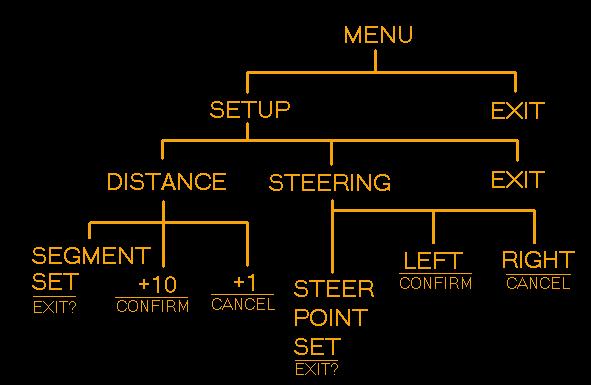
When the program is run it starts waiting for a message in the main menu. Pressing one will open the setup menu. Pressing three starts the robot on it's path. Let's say we press one. The RCX beeps to acknowledge the input and a light connected to output B flashes once to indicate menu one. The program is now waiting for input for the setup menu. Pressing one puts us into distance setup. Pressing two puts us into steering setup. If you press three the RCX makes a high pitch beep and flashes the light on output B asking if we want to exit. Pressing two makes us exit. Pressing three leaves us in the setup menu. From the setup menu say we press one. The RCX again beeps and flashes the light to indicate we are in distance setup. From here pressing one cycles through segments 1, 2, 3, 4, 5, 6, 7, 8, 9, 10, and exit? in that order. The RCX beeps the respective amount of times for each segment. Pressing two or three adds 10 or 1 increments to the distance segment we are currently setting. If we press one while setting segment 10, the exit menu comes up asking to exit or cancel. Pressing two exits back to the setup menu. Pressing three remains in the distance menu at which point you can press one to start the cycle over again. The steer point set works the same way only button two makes the steer point left and button three makes the steer point right. No input remains straight. The exit menu works as usual. As you set the distance segments and steer points, the values are stored as variables within the RCX memory.
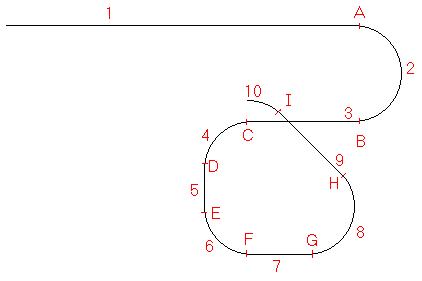
Once you exit back to main menu, pressing three makes the RCX run the robot using the stored information to its destination. Even complex paths, such as that of figure 2 below, are no problem. Of course the path has to be pre-determined by measuring distances and knowing where you want the RCX to turn, but no computer is required to set or reset the course. All you need is the Lego Remote. It's really neat to watch it avoid obstacles on it's own. The program uses a set value of 10 distances, with a steering point after each distance. The RCX goes forward the value given for distance 1, steers the direction for distance 2, then continues to go distance 3, etc. The distances can be set to 0 if desired, so as to have two steer points between moves, moving hard left, turns right (straight), then turns right again for a s-curve effect. Since this is the firs program of it's kind I've made, improvements are expected in the near future, including an easier interface and reverse action. |