FREDERIEK'S HEADER TUTORIAL

SKILLS/LEVEL
Beginner with knowledge of PSP, Letter Creator and the some working experience with tutorials
NEEDED
tube of your choice
PSP & Letter Creator
PREPARING
Open tube (maximum height of less then 400, width of less then 600) Duplicate(shift-D)your tube
Close out original
Chose a light color from the tube for your foregroundcolor box in your materialbox
Edit - Copy
Minimize tube
HEADER
File � New - New image of 600 x 400 (or if you have a smaller tube you can always make this new image smaller like: 500 x 330)
Selections � Select all
Edit � Paste � Paste into Selection
Selections � Select none
Effects � Image effects � Seamless tiling: default settings
Adjust � Blur � Gaussian Blur: settings: radius of 25
Layers � New raster layer
Floodfill your new layer with your foregroundcolor
Layers � Arrange � Send to bottom
Layers � Merge � Merge all (flatten)
Effects � L en K Landksiteofwonders � L en K�s Frederiek: with the following settings: control 0: 27, control 1: 3
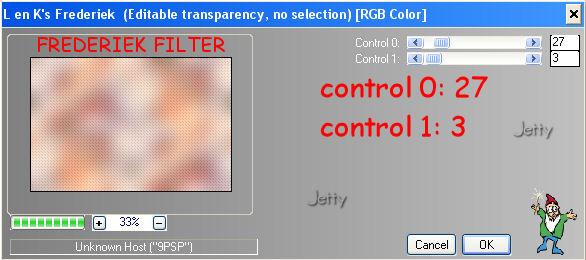
Duplicate (Shift D) and minimize copy
Edit � Paste � Paste as new layer
Effects � 3d effects � Dropshadow to your liking. I used: Horizontal: 3, Vertical: 3, Opacity: 45, Blur: 15.
Layers � New raster layer: add your watermark
Layers � Merge � Merge all (flatten)
BORDER
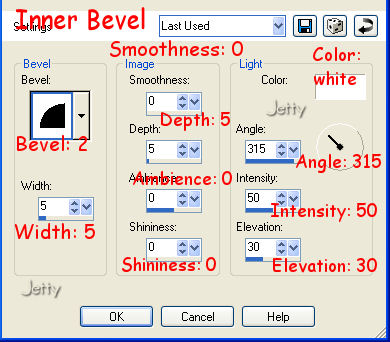
Effects � 3dEffects � Inner Bevel: with the following settings:
With your dropper tool chose a contrasting color and put it as your background color in your materialbox
Image � Add borders � 20 Pixels with symmetric checked: top 20, left 20, right: 20, bottom: 20. You should select your background color
With your magic wand select this border
Effects � L en K Landksiteofwonders � L en K�s Frederiek: with the following settings: control 0: 27, control 1: 3
Effects � 3d Effects � Inner Bevel: same settings as before
Selections � Select none
With your dropper tool chose a contrasting color and put it as your background color in your materialbox
Image � Add borders � 20 Pixels with symmetric checked in your background color
With your magic wand select this border
Effects � L en K Landksiteofwonders � L en K�s Frederiek: with the following settings: control 0: 27, control 1: 3
Effects � 3d Effects � Inner Bevel: same settings as before
Selections � Select none
Your header is now ready
Minimize
BACKGROUND
Open the minimized copy of your header without tube
Open your selection tool

Go to Custom Selection and use the following settings:
Top: 0, Left: 0, Right: 200, Bottom: 200
Image � Crop to selection
Effects � Image Effects � Seamless tiling with the following settings
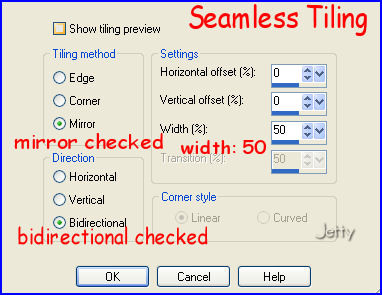
settings: Mirror checked, Bidirectional checked and width: 50
Your background tile is now ready
File � Export � JPEG optimizer with a compression of 20
You can close this tile now
OPTIONAL: ADDING TEXT TO HEADER
Activate your header
Activate your text tool
Chose one of the border colors for your background color
You can chose another or the same color for your foreground color box or close this off.
Chose a font to your liking, as big as possible
Put your text somewhere in the header, make it bigger if necessary
Effects to your liking
Layers � Merge � Merge All (flatten)
FINISHING
Export your header (with out without text) with a compression of 20
Open Letter Creator.
Go to your body and open your background tile
In your body �tile�
In your header go to your �header content and lay-out� and open in image your header and put it in the center
Put your credits in the footer
Finish.
I hope you enjoyed making this letter. I would love to see the results. You can mail them to me at:
[email protected]
My tutorials can be found in my groupfiles:
http://groups.yahoo.com/group/cuteIMlettersandtagsbyJetty
You can also visit my website:
http://www.geocities.com/ladyluna37/
With thanks to the brilliant women who have given me lessons in PSP and Incredimail letters. Many of the things I learnt have been used by me in creating my letters.
Any resemblance to other tutorials is purely coincidental. Special thanks to my testers...
You are free to share my tutorials. If you want to use them for lessons or a groupshare please ask me and please awknowledge it as my tutorial.
Hugs
Jetty