POSTERIZED CURLICUES TUTORIAL

SKILLS
Beginner with basic knowledge of PSP and Letter Creator
NEEDED
tube
PSP & Letter Creator
PREPARING
Chose tube: longer then wide, or squaire, height no more then 400
This tutorial works best with a tube with soft colors because otherwise the colors of the tube and the background are too different...
Make a copy (shift-D) from tube
Close out original
Chose a light color from the tube (make it your fore- or background)
Edit - Copy
Minimize tube
BACKGROUND IMAGE
File � New Image: 1450 x 400
Selections � Select all
Edit � Paste into Selection
Selections � select none
Layers � New Raster Layer
Floodfill with your chosen color
Layers � Arrange � Move down
Layers � Merge � Merge visible
Effects � Image Effects - Seamless tile at default
Effects � Artistic Effects � Posterize at default
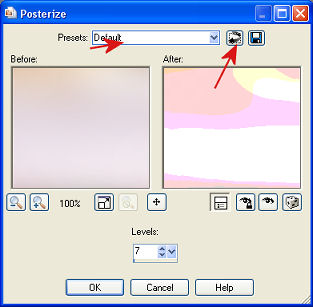
Effects � Distortion Effects � Curlicues , with the following settings:
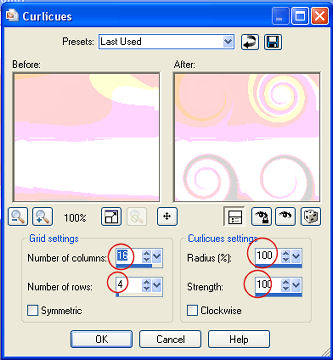
(SETTINGS: number of columns: 16, number of rows: 4, radius: 100, strength: 100, Symmetric and Clockwise NOT checked)
Lower Opacity of Layer (20-60) to make it more textfriendly
(with a tube of bright colors don�t go too low if you want to keep the colors matching, then you need a light color for text though )
Effects � Image effects � Seamless Tiling at default (vertical has less beautiful result)
Layers � Merge � Merge all layers
TUBE IMAGE
(not necessary if tube is still in the memory)
Activate your tube image
Edit - Copy
FINISHING
Activate background
Edit � Paste as a new Layer
Move the tube with your mover tool to the left.
Effects � 3d effects � Dropshadow , I used these settings:
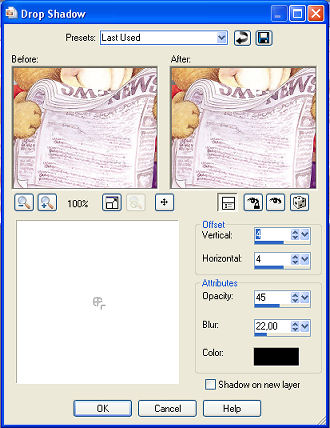
(SETTINGS: V&H: 4, opacity: 45, Blur: 22, Color black, Shadow on new layer not checked)
Layers � Merge � Merge all
Add new layer
Put your Watermark
Layers � Merge � Merge all
LETTER CREATOR>
Export with a compression of 20
Open in your body, tile
Aknowledge credits in Footer
Finish letter
I hope you enjoyed making this letter. I would love to see the results. You can mail them to me at:
[email protected]
My tutorials can be found in my groupfiles:
http://groups.yahoo.com/group/cuteIMlettersandtagsbyJetty or on my website: http://www.geocities.com/ladyluna37/index.htm
With thanks to the brilliant women who have given me lessons in PSP and Incredimail letters. Many of the things I learnt have been used by me in creating my letters.
Any resemblance to other tutorials is purely coincidental. Special thanks to my testers...
You are free to share my tutorials. If you want to use them for lessons or a groupshare please ask me and please awknowledge it as my tutorial.
Hugs
Jetty