(Thats 133+ for Welcome)
.
.
.
. . . . . . . . . .
.
| Here are the straight forward directions to use the 133+ speak auto program. First off, lets cover what it does exactly. To skip all this crap and just get the friggin program, click here. |
.
|
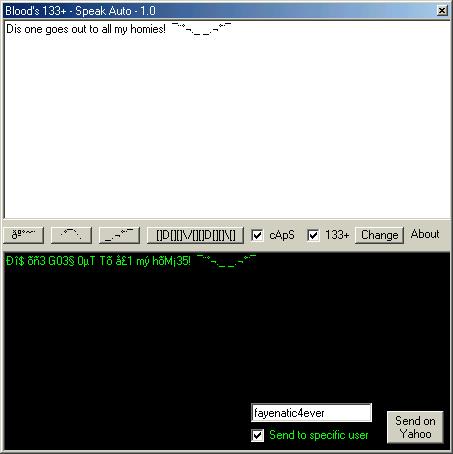
Function This program is an automatic converter of proper English into "133+" (Thats "LEET", a shortened version of Elite) automatically, but if you are at this page about to get this program, you should know this already. The operation of this program is simple, very simple. Once you have opened the program, you simply type in the white box. The options can be changed around to get differant results in the black textbox (Where the converted text is). There are not too many ways to configure this program, considering that 133+ is not complex. But don't think that I am not open to suggestions. The two settable options look as follow: 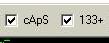 The "cApS" option alternates all not "133+ed" text. For example, if you were to have a string of text that has standard characters (a-z, A-Z), then it would convert the standard characters into alternating caps, always beginning with the first character being capped. Next comes the most important option, the 133+ option. With this, you can convert English into God knows what. It takes a master to read this crap fluently, yet it is so popular. That is why I made this program for the un-133+.
Next comes the sybology buttons.
With these, you can add the shown symbol pattern on the button with only a click. You can right click the buttons to reverse or change the shown pattern. In the instance of the "PIMP" button, the alternate of it is "PIMPIN".
Now comes the Change button. The change button.... (As shown)
....it has a very simple operation. Its function is to change the random replaced 133+ characters with another (it does not always change them all) to another completely random character. This can be useful if some of the contained characters are clashing with each other and making it difficult to read. Next comes the Yahoo! messenger options. The Yahoo! messenger options are available by right clicking anywhere in the black textbox area. After doing so, you should get the following image in the bottom right of the black textbox.
This allows you to place your 133+ed text directly into chat. You can either select to send directly to a specific user (By selecting "Send to specific user"), or by default, it sends to the last Yahoo screen used... if there are any open. If there are no instances of a instant message dialog, it will not open one unless you choose to send to a specific user. Please take note, there have been several instances of the text not properly sending to Yahoo messenger. This is not a problem with the 133+ program itself, but one with Yahoo! messenger. The converted text does in fact copy and paste out into other chat programs and text programs, but does not always work with everyone on Yahoo. I will try to address this issue as soon as possible. This concludes the tutorial to the 133+ speak auto program. You may download it here:
|
. . . . . . . . . . . . . . . . . . . . . . . . .. . . . . . . . . . . . . . . . . . . . . . . . . . . . . . . . .
Blood_And_Ashes (fayenatic4ever):  |
|
Ðë\/ï¦î§h·]¦÷¦[·(\/)í§£ì± (h3llz_d3m0n5_d3vili5h_mi5fit ): (Consultant, conceptionist)
|
.
. . . . . . . . . . . . . . . . . . . . . . .
|
. . . . . . . . . . . . . . . . . . . .
| I am not very good at all this legal crap. So this will do until someone from Yahoo! services tells me appropriate changes that need to be made here. All Yahoo! logos and trademarks are legal propery of Yahoo! inc, and reserves all rights to them. |