| Welcome to the home of my Encryption Master. This is a great program for encrypting and decrypting text. As far as I know, it cannot be broken. Enough BS, lets get to it. To skip all of this crap and just get the friggin program, click here. |
|
Function:
This program converts and text (that is referenced in the key) to an encrypted form, and it can covert it back again. Although most don't have a use for it, with the new Homeland Security act in place, it will be nice to have this little program. Although I doubt anyone that would use this is planning another September 11th, it is nice to have a little privacy when sending and receiving e-mail. As with all my programs, I am open to suggestions. This program is quite simple, it has only one settable running attribute:
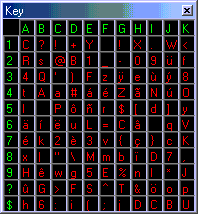
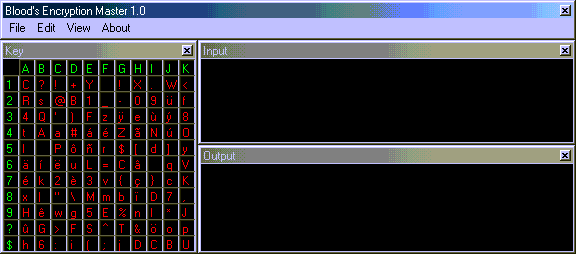
Next should come the encryption legend, or "key".
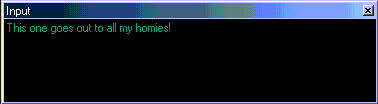
This is easy enough also to follow. You have all of your characters in red, and your encryption key in green. When you encode, the program finds a random character that matches (Case sensitive) to the letters in red. It then finds the correlating x/y characters in green, respectfully. To attempt this, run the program, and type in the input window:
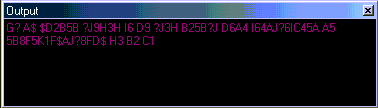
And you should get something out like this:
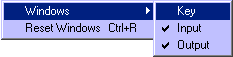
And remember, this goes both ways. If you get already encrypted text, you just type it into the output, and you have the input as the decrypted text. Lastly the windows need to be covered. The windows are not all needed. If for some reason you wish to remove the results, key, or input...it is easily done. You can remove any window by clicking on the close "x". If you close the main window (The one with the title bar), you will end the program while losing all information during that session. To add back a window, or yet another way to remove a window, you go to "view" on the title bar, and navigate to the "window" sub-menu. Then there, you can check and un-check any shown or un-shown windows. This should look like this:
This concludes the how-to of the program. How its not too difficult to follow. You may get the program here: |
. .
. . . .
. . .
. . . .
. . . .
. . .
. . .
. . . . .
. . . .
. . . .
. . .
. .
.
.
.
.
. . . . . . . . . . . . . . . . . . . . . . . .
. . .
. . .
. . .
.
.
. . . . . . . . . . . . . . . . . . . . .
. . .
. . .
. . .
. . . . . . . . . . . . . . . . . . . . . . . . . . . . . . . . . . . .
. . . . . . . . . . . . . . . . . . . . . . . . . . . . . . . . . . . . . . . . . . . . . . . . . . . . . . . . . . . . . . . . .
. . . . . . . . . . . . . . . . . . . . . . . . . . . . . . . . . . . . . . . . . . .
. . . . . . . . . . . . . . . . . . . . . . . . . . . . . . . . . . . . . . . . . . . . . . . . . . . . . . . . . .
. . . . . . . . . . . .
Blood_And_Ashes (fayenatic4ever):  |

 This is very easy to explain. If selected, it will output all typed text
into the input window as "encode.txt"; while all type code in the
output window as "decode.txt".
This is very easy to explain. If selected, it will output all typed text
into the input window as "encode.txt"; while all type code in the
output window as "decode.txt".