
Help Section
- profile picture
- signature line picture
- post a layout in the message on a message board
Profile Picture
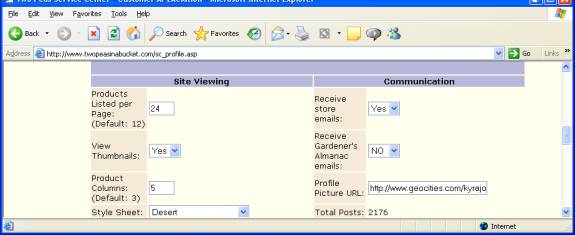
In
the 2 peas site..Go to My home..then find My profile..scroll down to where
you see Communication..
Next to:Profile Picture URL
insert a website address with an image.
Signature Line
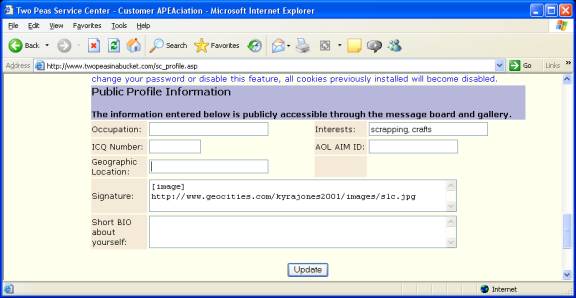
Under My Home and My profile..Scroll down to the bottom where you see Public Profile Information
if you want your signature line to be an image..you must start with [image] put the webaddress of the image and end with [/image]
Post a LO
- Go to the your LO. On the top of the browser copy the browser's address..( in the graphic above you can see the address: http://www.twopeasinabucket.com) highlight the address and press ctrl and then c (this copies it)
- go to the message and start typing in whatever... then below the message window you will see some options. One of them is URL..chose it. Make sure your cursor blink on the line of the box that opens up. then press ctrl and v (this pastes the address in the box) delete the extra http:// once you ok it..
- another box pops up and asks you to name it..put the name of your LO..