 |
|
|
|
|
|
|
|
|
|
|
|
|
|
|
|
|
|
|
|
|
|
Mixed language programming using Fortran 90 and Borland C++ builder |
|
|
| Tutorial 1: Getting started |
|
|
|
Create Fortran DLL |
|
|
|
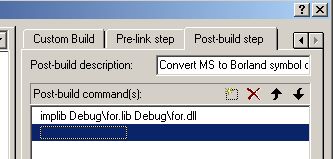
Start Compaq Visual Fortran and create new Fortran dynamic link library porject with project title FOR. Select dll application with exported symbols in next page. From Project>Setting menu, select Post-build step tab and create new command as: implib Debug\for.lib Debug\for.dll. This convert MS to Borland symbol naming convention after you build the project. |
|
|
|
 |
|
|
|
Put the following code:
REAL FUNCTION EXPO(x) RESULT(y)
! Expose function EXPO to users of this DLL
!DEC$ ATTRIBUTES DLLEXPORT :: EXPO
!DEC$ ATTRIBUTES ALIAS: '_EXPO' :: EXPO
!DEC$ ATTRIBUTES REFERENCE :: x
REAL :: x
y = EXP(x)
ENDFUNCTION EXPO
And build the project (F7). The should be no warning and error. |
|
|
|
Create GUI |
|
|
|
Start Borland C++ builder save the project in Debug folder of Frotran project. Put Edit, Button and Label to main form. Clear text of Edit1.
From Project>Add file to project menu insert for.lib.
In main form cpp file after TForm* Form1; declear external dll function as:
extern "C" float __stdcall EXPO(float* x);
Double click Button1 and put OnClick event handler
float x, y;
x = Edit1->Text.ToDouble();
y = EXPO(&x);
Label1->Caption = y;
Run the program and try some number. |
|
|
|
More advanced tutorial and explanation coming soon. |
|
|
|
Kyaw Tun |
|