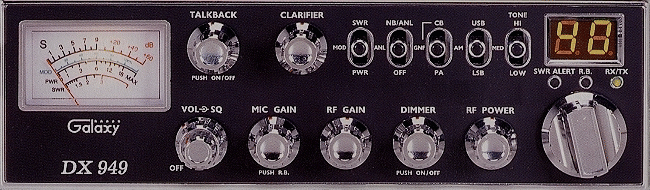
| DX-949 |
 |
| Channel Modification 1) On the back of the channel selector switch, locate the wires marked P5 and P6. 2) Cut these wires separately and place SPST switches in-line with them. You'll have to use a frequency counter to create a "Road Map" of the expanded channels. I don't have a chart at this time. |
| Power Tweek 1) Change Q47 and Q48 to a 2SC2312. 2) Change D91 to a 1N4148 diode. 3) Change C209 to a 390 pf. (50 volts, Mica) 4) Change C212 to a 104 uf ceramic cap. 5) Change R242 to a 22 ohm resister. 6) Change R243 to a 150 ohms resister. (1/2 watt) 7) I'm not sure if you can change L34, but make sure its a 22 uh coated choke. You may remove R276 for improved AM modulation, but be careful that it doesn't garble on SSB. You might want to attach a heat sink to the back of the radio to disapate the heat from the finals. |
| Unlocking the Clarifier 1) Remove R113. 2) Remove D68. 3) Remove D38 and place a jumper in its spot. 4) Solder a wire from J9, pin F1 to J14, pin marked "+8V". VR1 AM S-Meter VR2 SSB S-Meter VR3 SSB Squelch VR4 AM Squelch VR6 SSB Carrier Balance VR7 TX Offset VR9 RF Meter VR10 Final Bias VR12 Driver Bias VR13 SSB ALC VR14 AM High Power VR15 AM Modulation Meter VR16 AM Modulation VR17 SSB Power VR18 AM Low Power VC1 10.240 |
 |