| Galaxy DX 11B |

|
 |
| Frequency Modification
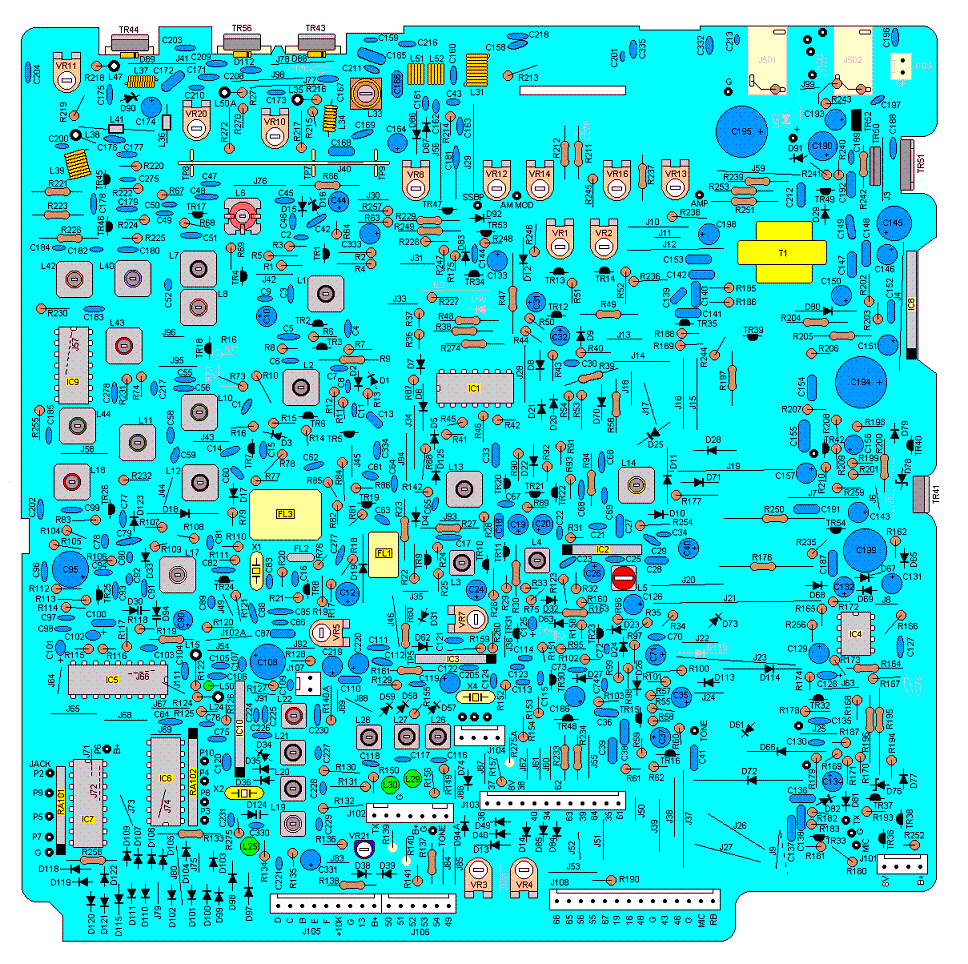
1. Remove the bottom cover of the radio. You�ll notice a row of pins up towards the front of the radio. There will be a wire soldered to one of these pins. Cut this wire closest to the pins. Remove this wire. Check to make sure none of these pins are shorted together. 2. Locate the backside of the band selector switch. You�ll see a red wire soldered to the switch. Locate a loose purple wire in the bundle of wires. Solder this wire to the pin that�s just left of the red wire on the band selector switch. 3. Find the MC14008 IC. Remove the solder bridge on pin 16. Make sure all the other pins are not shorted out. Clarifier Modification 1. Locate and remove R141 and D38. 2. Locate J106. Solder a wire from pin 54 of J106 to an 8-volt source. Roger Beep Modification The roger beep tone is controlled by R181 which is 220K ohms. For a higher tone try 150K to 200K ohms. For a lower tone try 270K to 2M ohms. The roger beep time is controlled by C134 which is 2.2uF@16V. For longer time try 5uF or 10uF@16V. For shorter time try 1uF@16V. VR 1....AM/FM S-Meter VR 2....SSB/CW S-Meter VR 3....SSB Squelch Range VR 4....AM/FM Squelch Range VR 5.....FM Deviation VR 7....SSB Carrier Balance VR 8....RF Meter VR10...Final Bias VR11...Driver Bias VR12...SSB ALC VR13...AM/FM High Power VR14...AM Modulation VR16...CW Tone Level VR20...Final Bias VR21...TX Offset VR601..13.8 Volt Power Supply VR803..AM/FM Low Power |
 |
|