Bluetooth technology replaces wires required to connect devices in proximity to each other ( 1 - 100 m ).
Its a communication protocol for short range wireless communication between devices.Typical devices which can communicate with bluetooth are PDAs,mobiles,laptops,PCs,printers,digital cameras,vedio games.
They communicate with unlicensed short range radio frequency based on low cost transceiver microchips in each device.They use radio communication systems do not need line of sight of each other.
Bluetooth pairing methods & security
A common task that involves Bluetooth security for most users is the "pairing" of devices. By default Bluetooth communication is not authenticated, and thus almost any device can freely connect to another. However, to access a particular service such as a dial-up account, a voice gateway, or to do a file transfer, some sort of authentication is usually required. The process of authentication is usually done during the pairing process by entering identical PIN codes (passkeys) on both devices, as shown below in Figure 2.
Once users have entered their correct PIN codes, both devices will generate a link key, which can be stored in the device's memory and will allow it to skip the authentication and authorisation process every time it attempts to communicate with the other paired device in the future.
Pairing occurs in the Data Link layer
Link Key
When a device1 tries to connect to another device2 , the device1 sends a PIN or passkey , determined by the device1 ( any random ASCII string up to 16 characters ). This is sent to the device2 . device2 must know this PIN , enters it in the PIN-Entry dialog box , once this is done a link key ( 128-bit secret key ) is generated by the device1 and sent back to device2.
This link key is stored in both devices and when a connection is requested , the devices are paired automatically.
Bluetooth terminology
Use the
Bluetooth
Discover function to search for
Bluetooth
devices that are within the permissible range. The function returns a list of
device addresses and names. These device addresses can then be used by a
client to
connect to a specific
Bluetooth
server. The
optional input parameter, time limit (ms),
specifies the length of
Bluetooth
inquiry. The default value is 10 ms and the maximum value is 30 s. If
time limit is less than or
equal to zero, the function returns a list of installed local
Bluetooth
devices.
Note:
Bluetooth
discovery is a slow operation because of the communication involved. A
Bluetooth
device address is a fixed address that is usually printed on the actual device
and you can query the address from the device control setting. This address is
unique to each device. If you know the
Bluetooth
address of the specific device you want to connect to, you can skip the
discovery process and use the
Bluetooth
Open Connection function to connect to the device
directly.
| Querying Services Available
on a
Bluetooth Device |
Use the
Bluetooth
RFCOMM Service Discovery VI to search for
available RFCOMM services on a local/remote
Bluetooth
device. This function returns a list of available services along with the
associated channel numbers. A channel number in the list can be used as an input
parameter of the
Bluetooth
Open Connection function to make a connection to
the corresponding service on the remote
Bluetooth
device.
A detailed description of Bluetooth Protocol
Bluetooth Widcomm Stack
http://www.high-point.com/ Third party tools , for BT access
http://franson.com/bluetools/ Commercial tools for Bluetooth
Procedure to Transfer files in Bluetooth
http://www.blueshareware.com/ Useful bluetooth programs free to try and cheap to buy
http://www.broadcom.com/products/bluetooth_sdk.php Bluetooth SDK Free Downloads
( Start developing application with this SDK + MS VS 6.0 )
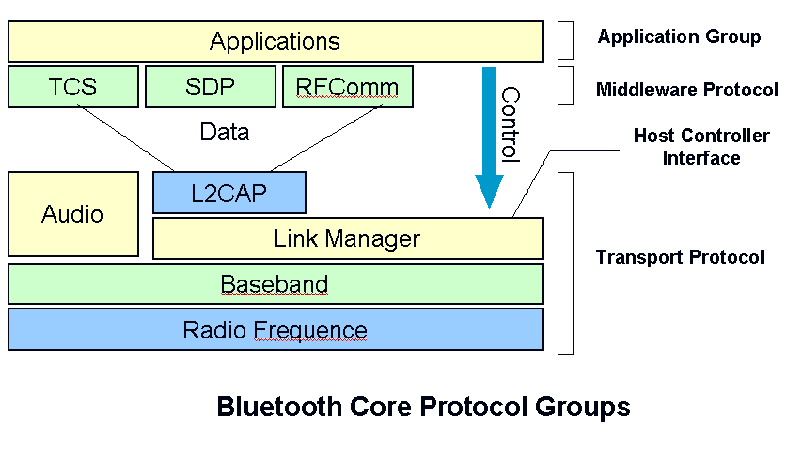
This is the RFCOMM protocol, whose purpose is to emulate a serial port. The protocol covers applications that use serial ports of the kind used in PCs. Thus, RFCOMM emulates RS-232 control and data signals over the Bluetooth baseband. It provides transport capabilities for upper level services, such as OBEX (Object Exchange protocol).
The Telephony Control Specification - Binary, TCS Binary or TCS BIN, is a bit-oriented protocol, which defines the call control signalling for the establishment of speech and data calls between Bluetooth units. The protocol defines the signalling for establishment and release of calls between Bluetooth units as well as signalling to ease the handling of groups of Bluetooth units.
A number of AT-commands are supported for transmitting control signals for telephony control. They use the serial port emulation, RFCOMM, for transmission.
This section describes a number of protocols that are defined to be adopted to the Bluetooth protocol stack.
The IETF Point-to-Point Protocol (PPP) in the Bluetooth technology is designed to run over RFCOMM to accomplish point-to-point connections. PPP is a packet-oriented protocol and must therefore use its serial mechanisms to convert the packet data stream into a serial data stream.
The TCP/UDP/IP standards are defined to operate in Bluetooth units allowing them to communicate with other units connected, for instance, to the Internet. Hence, the Bluetooth unit can act as a bridge to the Internet. The TCP/IP/PPP protocol configuration is used for all Internet Bridge usage scenarios in Bluetooth 1.0 and for OBEX in future versions.
IrOBEX, as is the correct term, is an optional application layer protocol designed to enable units supporting infrared communication to exchange a wide variety of data and commands in a resource-sensitive standardised fashion. OBEX uses a client-server model and is independent of the transport mechanism and transport API. The OBEX protocol also defines a folder-listing object, which is used to browse the contents of folders on remote device. RFCOMM is used as the main transport layer for OBEX.
WAP is a wireless protocol specification that works across a variety of wide-area wireless network technologies bringing the Internet to mobile devices. Bluetooth can be used like other wireless networks with regard to WAP, it can be used to provide a bearer for transporting data between the WAP Client and its adjacent WAP Server. Furthermore, Bluetooth's ad hoc networking capability gives a WAP client unique possibilities regarding mobility compared with other WAP bearers.
 Network
Establishment
Network
Establishment Bluetooth supports both point-to-point and point-to-multi-point connections. Several piconets (see definition above) can be established and linked together ad hoc, where each piconet is identified by a different frequency hopping sequence. All users participating on the same piconet are synchronized to this hopping sequence.
Before any connections in a piconet are created, all devices are in STANDBY mode. In this mode, an unconnected unit periodically "listens" for messages every 1.28 seconds. Each time a device wakes up, it listens on a set of 32 hop frequencies defined for that unit. The number of hop frequencies varies in different geographic regions; 32 is the number for most countries.
The connection procedure for a non-existent piconet is initiated by any of the devices, which then becomes master of the piconet thus created. A connection is made by a PAGE message being sent if the address is already known, or by an INQUIRY message followed by a subsequent PAGE message if the address is unknown.
In the initial PAGE state, the master unit will send a train of 16 identical page messages on 16 different hop frequencies defined for the device to be paged (slave unit). If no response, the master transmits a train on the remaining 16 hop frequencies in the wake-up sequence. The maximum delay before the master reaches the slave is twice the wakeup period (2.56 seconds) while the average delay is half the wakeup period (0.64 seconds).
The INQUIRY message is typically used for finding Bluetooth devices, including public printers, fax machines and similar devices with an unknown address. The INQUIRY message is very similar to the page message, but may require one additional train period to collect all the responses.
A power saving mode can be used for connected units in a piconet if no data needs to be transmitted. The master unit can put slave units into HOLD mode, where only an internal timer is running. Slave units can also demand to be put into HOLD mode. Data transfer restarts instantly when units transition out of HOLD mode. The HOLD is used when connecting several piconets or managing a low power device such as a temperature sensor.
In the SNIFF mode, a slave device listens to the piconet at reduced rate, thus reducing its duty cycle. The SNIFF interval is programmable and depends on the application.
In the PARK mode, a device is still synchronized to the piconet but does not participate in the traffic. Parked devices have given up their MAC address and only occasionally listen to the traffic of the master to re-synchronize and check on broadcast messages. It can thus receive broadcasts, but not addressed messages while parked.
Main difference between Bluetooth Widcomm stack and Bluetooth Microsoft Stack is that
BT Widcomm Stack has C++ APIs or More detailed description of Widcomm APIs
Microsoft BT Stack has C APIs
Bluetooth Forums
http://www.codecomments.com/message2240386.htm
http://discussion.forum.nokia.com/forum/showthread.php?p=241007#post241007
http://www.geekzone.co.nz/forums.asp?forumid=8
Tips :
Widcomm SDK class diagrams in DOxgen i.e pictorial form
http://www.plutohome.com/support/doxygen/df/df7/classCBtIf.php#a5
Theres something called BlueHoc a simulation tool runs under Linux
http://www-128.ibm.com/developerworks/views/wireless/downloads.jsp