3D Basics Introduction Welcome to the First part of this Series of Tutorials. Here you will learn, how to display convert your 3D data into 2D, so you can display them on the screen. Altough there are already libaries that fullfill this task very well (i.e. DirectX from Microsoft), it is always good to know how they work, and why. So what you will basically learn here is not how to use one of the libaries, but more, how to write one of your own. This tutorial will start out by explaining the basics of 3D and will later on cover more advance things related to 3D. These tutorials are mostly theory, because in my opinion, it is much better that you understand why it works like it does, than just copy-paste the code given. Most of the code will be in Visual Basic, since it is one of the easiest programming languages to understand. This is so a person who does not understand C or C++ can read through the code and follow the tutorial. At the time of writing this, i had no intention on actually coding a full Graphics Libary, but rather, just giving small example programs. Who should read this? Basically anyone who knows an existing Graphics Libary (like DirectX or OpenGL) and always wanted to know how they work, or a person who wishes to learn one of them, but rather wants to know the basics first. 3D Basics This is the hardest part of the tutorial, deciding what to explain first. So we will start by looking at what 3D actually is. The above seems to be a very obvious question, and it is. 3-Dimensional basically just means, we have 3 Directions to move, Forward/Backwards, Left/Right and Up/Down. The world we live in is in 3D. This type of coordinate system is often referred to as the "cartesian"-Coordinate system, which looks like this:  (Cartesian Coordinate System) Note that instead of Up/Down, etc. there are Variables like Y. Here is a list what each means:
Altough there is no real standard in how to define up, this is basically how most of the people do it. The +/- just means that if for example Z is positive (+Z) it would mean it was "behind" us. In 3D each point can be represented using these 3 variables (X,Y,Z). Of course there are other coordinate systems, like the polar-system, which uses angles, but this doesn't interest us at the moment (or maybe even never). As i have mentioned above, Points in 3D can represent where an object is. These "Points" are mostly called Vertices, or if it is only 1 Point, Vertex. As there are Vertices, there are also Vectors, which instead of showing where an object is, it shows where, for example, it is facing, moving to, or similar. Vectors describe Directions. Think of a Vector as an arrow that is pointing towards somewhere. And like an arrow, a Vector must have some kind of starting point and an end. The starting point is usually the Origin which has the coordinates X=0, Y=0 and Z=0 logically. From here on i will try to write Vectors as: v(x,y,z) and Vertices as: p(x,y,z) just to reduce typing. If you were to write down a Vector, you would make an arrow above the vectors head, for example: 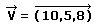 (How normally a vector is written down) Now, in real life each Object is made out of billions and billions of Molecules, but with computers, we simply don't have enough speed/storage to actually have 1 Vertex per molecule. So we use a different approach. Firstly, we only actually work with, what we can see. (for example, if we had an apple, we would just ignore the inside, like the seeds, etc..) This means we are left with a kind of "hull" of the object. This "hull" we can represent using all kinds of primitives, like triangles. Since the "hull" has a width of only 1 (1 molecule), we do not need to bother about how thick the primitve has to be. These triangles or whatever shape we used, are called Polygons. 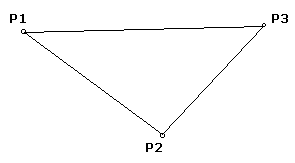 (A Polygon) Polygons are the simplest object in 3D. Each object in 3D is made out of Polygons (1, 2 or even millions). If you still aren't sure what polygons are, just imagine, you have alot of wood (let's say, very thin wood) and a saw. Now, your mom wants you to create a box for her out of that wood. What do you do? You simply cut the pieces of wood (or in 3D, Polygons) into the size you want them and glue them together. In these tutorials we will only use Polygons with 3 Points (Triangles), since they are the easiest to work with, and you can create almost anything using them. So, for each polygon we will need 3 Vertices. At this point i want to introduce some code: Type Point3D X as Single Y as Single Z as Single end Type Type Polygon P1 as Point3D P2 as Point3D P3 as Point3D end Type These are the Types i will use throughout the tutorials. They will be modified a bit later on tough, to fullfil more tasks. This is all for the first tutorial. I hope you have understood the basics of a 3D enviroment (Cartesian Coordinate System, Vectors, Vertices, Polygons) and how they relate. The next tutorial will teach some simple math and how to manipulate the above. On to the Next tutorial |