|
Animating the Waves
~~~~~~~~

Open
GA5
Navigate to were you have saved your UFO file and open it in GA5.
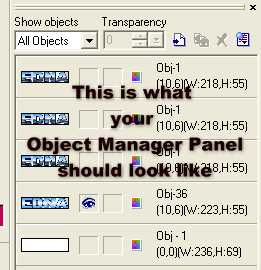
Below
is an image of what your Object Manager panel should look like
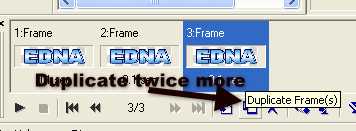
Duplicate the frame twice more by clicking on the Duplicate Frames button
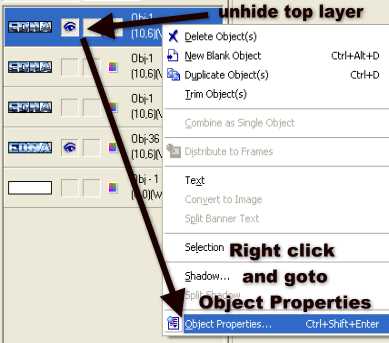
Highlight Frame 1 and unhide the top name layer
Right
Click and goto Object properties
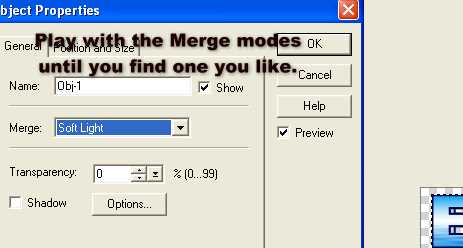
Play
with the Merge Modes until you like what you see. I am using Soft Light.
Highlight Frame 2, unhide the next name layer down and once again Right
click/object Properties, Merge Mode Soft Light
Highlight Frame 3, unhide the last name layer, Right click/object
Properties, Merge Mode Soft Light
Play
your animation do you like it??
If not
play with the settings some more
I
changed the speed of my frames to 25
Examples of the Merge Mode
Overlay:

Soft Light:
Hard Light:

Hue & Saturation:

I draw a sea dragon on put it in as
well.....lol

INDEX
Please feel free to print
this tutorial
out
or download
for your own personal use,
do not copy it in any
way to
put on-line, pass out, or
re-write and claim as your own.
Any resemblance to any other
tutorial like this is purely coincidental
and not intentional.
Hope you have enjoyed this tutorial.
© Edna Munn
13th April 2007
|