
|

LOCATION:
Auckland University of Technology (AUT)
State Building (corner of Wakefield and Queen streets)
13th floor (room 1307)
Auckland
DATE:
Thursday, 22nd August 2002
6:00 to 10:00pm.
WHAT HAPPENED:
Thanks to all those that came to the meeting - Sorry I didn't score those
Dunkin Donuts (just no time to get there!) however Stuart had all the
refreshments sorted as always...
SHOW AND TELL:
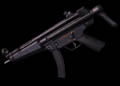 I showed an MP5 submachine gun I had been modelling as a prop for another character I was working on -
Using a side-on photo I dug up online, a little photoshop wizardry, and some very simple geometry, creating
quite an authentic looking weapon was reletively simple...
I showed an MP5 submachine gun I had been modelling as a prop for another character I was working on -
Using a side-on photo I dug up online, a little photoshop wizardry, and some very simple geometry, creating
quite an authentic looking weapon was reletively simple...
3 ELECTRIC IDEAS:
I was emailled a question 'Are there any tutorials or ways to make electrical effects in LightWave?'
- Well, this was a great opportunity to demonstrate a few tools and techniques in LightWave -
So I whacked together 3 methods on creating electrical arcing effects and we covered these in some detail...
TEXTURE
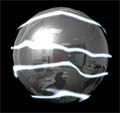 I showed how procedurals such as Marble, ripples and underwater, along with a turbulent texture
displacement allowed a variety of visual effects to be created in LightWave, from a pulsing plasma field
to arcing bolts of electricity that flowed up the sides of objects...
I showed how procedurals such as Marble, ripples and underwater, along with a turbulent texture
displacement allowed a variety of visual effects to be created in LightWave, from a pulsing plasma field
to arcing bolts of electricity that flowed up the sides of objects...
DISPLACED POLYGONS
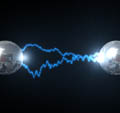 A quick tip on creating a 2-pt polygon chain fast in Modeler was followed by an overview of displacement mapping, falloff
and the use of glow and luminosity channel to create 3D arcs of lightning between a couple of teslacoil-type spheres.
Even lens flares got a mention, along with channel modifiers to automatically control the flares.
A quick tip on creating a 2-pt polygon chain fast in Modeler was followed by an overview of displacement mapping, falloff
and the use of glow and luminosity channel to create 3D arcs of lightning between a couple of teslacoil-type spheres.
Even lens flares got a mention, along with channel modifiers to automatically control the flares.
COOL PLUGINS
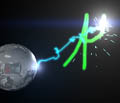 An opportunity to demonstrate some of the freely available plugins on the internet being put to practical use! This demo showed how to created a
lightning bolt that wrote a word on the screen using 3 very handy plugins from Japan. The first plugin for modeler - 'Curves2Polys' - Let us convert a word we wrote using the sketch
tool into a polygon chain. We then loaded this into Layout and used 'Traceline' to make the model 'write' on screen, and to also animate our
'lightning tip' with the text. Lastly we used 'FI_XYDrift', a plugin that let us 'attach' our lighting bolt model to the lightning tip! We put this
together with some of our techniques from the previous two examples to create a somewhat tacky, but quite funky effect!
An opportunity to demonstrate some of the freely available plugins on the internet being put to practical use! This demo showed how to created a
lightning bolt that wrote a word on the screen using 3 very handy plugins from Japan. The first plugin for modeler - 'Curves2Polys' - Let us convert a word we wrote using the sketch
tool into a polygon chain. We then loaded this into Layout and used 'Traceline' to make the model 'write' on screen, and to also animate our
'lightning tip' with the text. Lastly we used 'FI_XYDrift', a plugin that let us 'attach' our lighting bolt model to the lightning tip! We put this
together with some of our techniques from the previous two examples to create a somewhat tacky, but quite funky effect!
All 3 plugins were developed by the same person, and can be downloaded here (Along with his many other very cool plugins!):
http://www.hoops.livedoor.com/~f_ichikawa/
Just click on the 'Download' link at the top of the page...
DUNANANA-NAH-NAH, MY CORONA!
Corona is an image processing plugin that simulates the effect of bright
reflections on the camera lens, producing a 'glare' or glow effect... I'd
been playing with corona effects a bit lately, and thought that this would
be a great thing to run over since its capable of a LOT of stuff!
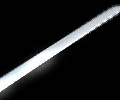 In the examples I had prepared, we first looked at how corona could be
applied to shiny objects (in this case, a Japanese sword) to add that subtle
enhancement of glints and sheens as light passed over it.
In the examples I had prepared, we first looked at how corona could be
applied to shiny objects (in this case, a Japanese sword) to add that subtle
enhancement of glints and sheens as light passed over it.
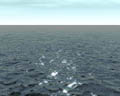 In my second example, we experimented with the settings of corona, and
overviewed what each one did - From input parameters to the texture
settings. In this example, I used a generic LW ocean plane (we used the
simple 'Water' preset from LW), a light and a '+' texture image to show how
we could use corona to pick the specular hilights from the render and
'sparkle' them...
In my second example, we experimented with the settings of corona, and
overviewed what each one did - From input parameters to the texture
settings. In this example, I used a generic LW ocean plane (we used the
simple 'Water' preset from LW), a light and a '+' texture image to show how
we could use corona to pick the specular hilights from the render and
'sparkle' them...
While showing how to determine the correct input parameters, we also looked
at 'buffers', layers of information that LightWave produces when it renders.
To view these, we activated the 'image preview' in the render options, and
added the image processing filter 'Render buffer view' (where we activated
the buffers we wished to view)
AND SOMETHING ELSE...
Finally, I demoed how using the colour input parameter in corona, we could
apply glares and glows to photos and video footage - Yes, LightWave can also
do video processing! :-)
DEMO - PARTICLE SYSTEM
I did a quick refresher review of the particle system in 7.5 - I still had
the last meetings examples I put together with me - The multiple emitter explosion, and the
machine gun/wall impact examples that showed just a small part of what the inbuilt particle engine in LightWave was capable of!
DEMO - NEWTEK MAGIC
I had the Siggraph content that Newtek posted online - and we took a quick
look through what was available using the demo version of 7.5 I had
installed at the last meeting. There was a bit of everything, from
character animation to particle effects... Some great models as well!
TIP - PROCEDURAL IN OPENGL
There's a simple tip in the LW manual on how to view procedural textures in OpenGL using image maps and the image processing filter 'TextureFilter'.
For those with LW 7 or greater, page 14.35 in the manual will tell you how!
QA - CIGARETTE SMOKE
Someone asked about Cigarette smoke, and how the particle system wouldn't
create the effect perfectly. One suggestion is the old 'animated texture'
effect of placing moving fractal effects flowing up a polygon. In
LW6.x/7.x, you can also throw in a texture displace layer as well, which can
create the effects of swirling and other smoke artifacts.
Since the meeting, there's also a new demo plugin someone has created to
generate smoke and fire. If anyone is curious (note that this is only a
demo, it won't render anything), the link is:http://www.polas.net/
FINALLY...
As always, a nice night with many new and old faces! Many thanks have to go yet again to Stuart who provided plenty of yummy muffins and drinks to keep us going...
See you all in September!
Kevman
|
|
