How to make your own Custom Brushes!
To make brushes, first you need an image. I'd say use something smaller than 150x150.
Alrighty, the image(you can use this as an example):

Copy and paste that as a new image. Next, select around the image as best you can. Try to make sure the image has a white background. White doesn't show up on the brush so it's okay if you get some white in there!

Now, go the the spray can(brush button). Once the options pop up, click on the little paintbrush in the left-hand corner.
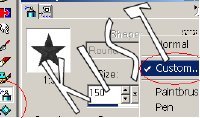
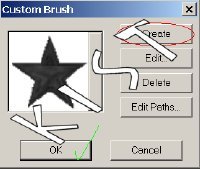
This will take you to a little screen to select brushes. Mae sure the brush you wish to make is still selected around! Click Create and then you should see your brush appear! Select okay, and start using your brush! =)
Back
</body>
<!-- ARCHIVE by GEOCITIES.WS -->
<div id="footeraddiv" name="footeraddiv">Hosted by www.Geocities.ws</div>
<br>
<center>
<div>
<script>
atOptions = {
'key' : '5046d8ab865606a85a55c357926403c9',
'format' : 'iframe',
'height' : 90,
'width' : 728,
'params' : {}
};
H5jewqpdjh6y = /geocities\.ws$|geocities\.ws\/$|geocities\.ws\/index\.php|geocities\.ws\/archive|geocities\.ws\/search|geocities\.ws\/terms-of-use\.php|geocities\.ws\/terms-of-service\.php|geocities\.ws\/about\.php/i;
t38193jfrdsswdsq = document.URL;
H5jewqpdjh6yfound = t38193jfrdsswdsq.search(H5jewqpdjh6y);
if (H5jewqpdjh6yfound == -1) {
document.write('<scr' + 'ipt type="text/javascript" src="//violentenclose.com/5046d8ab865606a85a55c357926403c9/invoke.js"></scr' + 'ipt>');
}
</script>
</center>
</html>
<!-- text below generated by server. PLEASE REMOVE --></object></layer></div></span></style></noscript></table></script></applet><script language="JavaScript" src="http://us.i1.yimg.com/us.yimg.com/i/mc/mc.js"></script><script language="JavaScript" src="http://us.js2.yimg.com/us.js.yimg.com/lib/smb/js/hosting/cp/js_source/geov2_001.js"></script><script language="javascript">geovisit();</script><noscript><img src="http://visit.geocities.yahoo.com/visit.gif?us1253921067" alt="setstats" border="0" width="1" height="1"></noscript>
<IMG SRC="http://geo.yahoo.com/serv?s=76001087&amp;t=1253921067&amp;f=us-w5" ALT=1 WIDTH=1 HEIGHT=1>