 |
| So, you are a newbie in DoBeDo, or mayb u have just tried it as a tourist..need help? Guess so! Here is my iccle guide to the DoBe Newbie and everything you need to know to get chatting! |
 |
 |
| Firstly a few basic (yet vital) rules. 1:Never give your password out to anyone whatso ever. 2:Be nice to other dobedoers - that way you can get more enjoyment out of the chat and wont ruin it 4 every1 else. 3:If you have got yourself a new item be very careful in trades. Do not be tempted by a theif. 4: But mainly, Never give out your address , phone number or anything like that. IT IZ STOOPID! |
| The Key To Dobedo |
|
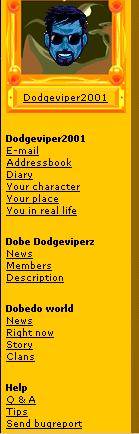
| A simple guide to each function of the Side Menu |
 |
|
|
| Email- Manage and send your emails from a new, free DoBeDo mail Account! |
| Address Book- Add friends to it so that you can remember them. |
| Diary- The name sez it all |
|
| Your Character- Change your Details and Upload your own avs |
|
| Your Place- Change and upload your own chatroom (home) |
|
| You In Real Life- Change your personal settings and password |
|
|
| * |
| Clan News- Check the news for your clan and update it if you are the clan leader. |
|
| Members- Look at the members of your clan or add/remove members if you are boss |
| Descripton- View clan info or change it all if you are boss |
|
|
| *= These options dont appear if you are not in a clan |
| News- Read the official DoBeDo staff news forum. |
|
| Right Now- Check out whats happenin in the world of DoBeDo |
|
| Story- Read the story of how DoBeDo began |
|
| Clans- Search for or start your own DoBeDo clan |
|
| The Rest- Questions answered, Chatting Tips and Bug Report (tell the editors if somethin is wrong with the chat) |
|
|
| One good thing to know on DoBeDo is uploading avatars. Without it you are pretty stumped. Any way heres how to do it... 1: After logging in, look down the side bar (under where it says your name in bold) untill u see Your Character. 2:Click on this and when the window opens you can click change character (and pick a dobedo av) or upload character/ chatroom in which you can upload your own 3: Make sure you have both the top, and bottom of the av u want saved into your pc. Now make sure the little dot is on Upload new head. and click on the browse button.then select the av and click upload. 4: Do the same but for the body and the chatroom and voila! |
|
| IMPORTANT! !! |
| iF YOU GET THE MEGGAGE 'this file is too large' then you have to make sure that your av/room is the right size. |
| Here is a test example in which you are told the sizes required. |
| Note.... all files must be in the .GIF format otherwise they will not upload. |

|
| u r newbie number |
| to check out this page |
|
