LEARN HOW TO MAKE YOUR WEB SITE.
Learning how to make a web site on your own can be challenging (it can also be a lot of fun). While no one component of the process is difficult, there are a lot of small steps. This thing works. I encourage you to slow w-a-y down. Plan on working on each part of the project more than once. Accept that you will be frustrated at times and maybe feel stupid or like it is too hard. This is a normal part of the process. Learning to walk is awkward - so is learning to make a web page. Hopefully, you'll enjoy it and that will make the process a little less painful. So, SLOW DOWN and read every word.
If you are a fairly new user, please save all your work onto a diskette. The directions in the project will assume you are using a diskette. If you are comfortable with it, you are more than welcome to use a folder to store your work on your hard drive. An additional benefit of using a diskette is that you can take your web page with you to work on. Also, some of you may already know how to use Front Page or some other HTML editor. That's great, but for this project, we'd like you to use Notepad. Hand coding your web page is a valuable lesson in paying attention to detail and problem solving, along with really learning HTML. So, please use Notepad. NO HTML EDITORS FOR THIS PROJECT. This includes FrontPage, Dreamweaver, the Geocities editor, etc. I will be checking your source code to verify that you typed it in by hand.
To create your web site you have many options. One way is to post your web site through a server. If you have a server at your working place or at your computer learning institute then you can post your site through it. Or else you need to ask your local server to post your site to the Internet and in return they will ask for a certain amount of cash.
You can own your own server too. But you will need to stay connected to the
Internet to work your pages on the World Wide Web(WWW). Are you still reading
the paragraph? Then I am sure you will like to download your own web server for
FREE.
Second way is that you buy a site from the other sites selling the web sites but make sure that you read their privacy policy carefully. If you find anything negative my advise is that you try some other site.
Third way is that you build your site with other site (eg-www.geocities.com) but if you want to use your own
recommended site but here wee will talk more about geocities.Geocities is owned by yahoo.com so to build your site with geocities you must have
an yahoo account. Your account name will be generally used in your domain name for example my yahoo ID is bulletanuj then my domain name is www.geocities.com/bulletanuj.
HTML is the "language" used to create web pages. We put the term language in quotes because HTML is not a programming language. It is a mark up language used to format text (among other things). A web browser (like Netscape or Explorer) takes the HTML commands (which look like garbage on their own) and converts them into the pages you see on the screen.
In beginning HTML looks quite difficult because of the symbols used in it called tags. But as you practice it, it becomes really easy.
CREATE A WEB PAGE IN NOTEPAD
Please don't use any HTML editor like front page dreamwear or geocities editor because they may not give you the required results
Open your notepad. To locate notepad, click on Start which is located in your task bar at the bottom right of your screen then go to program then to accessories then open notepad don't open WordPad
to begin, I have created a model HTML file. You should copy it as it is.
<html>
<head>
<title>My homepage</title
</head>
<body>
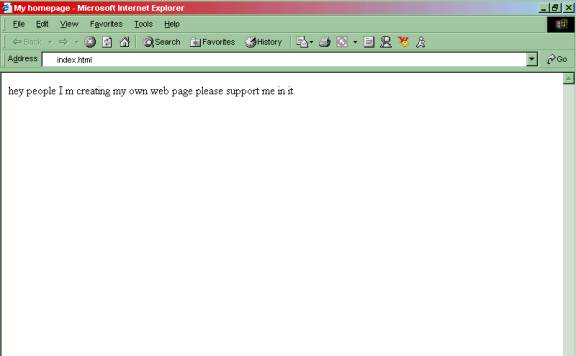
hey people I m creating my own web page please support me in it.
</body>
</html>
Go to file , save make sure you save the file as "text only" or "plain text". give the file name index.html(type as it is including .html
)Open the file and it will look something like this:
Now if you have seen the web page preview and it looks exactly like that then you now can
site.
You can always ask for help if you don't get anything write.
And the last thing to remember is that I may take some time in replying your mail because I am still 13 years old school student and have to study. but still I will try to reply your mail as soon as possible.
NOW YOU ARE READY TO CREATE YOUR OWN WEB SITE ON YOUR OWN.
Please ask for help if you don't get it write. My e-mail link is given on my Homepage
You can make a link to anything you'd like. Again, you need to put the link somewhere AFTER your <body> tag. You might notice when you use HTML that it ignores you when you hit enter. To go to the next line, you can use the <br> tag. If you put two of them together <br><br> you can put in a blank line.
To learn more tags click here
TO ADD A GRAPHIC.
TO. make an image link the code should be . To add graphic to your page you have to save the graphic first. Save the graphic as computers.jpg .Open the page in which you want add the graphic. Between the body tags write:TO ADD A LINK TO OTHER PAGE OR SITE
To add a link to a page in your system your code should be: <a href="index.html">Homepage</a>
The name "index.html" can be changed and the word homepage can also be changed. Homepage is the name your link will have.
To add a link to other site is no different than that of the page in the local system (your computer) the code will slightly change to <a href="http://SiteUrl.com>Site Name</a>
In this also "SiteUrl.com" is variable and Site Name is also variable.
Learn more links here
To upload your site to geocities.com, go to geocities.com. Sign-inthe site( if you have a yahoo account) if you don't have yahoo account then you have to sign-up to get a yahoo account(remember your sign-inname will be included in the domain name). However when you sign-in look for the link which says File Manager. Then click on Upload File.
Write the name of the file to upload(exact the same name). You even need to upload the graphic file too.
THINGS TO REMEMBER
You should only use notepad to create your web page.
You can create your own tag codes but not all the codes will work.
You have to type the same file name as it is.
Your homepage file name should be index.html exactly.
If you get anything wrong there is no problem every person in first attempt makes mistakes. Do the procedure again the part in which you go wrong. But don't get irritated and stop the build-up of your site.
You can always ask for help if you don't get anything write.
And the last thing to remember is that I may take some time in replying your mail because I am still 13 years old school student and have to study. but still I will try to reply your mail as soon as possible.
NOW YOU ARE READY TO CREATE YOUR OWN WEB SITE ON YOUR OWN.
Please ask for help if you don't get it right. E-mail me here.
Did you like to be with me? E-mail this page to your friend
.