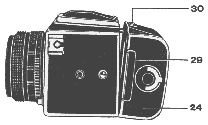
Insert the light proof slide 29 as far as it will go.
Having slid across button 30 in direction of the arrow and having tilted the film magazine 24 as shown in the Figure, remove the magazine from the camera.
The magazine lock will open only with the slide pushed all the way
home.
This ensures that the back can not release if the lock is accidently
operated.
Loading Film
The camera can be loaded in light.
*Note - Preferably film should be loaded and unloaded in subdued
lighting conditions.
Remove slide 29 from the magazine , lift handle 28 , turn it fully
counter-clockwise and withdraw the transport mechanism 33 from the
outer
film magazine body.
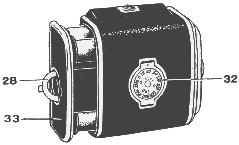
Tear off the paper label from your new films leader end.
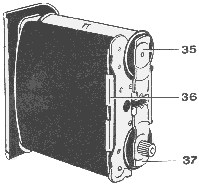
Lift the retaining plate 35 through 90 degrees , place the spool with the film into its place and reset the plate to its initial position. The protruding centre on the plate 35 should enter the spools end hole.
Turn handle 28 fully clockwise , lift retaining plate 37 through 90
degrees like what was just done to the supply side. Insert the
take-up spool into its place.
Reset plate 37 to it's initial position rotating the spool as necessary
so
that the
film drive enters the spools end hole.
Feed the films leader over the guide roller , thread it under
pressure
plate 36 ,
pass it up onto and over the second guide roller , fit the leader end
in the take-up
spool and
take up some of the leader by rotating the take-up spool.
Watch to see that the
leader goes on straight , without skewing or crumpling of it's edges.
*Note - Different films and spools may have a slight variation in
design but
usually it is simple to work out hole to attach the new film leader to
to the take up spool.
Turn handle 28 counter-clockwise , the pressure plate 36
will press
the leader to the table.
When the magazine is properly loaded , the dark side of the films
leader
paper should be forward facing as shown below.
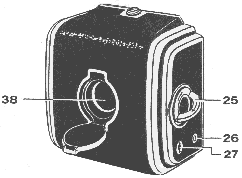
Insert transport mechanism 33 into the magazine housing as far as it
will go ,
slightly turning knob 25 if required in the direction of the arrow.
Reset knob 25
to its initial flat position.
Turn handle 28 fully clockwise to lock the inner mechanism to the
outer film chamber , after making sure that the lock
has fixed
the transport mechanism , reset the handle to its initial flat position.
Insert dark slide 29 home.
Open window 38.Lift knob 25 and rotate it in the direction of the arrow until the figure "1" appears in window 38 , which corresponds to the first picture in the film.
Set the loaded films speed on the scale
32.
This is done by turning the disk with the scale until the ISO/ASA value
coincides
with the index.
Note - Make
sure that figure
"1" is set in windows 27 and 38.