General Purpose Plug-In for Winamp 2 & 5
Version 1.02 (10 April 2003)
New options for your Winamp. Now you can set and save Start and End position for each track. Also you can set volume amplifying level for each track. Customizable Intro playback, Fade In, Fade Out, Loop playback and other options are also included. Jumps from one to other Winamp with crossfade. With this Plug-in you can link and play two or more Winamps one by one. With this possibilities you can easy create jingles and mixes. DJ Assistant is written for mp3 files, but with good Input Plug-ins can be used with any audio or video format. Enjoy.
DJ Assistant is optimized for WaveOut plug-in (out_wave.dll) and DirectSound plug-in (out_ds.dll) included with Winamp. With other plug-ins (like Nullsoft Crossfading Output (out_xf.dll)) may be some problems, but you can try.
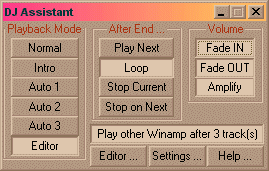
Playback mode : Here you can choose which part of track will play.
Normal : Track plays from beginning to the end.
Intro : Same for all tracks. Can be customized in Settings.
Auto1,Auto2,Auto3 : In Editor you can set and save Start and End position for each track.
Editor : Plays part of track selected in Editor.
After End mode : Here you can choose what to do after End position from playback mode.
Play Next : Plays next track.
Loop : Returns to Start position.
Stop Current : Stops playback and stays on same track.
Stop on Next : Stops playback and goes to next track.
Volume : Options for automatic changing volume level.
Fade In : Increases volume after Start position from Min Volume to Max Volume (view Settings).
Fade Out : Decreases volume before End position from Max Volume to Min Volume (view Setting).
Amplify : Changes volume level for percent saved for each track in Editor. Can be used for volume normalization.
Play other Winamp :
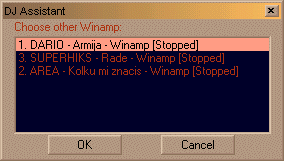
Jumps to other Winamp after n (1-100) tracks (set in Settings window). This plug-in can find 30 different Winamp instances. First you must choose other Winamp who will start playing before the end of last track. (Example: You have radio station and you want to play commercial after every 3 tracks. Then open one Winamp and insert tracks in playlist and open other Winamp with commercials in playlist. Set the first Winamp to play other Winamp after 3 tracks and set the second Winamp to play first Winamp after 1 track.).
For this option you must open two or more Winamps .
Editor... : Opens Editor Dialog.
Settings... : Opens Settings Dialog.
Help... : Opens Help page.
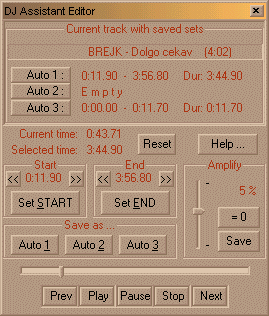
In this dialog you can see current track with saved sets and save new sets for Auto1, Auto2, Auto3 and Amplifying. When is active I recommend to choose Editor in Playback mode, Loop in After End mode and Amplify in main window .
Set Start button : Sets current time for Start position.
Set End button : Sets current time for End Position.
<<,>> buttons : Fine tunes Start and End Position (+/- 0.1 second).
Save as... : Saves current set in Editor for Start and End as Auto1, Auto2 or Auto3.(Example: I'm using Auto1 to cut too long end, Auto2 to save some part from track as jingle and Auto3 for part from track good for loops).
Reset : Clears current set of Start and End.
Amplify : Choose and save amplifying level for current track.
Auto1 :, Auto2 :, Auto3 : buttons : Inserts saved sets as current set in Editor for Start and End.
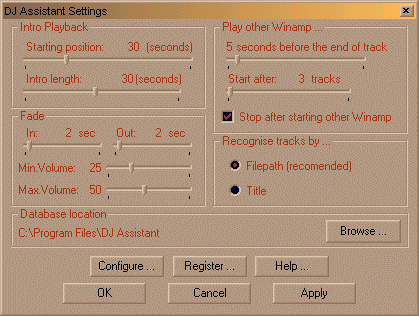
Intro Playback : Set Start position and time length for Intro play (same for all tracks).
Fade : Set time length, Min and Max Volume for Fade In and Fade Out.
Play other Winamp: Set when to start playing other Winamp.
Recognize tracks : Choose how plug-in to recognize tracks:
by Filename : It's set by default and is recommended if you have different tracks with same titles.
by Titles : It's good if every track have different title. Then plug-in can recognize same track on different locations (HDD, CD, different folders) and use same sets for Start, End and Amplifying. (For mp3 files title is configured in MPEG decoder Input plug-in).
Database location : This is location where plug-in saves sets for each track. In one database you can save sets for more than 20000 tracks (approximately). You can have more databases , but can use only one. One database can be shared between more Winamps in same time.
Play two or more Winamps (menu)
To play two or more Winamps in same time first you need fast computer to play more Winamps (for two Winamps with DJ Assistant plug-in you need Pentium with 300MHz). Other things depends from your soundcard and Output plug-in for Winamp.
Better solution is if you have soundcard which can play multiple streams. Then you can use DirectSound Output plug-in and play more Winamps.
Other solution is if you have two soundcards. Then connect Line Out from first soundcard to Line In on second soundcard. Connect speakers or amplifier to Line Out on second soundcard. In that case you can use WaveOut plug-in (choose Wave Mapper as output devise). Now you can open more Winamps, but in same time can play only two Winamps.
You can open more Winamps from same locations if in Preferences\Options\ is enabled "Allow multiple instances" or install more Winamps on different locations.
DJ Assistant is optimized for WaveOut plug-in (out_wave.dll) and DirectSound plug-in (out_ds.dll) included with Winamp. With other plug-ins (like Nullsoft Crossfading Output (out_xf.dll)) may be some problems, but you can try.
Only limitations in Demo version is saving in Editor. In Demo (unregistered) version all saved sets are temporary and will be lost on quit.
If you like this plug-in, for full functionality you must register it.
Registration cost for one license via "Share It!" secure service is 15$.
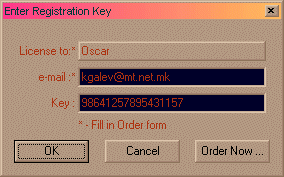
Field 'License to" is automatically filled by plug-in and you only can choose between 2 or 3 names (depends from your Windows installation) .
For right Key in Order form you must enter correct "License to" and "e-mail" fields.
Fields are case sensitive.
Comments, suggestions and bug reports are welcome. Send e-mail to [email protected]
Thanks
Biggest thanks to my brother Gale, Chikson, Kango, Lindsay Clout and ShareIt Team.
Copyright �2002-2003 Kire Galev