Speech Analysis and Synthesis for Peoplebot
Overview
Voice analysis\synthesis functions were added to the Peoplebot project in order to make the robot more approachable and interesting. The goal of the project team was to have a robot that could understand various questions and respond accordingly. Some of the design goals were as follows:
- The speech analysis would be performed at real-time rates on continuous speech.
- No training of the robot’s voice analysis functions would be required. This would allow anyone to approach the robot and initiate a conversation.
- None of the questions were preprogrammed. Rather the analysis of the content of a question would be used to search for the best possible response.
- The voice synthesis would have the ability to change personalities either by varying the speaking speed or pitch. This would give the robot a little more unpredictability.
General Description
The speech system for PeopleBot consisted four major components. These where the speech analysis, speech synthesis, Lisp interpretor\program, and the user interface. Each one of these components either used off the shelf software or modifications to public domain source code. The largest task by far was the integration of the components.
Speech Analysis
The program selected for the speech analysis was the IBM ViaVoice Gold. This choice was made because a member of the project team had an old version of the software. The performance of program with a properly trained user profile was very impressive when the user was reading the material to be analyzed. When the material was typically conversation the performance was drastically reduced. The reason for this was probably because pronunciation is better when reading and that the speaker’s speed has a more even cadence when reading. All training is done by reading.
Performance of the program was even further reduced with very short sentences which were read or spontaneous ones with one or two word bursts.
Presently, the robot uses a headset. There are two reasons for using the headset. First, the headset helps eliminate feedback from the speakers because the microphone and speakers are essentially isolated from one another. Second, the headset was used during the training session to improve the accuracy of speech to text conversion. Speech to text conversion is partially dependent on the electrical characteristics of the microphone being used. Since we trained the robot on our voices using this particular headset, we needed to use the same headset during normal conversations to the robot in order for the robot to maintain its speech to text conversion accuracy.
Speech Synthesis
There are various text to speech synthesis programs. The voice quality ranges from very poor to spectacular. The OGI festival speech system was evaluated and had very good performance. In the end the project team decided to use the voice synthesis built into the newer Microsoft libraries called "Microsoft Voice". The pitch and speed are variable and the integration into the user interface was very simple.
Lisp interpreter – Eliza
The Lispworks interpreter from Harlequin was used as our Lisp interpreter. This program provided a very simple communication package that was used to interface to other blocks in the system.
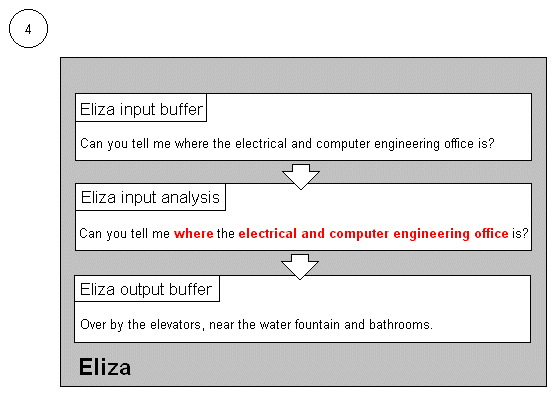 The program that was running was a variation of the Eliza program developed by Matt Maple. The first thing Eliza does to an input text is strip off any punctuation and converts it to a list. It then replaces words or phrases in the list that are semantically the same but syntactically different from key words Eliza understands, with the key words Eliza understands. Eliza then attempts to deduce what the individual is saying. It does this by looking for key words in specific positions relative to one another. If it finds a match, it generates the output response attached to that particular condition and stores it in the output buffer.
This principle is illustrated by the sample input text in the figure above. Eliza checks to see if the individual is asking for directions to the ECE office by looking for the words "where" and "electrical and computer engineering office" in that order. In this particular example, the user could have substituted "electrical and computer engineering" with "ECE", since Eliza understands that both words mean the same thing. This form of analysis is very flexible because it gives the user freedom in constructing the question.
The program had three personalities and could respond to several questions.
User interface
The user interface is written in Visual Basic. The code is rather straightforward and is included in the end of the report.
System Operation
All of the components described above were integrated into the system. For our purposes two computers were used to make the system. One computer was used to perform the user interface, voice analysis and voice synthesis. The second computer was performing the text-based analysis. The division was done because the voice analysis was consuming lots of CPU cycles. Splitting the voice processing off onto its own computer allows the Lisp portion of the system to grow and control various other sub systems of the robot such as locomotion and sensor integration. The two computers communicated via TCP/IP sockets. A rough diagram of the system is shown below.
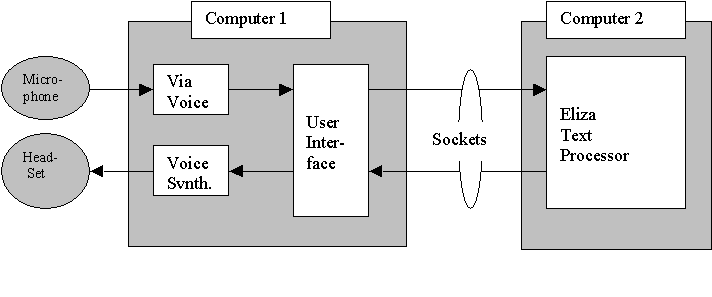
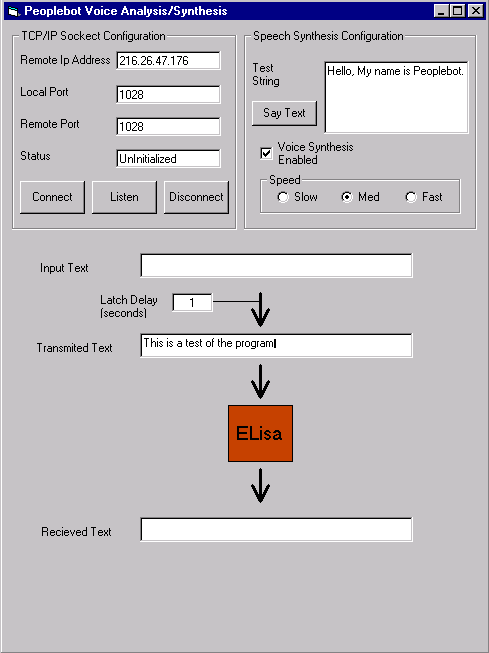
The microphone captures data in the form of speech. The data is processed by the voice analysis software and sent to the user interface in the form of a text string and stored in the "input text" buffer. When the user has not spoken for 1 to 2 seconds (Latch delay) the data is latched into the "transmitted text" buffer and the user interface sends that buffer to the Eliza-like program for text processing. When the Eliza processing is completed the response is sent to the user interface via the network and is stored in the "receive text" buffer. The user interface will display the text and also send the text string to the voice synthesis block that in turn produces the verbal response.
The Eliza program had the ability (or disability) to have multiple personalities. The Eliza program changes the vocabulary for each personality. Additionally a system was setup whereby the Eliza program could also control the verbal characteristics of the outbound speech to match the personality. The Eliza program sends escape control words to the user interface in the normal out going data path. The user interface program detects the escape word and then performs the desired operation. The escape control word is not uttered. Currently only two escape commands are issued. One is for the friendly personality and the other is for the police personality. The police personality has a lower pitch and slower cadence compared to the friendly personality.
Conclusions
The system developed for the first for this project was sufficient for a well-controlled stationary environment. Unfortunately this is not the normal operation environment for a mobile robot. We were very disappointed with the accuracy of the voice analysis portion of the system. A simpler, smaller vocabulary system would probably do better.
We were very amused by the conversations that the robot would have with itself if the feedback from the speakers was picked up by the microphone. While amusing, these conversations usually resulted in mumbling incoherent sentences. Maybe this is the idiot personality?
Anyway, the project team needs for focus more on getting the robot to move in a controlled manner in the future. The voice improvements should probably come after this is accomplished.
Future Work
In the future the speech system needs to be made mobile and fitted onto the Robot. For this it is intended that the voice input be taken from a wireless camera which is mounted onto the robot. The audio portion of this link sent to the receiver and connected to the computer. The voice analysis computer will not be onboard the robot mainly because of the processing required. For the voice synthesis portion of the mobile robot there will be a wireless link to send the audio to the robot. A modified walky-talky would probably suffice.
Additionally, as noted above, the voice analysis portion of the robot needs to be made more robust. We need to replace the via voice analyzer with one with a limited vocabulary. This will improve performance.
ANNEX 1. User Interface Code
Dim savestring As String
Private Sub Command1_Click()
DirectSS1.TextData 0, 0, Text1.Text
End Sub
Private Sub cmdConnect_Click()
ws.RemoteHost = txtIPaddress.Text
ws.RemotePort = txtRemotePort.Text
ws.Connect
End Sub
Private Sub HScroll1_Change()
Timer1.Interval = HScroll1.Value
End Sub
Private Sub Option1_Click(Index As Integer)
DirectSS1.Speed = 50 * (Index + 1)
End Sub
Private Sub Text2_Change()
Timer1.Interval = 1000 * Val(Text2.Text)
End Sub
Private Sub Timer1_Timer()
If txtViavoice.Text = savestring Then
If savestring <> "" Then
txtTransmit.Text = txtViavoice.Text + Chr$(10)
End If
txtViavoice.Text = ""
End If
savestring = txtViavoice.Text
End Sub
Private Sub txtTransmit_Change()
If ws.State = sckConnected Then
ws.SendData txtTransmit.Text
End If
End Sub
Private Sub cmdListen_Click()
ws.LocalPort = txtLocalPort.Text
ws.Listen
txtState.Text = "Listening"
End Sub
Private Sub ws_ConnectionRequest(ByVal requestID As Long)
If ws.State <> sckClosed Then
ws.Close
End If
ws.Accept requestID
txtState.Text = "Connected"
End Sub
Private Sub ws_DataArrival(ByVal bytesTotal As Long)
Dim strData As String
ws.GetData strData
If strData = "np_friendly" Then
DirectSS1.Pitch = 85
Else
If strData = "np_police" Then
DirectSS1.Pitch = 55
Else
txtReceive.Text = strData
DirectSS1.TextData 0, 0, strData
End If
End If
End Sub