
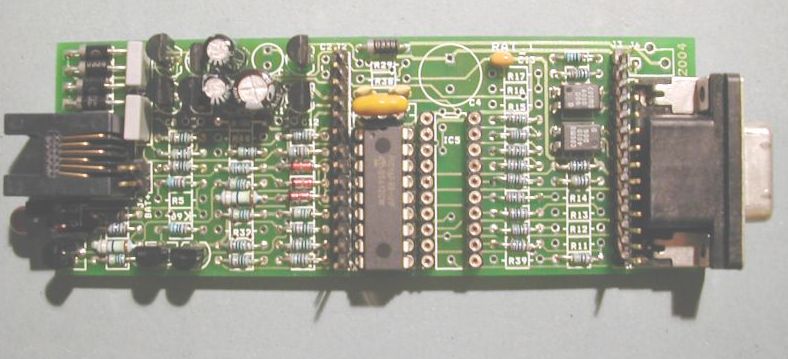
Upon recognition, RAT_1 answers the phone call and sends a short acknowledgement tone.
The RAT_1 sends the Calling Number and the time and date to a PC terminal via its optoisolated serial link. The message is sent at 9600 baud.
This mini-application fits into the first 256 locations of the program ROM leaving most of the ROM for other user applications.
It has been tried and tested in the UK and should work in most countries that use either V23 or Bell 202 for their Caller_ID.
It may need a little modification to work correctly in the USA. An update is planned as soon as it has been tested in the USA.
Download RAT_1_88 Latest Firmware
RAT_1_88_MAY30.zip is the latest version of the assembly code firmware for the RAT_1.
Download and save it on your PC and then use Microchip MPLAB to access the asm file.
Other Integrated Programming Tools could be used if desired, but RAT_1 firmware has been written on MPLAB IDE V6.40 available free from Microchip.
The firmware is then loaded into the PIC16F88 on the RAT_1 using In Circuit Serial Programming (ICSP) mode, or alternatively program the chip directly in the socket of a PIC programmer.
This firmware implements a simple serial command interface allowing commands to be sent from the PC using a terminal emulation program - such as "Hyperterminal".
It should be set for 1200 baud, 8 bits, no parity, 1 stop bit and no - handshaking sometimes called 1200, 8, N, 1.
The following serial commands have been implemented - just type the letter from the PC keyboard when connected as a terminal:
A Answer the incoming Call - go off hook
C Caller_ID mode - await an incoming call and display the Caller_ID on the PC. Answer call if number recognised
D Dialnumber - this dials a number that has been pre-stored in the RAT memory
H Hang-up - go back on-hook
K Send a 1kHz test tone
M Send a short modem message
N Simulate a payphone Nickel tone sequence for Nickel, Dime, Quarter, Dime
O Go Off-hook, ready to dial
P Send some short peep-tones down the line
R Display the Caller_ID RAM buffer registers as a Hex Dump
S Send the slow 75 baud modem signal
T Send some 2100Hz answer tone
U Enter a short message of up to 96 characters and send it using the M command
V Enter Voltmeter Mode
X Print out the contents of the RAM buffer to the terminal (Caller_ID or message)
...... Exit Voltmeter mode
Digits 0 to 9. These dial the DTMF tones directly when the number is pressed. Press O to go off-hook first, H to hang-up.
RAT_1_88 also includes a simple voltmeter program to run on the RAT_1.
Plug the RAT_1 into the PC serial port running Hyperterminal, Press "V" for voltmeter mode.
RAT_1 measures the voltage applied to pin 17 Port RA0, and it displays the voltage to 2 decimal places on the PC screen . It updates about once a second.
Pressing several full-stops will exit the Voltmeter mode.
Full details of the RAT project are at the rat_ring Yahoo Group.