Without a doubt, The Merchant's Friend is my favourite SWG-related download. It lets me keep track of my sales, tells me which items are most popular, and helps me print off restock lists. It also tells me how much money I've made, which is always nice to know ;)
In order to print restocking lists using The Merchant's Friend you will obviously need the application itself. Details for how to install it are on that site too. Sadly its not been updated in a long time, but at least it is still available.
So, start up The Merchant's Friend and you should be greeted by your list of sales (if not click on Files > Open > From SWG Dir.. OR Load Default).
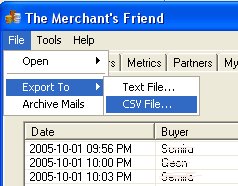
First thing we want to do is get the data out so we can print it, so click
on Files > Export To > CSV File as shown.
You will then be asked where you want to save the file, and what to call it. I tend to use the day's date as the file name to make life a little easier.
You can then open the CSV file into a spreadsheet program such as Excel. I only have Microsoft Works Spreadsheet on my pc which is rather basic but does everything I need it to do.
Once open in the spreadsheet I get rid of the date, buyer and vendor location columns as they are not needed. That leaves me with item name, price, and vendor name. If you only have one vendor, then you can get rid of the vendor name column too and skip the next step.
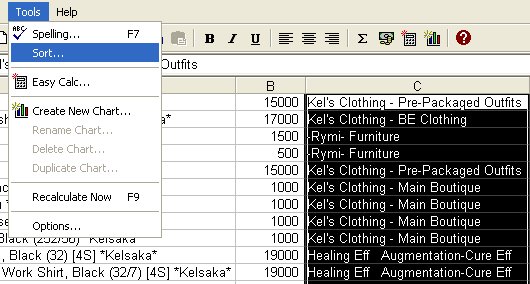
As I have multiple vendors I highlight and sort by that column first using
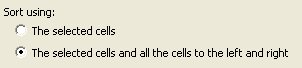
the Tools > Sort option as shown. Make sure you pick the selected cells and
the all cells to the left and right, or your data will become mixed up.
Now I have the items separated by vendor, I highlight each vendor's contents in turn, sorting them again but this time using column A. I like to work from A-Z rather than jump back and forth to an item multiple times. This also means I can restock each vendor separately without worrying about accidentally putting some jewellery on the Wookiee vendor, or a ladies-only item on the main boutique vendor! I tend to add a blank row between each vendor's items but its not necessary.
With that done I delete the vendor name column and my restock list is ready to print.
So I don't get the same items comming up each time I make a restock list I empty out my mails from my main folder and file them away in monthly folders. Thankfully they are easy to make and don't upset SWG or The Merchant's Friend.
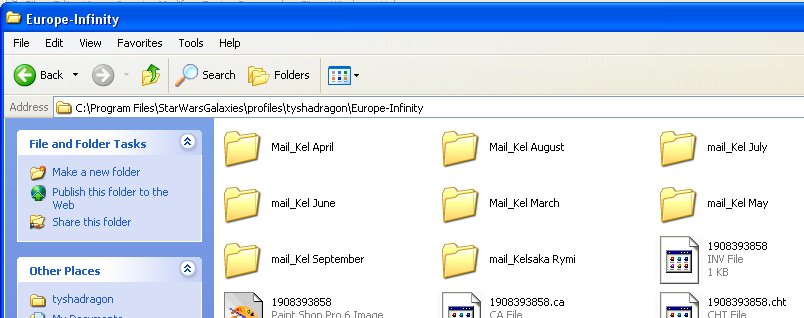
All you need to do is go into your SWG folder > Profiles > Account Name
> Server Name and you will see you have a Mail_Character Name folder. To
make monthly folders all you need to do is create a new folder and call it Mail_Name
Month like what I have below.
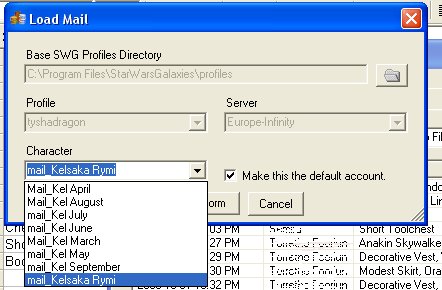
Then you can use File > Open > From SWG Dir.. to check your monthly sales.
Clearing out your mails like this also helps The Merchant's Friend to load quicker,
it can take a while to load a few months worth of sales at once!
So there you go, simple restock lists via The Merchant's Friend :)