Lesson Four: Uploading

A. Review
  • You have learned a lot in the last three lessons
B. Uploading
  • Uploading
    • Simply is taking copies of the files you want and putting them on your site at Geocities.com
      • I say copies because you will have two copies all the files you upload: one on your computer and one at Geocities.com.
C. Geocities.com
  • Uploading to Geocities.com is easy
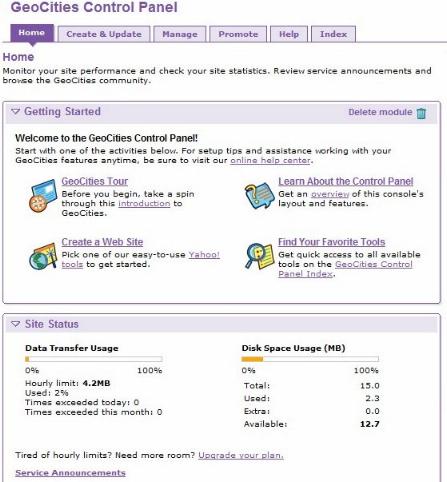
    • First Login. You will see screen that look like figure N


    Figure N

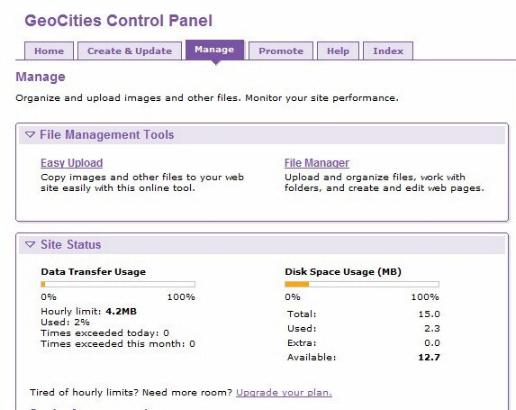
    • Click on Manage. That will take you the screen in figure O


    Figure O

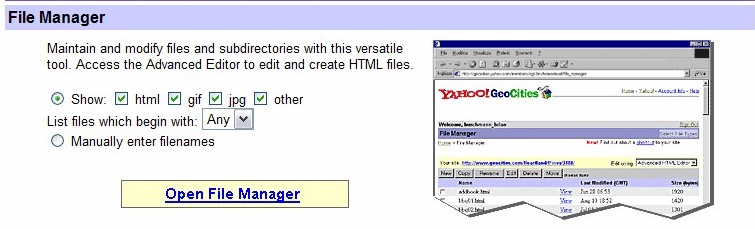
    • Then click  File Manager make sure all the boxes checked. Then Open File Manager


    Figure P

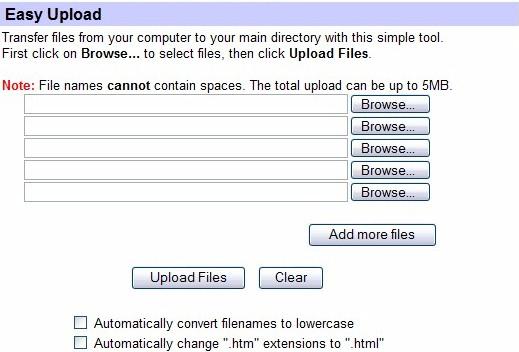
    • As shown in figure P GIF, JPEG, and html files must be uploaded separately. Moving down the page you will come to the upload area shown in figure Q.


    Figure Q

    • From there follow the instructions.

Top of Page


Please email me with any questions.


e-mail John Keegan                                                                                                                                        Keegan's Page
©  John Keegan 2006
setstats
Hosted by www.Geocities.ws

1