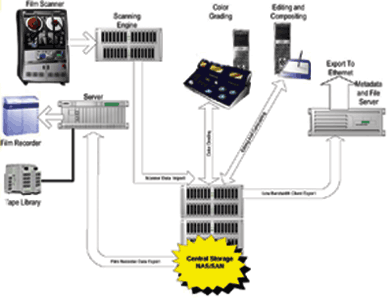
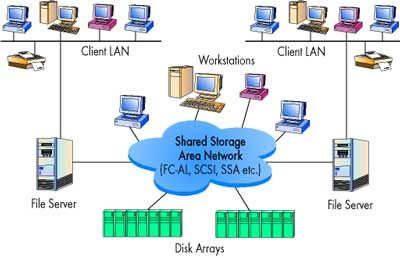
| SAN: A network that exists exclusively to provide storage for the massive amount of data entailed in an e-commerce business. A SAN's architecture works in a way that makes all storage devices available to all servers on a LAN or WAN. As more storage devices are added to a SAN, they too will be accessible from any server in the larger network. In this case, the server merely acts as a pathway between the end user and the stored data.
Because stored data does not reside directly on any of a network's servers, server power is utilized for business applications, and network capacity is released to the end user.
|
|
 |
Benifits
- Availability: Due to its multiple levels of redundancy, it reduces the level of downtime associated with failures. A SAN allows for multiple physical connections to disks from single or multiple servers.
- Disk Utilization: Space can be assigned to any server that needs more storage space, thus allowing you to grow as needed with no downtime. This is referred to as storage on demand. The SAN enables more than one server to access the same physical disk, which lets you allocate the free space on those disks more effectively. Because you can use disk space more effectively, no space goes to waste, thus you don't need to buy disks as often as you used to.
- Management: Storage is managed from a centralized location instead of on each server.
- Reduced Data Center Rack Space: By consolidating storage on the SAN instead of on the servers, it means that more servers with smaller footprint can be used. This eliminates the need for larger bulky servers.
- Connectivity: The SAN uses Fibre Channel to connect to the servers allowing for faster and larger throughput or I/O. The SAN drives are also Fibre Channel.
- Improved Disaster Recovery Capabilities: Since storage is located on the SAN, a server failure can be recovered much faster. SAN devices have the ability to mirror the data on the disks to another location. This can make your data safe if a disaster occurs.
- Vendor Consolidation: Pooled storage architecture can consolidate the number of vendors involved in providing infrastructure services.
- Clustering Support: All SANs support server clustering. One of the reasons a SAN is purchased is to cluster multiple servers together while having the storage centralized on the SAN.
- Removes the distance limits of SCSI-connected disks: The maximum length of a SCSI bus is around 25 meters. Fibre Channel SANs allow you to connect disks to your servers over much greater distances.
- Better staff utilization: SANs enable more data management with fewer IT resources.
|
|  |
|
Technical details
The Datacenter team manages several SANs in support of Medical Center hosted applications, with terabytes worth of storage. Examples of these SANs are an IBM DS4400 and DS4500. They house critical enterprise data including electronic mail, many relational databases (e.g., SQL, Oracle, DB2), File Sharing services, and a wide variety of applications.
The DS4400s and DS4500s have several levels of redundancy. Aside from a physical level, they also have software level redundancy. Each grouping of drives is configured as an Array. The RAID (Redundant Array of Independent Drives) Level of the Array sets the amount of redundancy. The most common RAID Levels we use are 1, 5, and 10.
For RAID-1, 2 drives are used to mirror each other. For RAID-5, small parts of the data are written to each of the drives allowing for a failure of any one drive. RAID-10 adds the redundancy of a RAID-1 and the performance of a RAID-0 (not discussed here as there is no redundancy with RAID-0).
Each of these RAID levels are delivered by allocating one or more physical drives per Array. This means that if an Array consists of 10 drives and is set at a RAID level of 5 then the usable space is the amount of 9 drives. RAID-10, on the other hand, requires that each drive in the Array have its own mirror, which means that 50% of usable storage is lost for redundancy and performance -- e.g. an Array of 3 drives will require 3 additional drives to house the mirrored data, which brings the Array total to 6 drives. With this extra level of redundancy it is highly unlikely that data loss or corruption will occur due to a physical loss of any one drive per Array.
|
|  |
