Click on the dustbox, take the violet blocks
inside.
Click on the shelf above the tinted window, take the remote control.
Face the poster on the wall. Click on it, you will see a little red square
near the top. Click on the red square to receive the red memory chip.
Check the silver box on the wall, then the worktable.
Click on the manual on the worktable. You can keep clicking on it to cycle
through the pages, to gain hints about what you are supposed to do. Go to the
final page, take the of paper with morse code.
Click underneath the table. Take a yellow mount (on the floor), the steel
stick hanging on one of the table's legs, and then the brass hook that the
steel stick was hanging from.
Head right until you see the teal-colored, steel door in front of you. If you
look carefully at the grey ledge above the door, you should see a black dot
sitting on top of it, a little over to the right side. Click on the dot then
click on the black motorcycle key to take it.
Face the motorcycle. Click on the bottom region of the center of the
motorcycle and take the yellow memory chip.
Click on the passenger (rear) seat of the motorcycle. You'll see a slot for a
key right below the seat; use the black motorcycle key on the slot. Take the
wrench.
Click on the rear wheel of the motorcycle, and then click on the space just
above the rear wheel on the next screen, and you will find yourself on the
other side of the motorcycle. Take the key on the ground.
Click on the top part of the screen to examine the control panel on the
motorcycle. Just above the yellow button is the ignition slot, insert the
motorcycle key.
Make your way to the right until you see "the door that never opens" in front
of you. Click above it to examine the ceiling. There's a piece of paper on the
ceiling, use the steel stick to take it. The two pieces of paper will fuse
together in your inventory. If you examine the paper, you'll notice that there
are 26 sets of morse code, an alphabet.
A through M are listed in the left column and N through Z are listed in the
right column.
Go to the silver box on the wall, and then click on the top part of the screen
to look up at the ceiling. You will see another box. Click on it. Use the
silver key to activate the power.
Return to the silver box below, open it. Two buttons appear: a blue one on the
left and a red one on the right.
Pressing the blue button will result in a "dot" appearing, and pressing the
red button will result in a "dash" appearing.
The password here is "OPEN." The button sequences, in order, are: red-red-red;
blue-red-red-blue; blue; and red-blue.
After inputting the password, the buttons will dissappear, leaving only the
word "OPEN" visible. Click on the word to close the box. A blue door appear to
the left of the silver box.
Click on the door then click on it again to open it, revealing a closet. Take
the blue memory chip.
Click on the remote control in your inventory and click on the "i" bubble to
examine it closely. Click on the space around the perimeter of the remote
control to flip it over, revealing four square indentations on its underside.
Click on each of the memory chips in your inventory to insert them into the
remote control.Then close the inventory screen Close the door. You'll see that
the remote control appears, automatically pointing at the door (if it's not,
you just click on the remote control in your inventory while looking at the
door to bring you to this step). Press the large purple button on the remote,
and you'll see the blinking light on the remote change from grey to blue.
Click on the door again to open it, and take the headlight. Close the door
again. Press the button on the remote again, and the light will change from
blue to red.
Click on the door again to open it, and take the binoculars. Close the door
again. Press the button on the remote again, and the light will change from
red to yellow.
Click on the door again to open it, and take the mirror. Close the door again.
Go back to the motorcycle, and click on the front wheel to zoom in. Click on
the top part of the screen to focus on the front section of the bike - you'll
see a yellow strip of metal with a hole in it near the top. Click on the mount
in your inventory, and the wrench will automatically pop up. Click on the
yellow strip to attach the mount to the bike. Click on the headlight and the
wrench will pop up automatically again. Click on the mount you just attached
to affix the headlight. Since you turned on the motorcycle's power already,
the headlight should be on.
Head back to the screen with the teal-colored steel door. Just to the right of
the door, where the headlight is shining, there's a little black dot. Click on
the dot to zoom in. If you click on the dot again, you'll learn that it's a
hole in the wall. Insert the brass hook from your inventory into the hole.
Hang the mirror from the brass hook. This will reflect the light shining from
the motorcycle back towards the tinted window, allowing you to see inside.
Go back to the screen with the tinted window and click on it, you'll look
inside the room. Use the binoculars to reveal a randomly-generated, 6-digit
code. Make note of this number sequence.
Go back to the control panel with the colored buttons on the motorcycle .
Notice that each one of the colored buttons corresponds to a number: green =
1, red = 2, yellow = 3, blue = 4, and orange = 5. Click on the right handle to
see the -hidden sixth (purple) button. Press the buttons in the order shown.
You get a message that the engine doesn't start, but you'll also hear
something being opened or unlocked.
Head around to the other side of the motorcycle again, check out the front
tire. From the screen with the sixth (purple) button showing on the
motorcycle's handle, click on the top-right part of the screen, and then the
space just above the front wheel on the next screen. You'll see a clamp
attached to the front wheel, with six colored squares on it. Clicking on the
clamp will zoom in on it. Clicking on it one last time will move it out of the
way, revealing a purple memory chip - take it.
Examine the underside of the remote control in your inventory again, and swap
the grey memory chip for the purple chip that you just found. Head back to the
closet, and keep pressing the purple button on the remote control until the
blinking light changes to purple. Open the door to reveal a yellow panel with
a blue button, and then click on the panel.
Click the blocks in your inventory while looking at the panel, it will make
them appear onscreeen. You can click-and-drag a maximum of four blocks onto
the yellow panel, and then press the blue button to have the machine process
them.
This is another panel asking for a password in morse code.
The password here is "HELP." The button sequences, in order, are:
right-right-right-right (....); right (.); right-left-right-right (.-..); and
right-left-left-right (.--.).
After inputting the correct password, the panel and button will begin to
flash. Click on the button to retract the yellow panel, revealing a golden
key.
Head back to the control panel on the motorcycle, remove the black motorcycle
key from the ignition, and insert the golden key. Then, press the purple
button on the right handlebar to start the motorcycle up. The motorcycle will
rev up and crash into the teal-colored steel door, providing an exit.
Congratulations, you've just escaped !
White Chamber
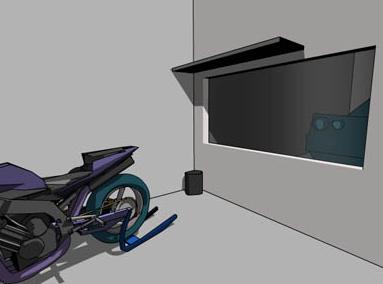
攻略
先係垃圾筒發現一堆紫色積木收起佢,
轉去個電單車側面近腳踏會搵到一塊黃色晶片,
車身後一條鎖匙, 同埋你會發現部車俾人用locker鎖住左,
吾好理佢, 轉去右面牆有塊大玻璃窗,但內裡實在太黑你咩都見吾到,
係上面有個架, 點擊會有個remote, 再轉右兩次發現紅色海報,
點擊海報會發現一塊紅色晶片, 轉右發現將枱,
枱上有本說明書教你點用左個remote同埋點出去,
會有將半紙飛出黎, 枱底搵到一枝七字型勾,一條長灰色鐵枝,一個金色架.
轉右發現一道好堅固既鐵門, 門頂上發現鎖匙. 轉回電單車,
用果條鎖匙開左車尾箱, 發現螺絲扳手. 轉向深綠色門果道牆,
向上點擊會見到天花板有張紙, 用長灰色鐵枝勾佢落黎,
咁就會同之前果半張紙變成一張完整的摩斯密碼.
由左至右上至下分別係A-Z既英文抒入. 轉向枱既左邊發現一個灰色箱,
向上點擊會發現佢連住個系統, 用鎖匙插入去就會通電.
去番下面個灰色箱用紙上提示既摩斯密碼抒入OPEN,
會出現一道藍色門, 點擊會打開發現藍色晶片. 扲起REMOTE按(i)
按住之前說明書, 再對住度門用個remote, 開出吾同顏色既門扲出入面既野.
紅色門會有望遠鏡,
黃色門會有塊鏡,
藍色門會有個車頭燈.
轉右兩次去番大鐵門, 門右手邊會有個細既正方型洞,
插入七字型勾同埋掛起塊鏡. 用螺絲扳手裝上金色架同埋個車頭燈.
用番開車尾箱條鎖匙插入電單車頭個鎖匙洞內開著車頭燈,
令到整間房光d, 轉到後面大玻璃窗度用望遠鏡照入去,
發現字條上有個密碼抄底. 去番車頭入番呢個密碼,
聽到locker開鎖聲按ok, 就會得到最後一塊紫色晶片,
同上按remote, 取走灰色晶片換上紫色晶片, 去番剛才果度變色門,
按紫色制入去會發現個正方型機關, 扲起你係垃圾筒搵到既紫色積木,
按住紙上面既摩斯密碼插入"HELP", 就會得到金色鎖匙,
將金色鎖匙插入車頭, 按"6"制
開車撞門過關.
Walkthrough
 |
 |
 |
 |
 |
  |
 |
 |
 |

|