
University of Sheffield
MSc in INFORMATION MANAGEMENT
INF6350
Access to Information Resources
Practical Information Searching Coursework
Module Co-ordinator: Brendan Loughridge
February 4th 2000
CONSERVATION OF THE BUILT ENVIRONMENT
|
Catherine Brown |
|
|
Sylvia Sam Yen Kwan |
|
|
Thomas Ho Man Lam |
|
|
Julie Missen |
|

 Abstract
Description of the topic
Reference_Interview including the summary of the client's needs
Results of the search
Critical evaluation of the sources used
Discussion of the search
The aim of this literature search was to find relevant references, for a client, which fulfilled his needs for his Ph.D. thesis on the conservation of the built environment. At the same time the search enabled the group to learn how to effectively use information resources. The group pinpointed the client's needs from the reference interview and fulfilled his requirements with a high degree of success. The group was successful in finding relevant references that were both new to the client and were within the specified dates and resources. A bibliography and a web page was created by the group in order to display the method, evaluations, results and the references that were found by the literature search.
The client's thesis concerns the conservation of the built environment, which is a multi-disciplinary subject. His thesis covers a qualitative angle, which looks at the values involved with protection systems of listed buildings and conservation areas, for example, why we feel the need to preserve these things.
The client and reason for the request
The search was carried out for Ed Hobson a final year Ph.D. student in the Town Planning Department. He is at the end of his research and wanted a literature search carried out to cover information published since 1997.
Reference interview including the summary of the client's needs
What specifically is the research topic? e.g. What exactly is included in the 'conservation of the built environment?' (Are there any specific listed buildings we look for?)
Protection systems and the methods involved
The urban environment, legal and planning mechanisms, purpose of protection systems, values and justifications for protection systems
Philosophies, decisions and why decisions were taken/made
Does not involve specific buildings
What is the context of the subject topic in relation to the general research area?
The subject area is dominated by quantitative studies this study is qualitative
What is the purpose of the subject search and what kind of information do you hope to find?
The purpose is to fill in the gaps in his research with recent developments and future policies (1997-1999)
Information on economic developments, English Heritage, policies, current affairs, political issues
Is the subject single or multi-disciplinary?
Multi-disciplinary, covering the arts, humanities and social sciences, including geography, urban planning and architecture
Have you already done any literature searches on this topic? If so, which sources have you used? (e.g. BIDs, Dialog?)
BIDs,
Architectural publications index (API),
Urbadisc,
Newspapers,
Opac 97
What stage are you at to resolve the problem? How much searching have you done yourself on the topic?
Pre-1997 searching has been completed
What languages are you interested in? e.g. English?
English - focusing on policies in England and Wales, not Scotland
What are the earliest and latest dates of material that you require?
1997 onwards
What types of information are you looking for? e.g. journal articles, books
Journal articles,
Information from the Internet,
Newspaper articles
Are there any specific authors you are looking for?
Larkham, Peter
How do you want us to approach the subject area? (e.g. from an historic viewpoint or looking at policies?)
Discussions/consultations
Current and future trends (things that will be happening five years into the future),
Policies
Have you got any hints, for example, the terminology to be used in the search?
Conservation as a term is too broad
Do not use nature, landscaping, energy
Preservation, urban regeneration, urban renewal, urban protection can be useful terms
Are there any information sources you want us to avoid?
BIDs ISI social sciences resulted in few hits on previous literature searches
DTER (Department of transport, environment and regions.
What form do you want us to present the results in - do you want them presented in paper copy on disc or as an e-mail attachment?
As an e-mail attachment
How much detail do you want in the references?
Title, author and abstract if available
Brief explanation of what the client needs to do after our search.
The client needs to provide the group with his written comments on the success or otherwise of the search and the relevance of the references he has been provided with (which are needed to evaluate the sources used). The client receives one copy of the references to keep and one copy is retained by the group (marked with his comments) to include in the report.
Method
Preparation for the Interview
The client was contacted via e-mail to arrange a time and place for the initial interview. The interview questions, based on the information received during the first tutorial, were then discussed and finalised by all members of the group. The questions were then typed up and e-mailed to the client prior to the interview to allow him to prepare the answers.
The Interview
The interview was undertaken in the client's office. The interview was conducted with two members of the group asking the questions, (Kate and Thomas), whilst two members wrote down the information (Julie and Sylvia). The client's needs were established and the aim of the search discussed. Another meeting was arranged with the client for the following week. The search procedure was then discussed and a time scale for the trial search established.
The Trial Search
The group was split into two pairs for the trial search;
Group A to cover Dialog and Bid's (Kate and Julie)
Group B to cover CD-ROM's and the Internet. (Thomas and Sylvia).
The search was conducted in the two groups using a standard set of keywords (Table 2.1) to search with, using Dialog, Bid's, CD-ROM's and the Internet. The trial was conducted over about an hour for each source in order to establish whether all the necessary information had been extracted from the client.
Table 2.1: Trial Search Terms
|
Conservation & Heritage & Urban & England |
|
Conservation & Historic & Building & England |
|
Conservation & Policy & Urban & England |
|
Conservation & Built & Environment & England |
|
Urban & Regeneration & England |
|
Urban & Renewal & England |
|
Conservation & Preservation & System & England |
|
Conservation & Listed & Building & England |
The Client was sent the results of the trial search via e-mail and the time for the second meeting was arranged to discuss these results. The second meeting with the client established the precision of the trial search results. The client then ranked the results of the trial search, which he consequently e-mailed to the group to enable the group to eliminate any references which were either too general, or ones that the client had found in previous literature searches.
The Search
The trial search led to a review of our method and it was decided that Group A was to include some stand-alone CD-ROM's and manual sources in order to even out the group load. New search terms were then established and used in the second dialog search (IAC Business A.R.T.S database). Both Boolean and best match techniques were used in searching the electronic sources due to the variations in user interfaces, whereas browsing of the indexes and abstracts were used when searching manual sources. Whenever possible the searches were limited by date, language and country, depending on the source's interface. The remainder of the sources were thoroughly searched using a variety of search terms (see Table 2.4). The amount of time spent on each of the sources can be seen in Table 2.2.
Table 2.2: Time Spent Searching Sources
|
Sources Searched |
Time Searching (in minutes) |
|
60 60 60 60 |
|
DIALOG
|
40 60 |
|
CD-ROM |
90 120 |
|
- RLIN & Blackwell |
60 |
|
60 |
|
|
INTERNET |
180 |
|
GEO ABSTRACT 1998&1999 |
60 |
|
BARBOUR INDEX |
60 |
|
40 |
|
|
PAIS |
30 |
|
TOTAL TIME SEARCHING |
1040 |
The Results
The results were collated on EndNote and the references e-mailed to the client. Only those references from the trial search with a ranking of 1 or 2 were used in the final bibliography, as these were deemed most likely to fulfil the client's requirements. The list of ranked references were then used to guide our evaluation of the relevance of the new references. The results were then discussed and the writing up of the report was divided up equally. Each source was evaluated and the success of the literature search discussed. A third meeting was arranged via e-mail with the client, in order to collect the client's evaluations and comments.
The Web Page
The Web page was designed by all members of the group on using a Word template on Office '97. Meta tags were added to include keyword, author and title information. These keyword meta tags also contain some phrases and common mis-spellings of words because this can often help inexperienced searchers to find a web page. Links were added to the template for direct access to the databases searched, and to access sections within the web page. A link was also created to the file containing the list of references produced for the client. The guidelines for the coursework were consulted to establish the content of the Web page, and each member contributed to the section that they personally wrote up in the report.
Table 2.3: Sources Searched
|
Group Member |
Sources Searched |
|
Julie |
DIALOG GEOABSTRACTS 1998 PAIS '97 |
|
Kate |
BARBOUR INDEX DIALOG GEOABSTRACTS 1999 |
|
Sylvia |
DIALOG EUREKA - RLIN & Blackwell NEWSPAPERS ON CD-ROMS |
|
Thomas |
DIALOG INTERNET |
Table 2.4: Examples of Keyword Search Terms Used During the Search :
|
Architecture & Historic |
|
Architecture & Preservation |
|
Architecture & Urban |
|
Conservation & Architecture & Preservation |
|
Conservation & Building & Planning & Policy |
|
Conservation & Built & Environment & UK |
|
Conservation & Built & Environment & UK not America or USA or US (used in DIALOG) |
|
Conservation & Cultural & Property |
|
Conservation & Government & Policy |
|
Conservation & Heritage & Urban |
|
Conservation & Historic & Building |
|
Conservation & Listed & Building |
|
Conservation & Policy & Property |
|
Conservation & Policy & Urban |
|
Conservation & Preservation & System |
|
Conservation & Trends & Policy & Urban |
|
Conservation & Urban & Development |
|
Conservation & Urban not Nature |
|
Conservation & Urban & Policy not Nature |
|
Cultural Property & Urban & Regeneration |
|
English & Heritage |
|
English & Heritage & Conservation & Urban & Policy |
|
Larkham, Peter |
|
Listed & Building & (Urban & Policy) |
|
Listed & Building & (Urban & Regeneration) |
|
Planning & Policy & Guidance & Note |
|
Preservation & Cultural & Policy & Cities |
|
Preservation & Cultural & Property & Policy |
|
Protection & Systems & Purpose |
|
Sustainable & Architectural & Urban & Policies |
|
Sustainable & Architecture & Conservation & Policy |
|
Sustainable & Development & Policy & Historic |
|
Urban & Development & Regeneration |
|
Urban & Renewal & Planning & Policy |
Table 2.5: Meetings
|
28/10/99 |
Tutorial with David Ellis |
Reference interview techniques discussed |
|
28/10/99 |
Meeting to set questions to ask the client. |
E-mailed the client the list of questions |
|
4/11/99 |
Interviewed the client about his search topic |
|
|
4/11/99 |
Meeting to discuss the client's requirements and to decide who would search which databases |
Sources divided between group members |
|
8/11/99 |
Searched Dialog |
|
|
12/11/99 |
Meeting with the client to discuss the results of the trial search |
The client ranked the results to produce a list of relevant articles to measure new references against to decide their relevance |
|
15/11/99 |
Searched Dialog |
|
|
22/11/99 |
Tutorial with David Ellis |
Search results |
|
30/11/99 |
Meeting to discuss the writing of the report |
Decision to amalgamate the search results using Endnote Kate to write description and to produce and e-mail the list of references to the client Julie to write the method Sylvia to compile the results Thomas to write the evaluation |
|
13/12/99 |
Tutorial with David Ellis |
Evaluation |
|
17/01/00 |
Meeting with client |
Evaluation and comments given by client |
|
20/01/00 |
Meeting with group |
Finalise report and design web page |
|
24/01/00 |
Meeting with group |
Finalise web page |
Table 3.1 shows the variety in the number of references retrieved from the different resources by using different combinations of search terms. There were a total of 220 references found in this search. However, some of them have been discarded because they were duplicated references. As a result of this there are only a total of 170 references used in the final bibliography for Mr. Edward Hobson. References for Peter Larkham were also included that were outside the specified dates because the client asked for all articles by this author.
The results show that most of the references were obtained from the Newspaper database. Search terms such as 'Conservation & Built & Environment'; 'Urban & Regeneration'; and 'Urban & Renewal' yielded the most relevant references for this search. Some of the resources such as PAIS 97, E-Journal and the Barbour Index were not as useful in retrieving relevant references.
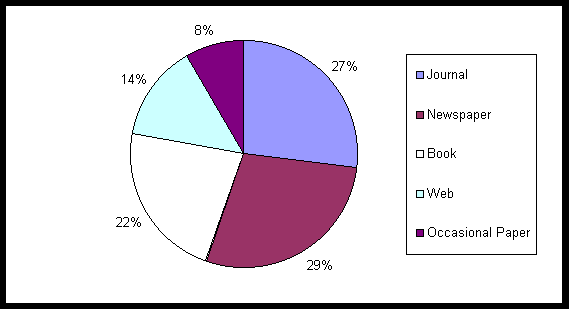
The sample of references has been divided into different categories. Journals and Newspapers have been included in the 'Articles' category. 'Occasional Papers' includes Working Papers, Conference Papers, etc.
Figure 3.1 shows the percentage of different types of references found, and represents the same results that have been tabulated in Table 3.1
Table 3.1: Total number of references from each sources
|
BIDs |
Dialog |
CD-ROM |
Eureka |
Internet |
Opac |
|||||||||||||||||
|
Social Science |
IBSS |
Art & Hum. |
Ingenta |
IAC |
Archi. |
UrbaDisc |
Newsp. |
RLIN & Black |
||||||||||||||
|
H |
R |
H |
R |
H |
R |
H |
R |
H |
R |
H |
R |
H |
R |
H |
R |
H |
R |
H |
R |
H |
R |
|
|
Conservation & architecture & preservation |
- |
- |
- |
- |
3 |
0 |
1 |
0 |
- |
- |
0 |
0 |
- |
- |
3 |
1 |
- |
- |
2 |
1 |
- |
- |
|
Conservation & built & environment |
24 |
2 |
3 |
2 |
1 |
0 |
0 |
0 |
11 |
2 |
14 |
3 |
7 |
2 |
18 |
6 |
4 |
1 |
10 |
3 |
0 |
0 |
|
Conservation & cultural & property |
11 |
0 |
11 |
0 |
2 |
1 |
5 |
0 |
5 |
0 |
1 |
0 |
- |
- |
5 |
0 |
0 |
0 |
1 |
0 |
0 |
0 |
|
Conservation & heritage & urban |
7 |
1 |
5 |
3 |
3 |
0 |
2 |
0 |
1 |
0 |
20 |
5 |
7 |
3 |
10 |
4 |
0 |
0 |
14 |
6 |
0 |
0 |
|
Conservation & historic & building |
2 |
0 |
- |
- |
2 |
0 |
5 |
0 |
2 |
0 |
1 |
1 |
2 |
13 |
4 |
7 |
2 |
12 |
5 |
0 |
0 |
|
|
Conservation & listed & building |
1 |
0 |
- |
- |
- |
- |
8 |
0 |
- |
- |
9 |
8 |
8 |
3 |
16 |
8 |
5 |
1 |
5 |
2 |
- |
- |
|
Conservation & policy & property |
22 |
1 |
- |
- |
5 |
0 |
- |
- |
5 |
0 |
0 |
0 |
- |
- |
7 |
0 |
- |
- |
- |
- |
||
|
Conservation & policy & urban |
7 |
1 |
18 |
3 |
0 |
0 |
6 |
0 |
0 |
0 |
2 |
0 |
2 |
0 |
21 |
4 |
0 |
0 |
4 |
1 |
- |
- |
|
Conservation & preservation & system |
4 |
0 |
6 |
0 |
0 |
0 |
5 |
0 |
0 |
0 |
0 |
0 |
0 |
0 |
0 |
0 |
- |
- |
27 |
1 |
0 |
0 |
|
Conservation & Trends & Policy |
3 |
0 |
4 |
0 |
2 |
0 |
0 |
0 |
5 |
0 |
0 |
0 |
- |
- |
- |
- |
- |
- |
4 |
0 |
0 |
0 |
|
Conservation & Urban & Policy |
- |
- |
8 |
1 |
- |
- |
- |
- |
39 |
1 |
- |
- |
- |
- |
13 |
4 |
7 |
3 |
0 |
0 |
2 |
1 |
|
English & heritage & urban & policy |
- |
- |
- |
- |
- |
- |
- |
- |
25 |
1 |
- |
- |
- |
- |
7 |
3 |
7 |
5 |
25 |
1 |
- |
- |
|
Larkham, Peter |
0 |
0 |
0 |
0 |
0 |
0 |
0 |
0 |
0 |
0 |
0 |
0 |
7 |
5 |
0 |
0 |
9 |
7 |
5 |
4 |
10 |
1 |
|
Urban & policy & (listed or historic) |
- |
- |
3 |
0 |
- |
- |
- |
- |
8 |
0 |
- |
- |
- |
- |
9 |
2 |
- |
- |
15 |
3 |
- |
- |
|
Planning & Policy & guidance & note |
0 |
0 |
5 |
3 |
3 |
0 |
0 |
0 |
- |
- |
0 |
0 |
6 |
2 |
5 |
2 |
0 |
0 |
13 |
4 |
0 |
0 |
|
Preservation & Cultural & Property & Policy |
0 |
0 |
2 |
1 |
- |
- |
- |
- |
- |
- |
0 |
0 |
- |
- |
- |
- |
- |
- |
- |
- |
11 |
2 |
|
Sustainable & Policy & (Historic or Urban) |
0 |
0 |
1 |
1 |
0 |
0 |
0 |
0 |
0 |
0 |
0 |
0 |
8 |
1 |
18 |
4 |
- |
- |
13 |
2 |
- |
- |
|
Urban & Regeneration |
62 |
10 |
11 |
5 |
2 |
0 |
17 |
2 |
- |
- |
44 |
7 |
7 |
3 |
8 |
3 |
6 |
2 |
7 |
4 |
0 |
0 |
|
Urban & renewal |
20 |
4 |
18 |
4 |
16 |
1 |
5 |
2 |
12 |
1 |
26 |
3 |
9 |
3 |
5 |
3 |
5 |
1 |
11 |
1 |
48 |
4 |
|
TOTAL |
163 |
19 |
95 |
23 |
39 |
2 |
54 |
4 |
113 |
5 |
117 |
27 |
61 |
24 |
151 |
48 |
57 |
22 |
168 |
38 |
71 |
8 |
H- No. of Hits
R- No. Relevant hits
Figure 3.1: Percentage of Different Types of References
Sample of References
Journal
Ashworth_G.J (1997). "Conservation as preservation or as heritage: two paradigms and two answers." Built Environment 23(2): 92-102.
Ball_R. (1997). "Exploring the realities of the sustainable city through the use and re-use of vacant industrial buildings." European Environment 7(6): 194-207.
Larkham_P.J. (1997). "Conservation areas: ideal and reality reviewed." Transactions of the Ancient Monument Society 41: 23-44.
Ross_M, P. J. R. (1997). "Planning and the heritage: policy and procedures [review]." Urban studies 34(7): 1134-1135.
Tewdwr-Jones_M (1997). "Plans, policies and inter-governmental relations: assessing the." Urban studies 34(1): 141-162.
Book
Greed, C. and M. Roberts (1998). Introducing urban design interventions and responses. Harlow, Addison Wesley Longman.
Harris, R. and P. J. Larkham (1999). Changing suburbs : foundation, form, and function, E & FN Spon; Routledge.
Hutter, M. and Rizzo_Ilde (1997). Economic perspectives on cultural heritage. Basingstoke, Macmillan.
Larkham_P.J. (1996). Conservation and the city. London, Routledge.
Pickard_R.D (1996). Conservation in the Built Environment. Harlow, Addison-Wesley-Longman.
Newspaper
THE SUNDAY TIMES, 14 June 1998, Owners of listed buildings miss Pounds 250m in Vat relief, by Michael Holmes
THE TIMES, 09 June 1999, Pounds 400m needed to rescue decaying listed buildings, by Marcus Binney
The Observer, 25 January 1998 / Seventies buildings are back. But this acclaimed architect wants his masterpiece demolished by design / Home News, By Peter Beaumont
The Guardian, 15 April 1999 / Beauty of the Cornish chapels saved as they enter new listings / Home News, By Maev Kennedy, Heritage Correspondent
INDEPENDENT 99 Jun 09 / A quarter of the nation's top listed buildings are in a state of disrepair, By Kate Watson-Smyth
SUNDAY TELEGRAPH 97 Jun 01 / House & Home: History's hard harvest: Farmyard ruin or historic monument? Andrew Morgan on a conservation conundrum, By Andrew Morgan
DAILY TELEGRAPH 98 May 20 / Buildings at risk: History in danger of crumbling to dust, says English Heritage, By Mark Edmonds & Giles Worsley
Occasional Paper
Larkham, Peter J. (1994). Conservation areas: issues and management, Conference: Papers, University of Central England in Birmingham.
Larkham, Peter J. (1991). The changing urban landscape in historical areas. Occasional publication, no. 29. School of Geography, University of Birmingham.
Larkham, Peter J. (1991). Gentrification, renewal and the urban landscape. Working paper, no 59. Edgbaston: School of Geography, University of Birmingham.
Cambridge Univ. (GB). Dept. of Land Economy (1997). Evaluation of regeneration activities funded under the single regeneration budget bidding round, The evaluation framework. Discussion paper; no. 83
Web Result
Listed Buildings System and the NMR
The Conservation Work of English Heritage Looking After Listed Buildings
Heritage Conservation Information Web
British Library National Preservation Office
Conservation and Heritage Bibliography: Heritage
© P.J.Larkham, 1998
Critical Evaluation of the Sources Used
EVALUATION OF DIALOG -
Search Process
User Registration
It is necessary for Dialog users to both register and obtain a password.
Ease of Access
Although Dialog is supposed to be available for use 24 hours a day it cannot be accessed for 8 hours on Sunday. In reality, access for the group was only available during supervised practical sessions and the help of demonstrators was needed to log into the system.
Ease of Use
Dialog is not a very user-friendly searching tool for the inexperienced user. A specific knowledge of Boolean searching, of how to use Dialog and the specific commands to be used were needed in order to search the databases.
Search Help Function
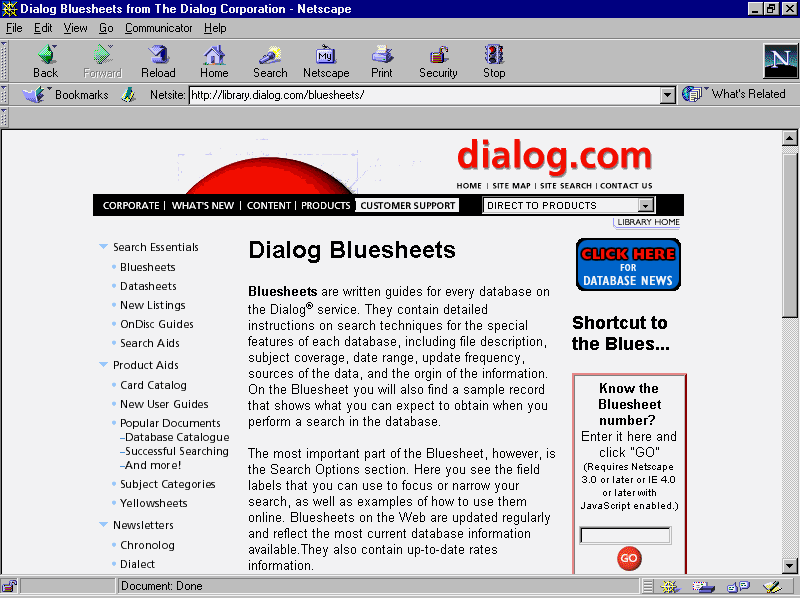
(Bluesheet http://library.dialog.com/bluesheets/)Bluesheet is a written guide for every database on Dialog. It contains detailed instructions on search techniques for the special features of each database, such as file description, date range, source of the data and the origin of the information.
The most important part of Bluesheet, is the Search Options section which users can use to focus or to narrow a search. In addition, users can choose to view databases by subject, database name, database number, etc. Bluesheet on the Web is updated regularly and reflects the most current database information available.
Figure 4.1: Dialog.com home page from which the Dialog help pages can be accessed.
Boolean operator
Searching on Dialog requires the use of Boolean operators. Users can use the Boolean functions, e.g. parentheses (), NOT, AND, OR to narrow down the search.
Format Options
Format Options are used in Dialog ranging from 1 to 9. Each format represents a different record content and the price for the record. Users can choose the specific format in which they require to download the information.
Speed of Processing Search
The speed of processing can be very slow. When keying in some commands, the user has to wait for more than 10 seconds or 20 seconds for the commands to be displayed on the screen.
Search Results
Presence of Duplicates
There was an overlapping of references retrieved in Dialog with those that were retrieved from BIDs and other databases. Some of the references retrieved from the Architectural Database duplicated the references found from IAC.
Accuracy and Completeness of the Results
The accuracy of results was enhanced by the numerous search functions such as Boolean and Format. Unnecessary results can be avoided and information accuracy can be increased when these functions are used.
With regards to completeness of results, Dialog can display the results in different formats ranging from Dialog accession number to the full text record. Users can choose the way in which they require the search results to be displayed according to their needs.
Cost
Dialog is not free of charge. The price can vary from one database to other. For example the daily unit cost of IAC was £1.38 whereas Architectural Database was £1.88. (That is based on the search results and records). Furthermore the format of the record downloaded also affects the price. Even under the same format, different databases can have different prices.
EVALUATION OF BIDs - Search Process
User Registration
BIDs is available to all higher institutions within the UK and elsewhere. Access to BIDs requires the registration of the user on ATHENS. For those higher institutions within UK, ATHENS registration and thus access to BIDs can be completed easily. For other institutions, a 'Licensed Agreement' is required. This may cause inconvenience for users from countries outside the UK.
Ease of Access
BIDs can be accessed via the World Wide Web or Telnet. Overall, it was easy to access the main web page through
http://www.bids.ac.uk. This is a helpful searching tool, in comparison with Dialog. However, accessing BIDs is subject to certain restrictions, which will be discussed further.Ease of Use
Overall, BIDs is a user-friendly searching tool. The JISC page, regarding the introduction of BIDs ISI, claims that no previous online searching experience is needed for users to handle BIDs.
In addition, users can conduct the searches simply by browsing the web page and typing the queries into different field boxes, which are easy to use and aesthetically pleasing to the user. However, as browsing is needed for conducting searches on different web pages, users may easily become lost after several browsing actions on different pages.
Search Function
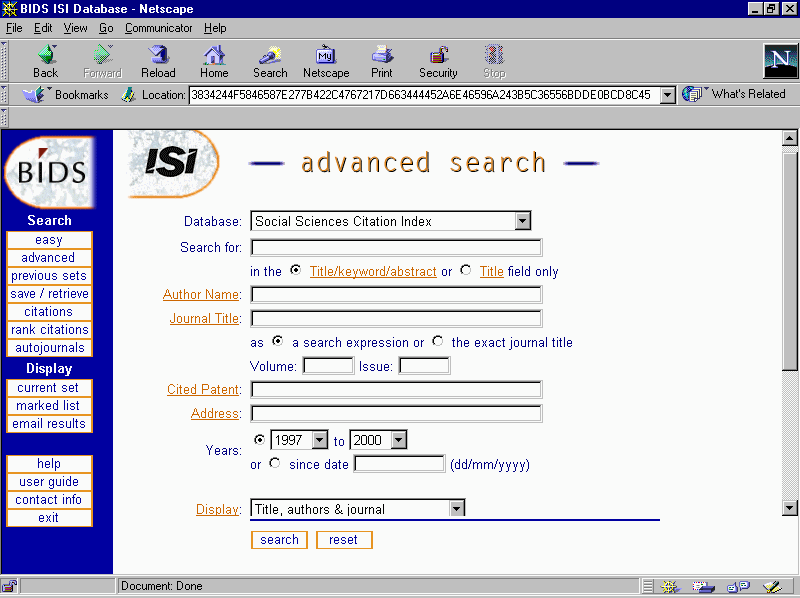
BIDs ISI have two different search pages: the 'easy search' and 'the advanced search'. Both of them support Boolean search functions and allow users to choose, and to easily change to, different databases in the same search page. Each page contains several query boxes, with clearly marked labels, to direct users to type in their queries into the different fields.
BIDs also provide a "Help" document page to help users in conducting searches. The help facility introduces the details of each query field boxes and the way in which to conduct a Boolean search in BIDs. The overall performance of this page is concise and understandable even to the inexperienced user.
Easy Search Page
The easy search page provides the most basic search fields including keyword, author name, year, title search and the display format, which allow users to conduct searches in a very general way. This is useful when the user is browsing a general topic area, instead of a narrowly defined search.
Advanced Search Page
For a more advanced search it provides more query fields which enables the user to achieve a more focused and specific search. Moreover, it also provides various query fields that help to narrow a search, such as language, year of publications and type of document. This was especially useful for this literature search.
Figure 4.2: BIDs advanced search interface.
Use Previous Sets Search
One of the advantages of BIDs is that it allows users to review previous sets of search queries and to use them to narrow the search by utilising the Boolean function. Users can clearly view the previous sets of queries and narrow the search by using Boolean functions such as AND(+), OR(,), and NOT(/) to combine the previous sets. This is achieved by using the number assigned for each set and can help to avoid retrieving unwanted results.
However, users cannot add new query terms to combine the previous sets of search terms as the combination can only be achieved during the process of the search. Unfortunately, it is relatively more time-consuming to construct the different search sets than it would be to amend the previous searches.
Marked List and E-mail Results
BIDs also enables users to mark the relevant or wanted information from the search result list and e-mail the result to the user's e-mail account. The users can therefore filter out unwanted results, thus saving time in editing the results. However, this function is not always useful when the abstract is not available (and thus the content of the paper unknown) or a large quantity of results are received).
Speed of Processing Search
The speed of processing the search partially depends on the retrieval speed of the PC used. If using the PII-266 as the counting basis, the speed is acceptable. The retrieval speed was also observed to be significantly slower during the peak hours (afternoon). The overall speed and performance of BIDs is acceptable.
Search Results
Accuracy and Completeness of Results
Accuracy of the results is greatly enhanced by the numerous search functions available. In using these functions, unnecessary information can be avoided.
In terms of Completeness of results, BIDs is able to display the search results in different formats, ranging from title and author to a full text record. This means that users can choose the way to display the search results, according to preference.
Presence of Duplicates
Overlapping did exist within the various databases. It was also found that there was a considerable amount of overlapping of the BIDs ISI results with those retrieved from Dialog.
Cost of Search
Generally, the BIDs service is free of charge. The only possible charge to incur is the connection fee for telephone line or the Internet service provider. Apart from the above costs, there is also a possible labour cost involved in conducting searches in BIDs, as information searching is a time-consuming activity.
EVALUATION OF THE INTERNET -
Search ProcessUser Registration
There is no registration required for the Internet user.
Ease of Access
In general, the Internet was quite easy to access for a university student because it is available throughout the University network. However, as the network is usually busy at peak hours it may take quite a long time to access it. Access is also easy for non-university users, who may simply need to join an Internet provider to gain access to the service. Access is also possible from public institutions such as libraries, where the service may be deemed to be free to the user.
Ease of Use
Generally speaking, the Internet is simple to use and easy to handle. Users simply type in the keyword into the 'search box' and queries into the other field boxes to specify the search. Guidelines are provided by some search engines such as MetaCrawler and Lycos who have search tips for users.
Figure 4.3: Metacrawler search help page
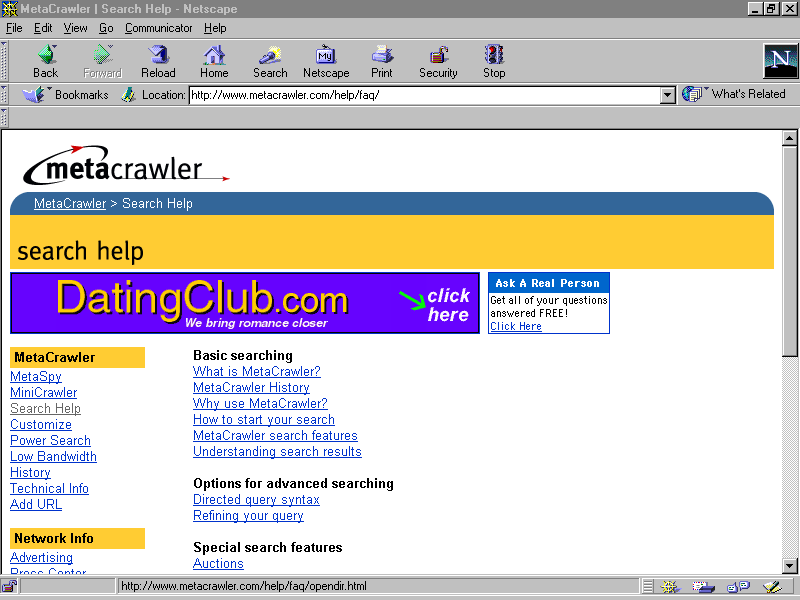
The MetaCrawler works by querying a number of pre-existing search engines and displays the results in a uniform format. Furthermore, the MetaCrawler also allows users to have the option of sorting the hits. Thus, the results list can be displayed in a number of different ways, such as organisation, locality and region. As the listed web address (URL) is linked to the web site users can easily browse through the sites.
Search Function
Boolean searching (AND, OR, NOT) and a drop-down menu ( + , - ) are offered in MetaCrawler. It also provides some options where users may limit the query by search site and region. The results specify: name, URL, and the database in which the information can be found, as well as any annotations that could be found in the source database. It can also present a variety of options for sorting the results and removal of duplicates.
Figure 4.4: Metacrawler search engine
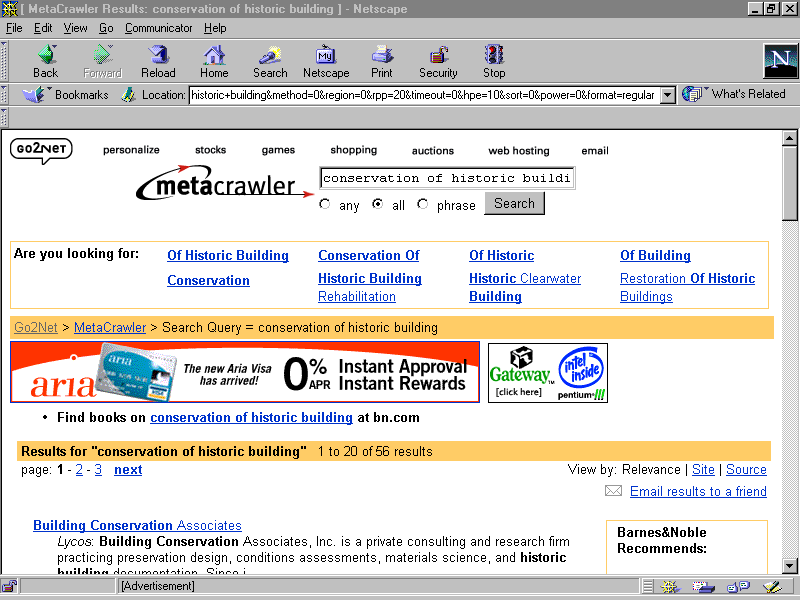
Users can also use Boolean queries, by selecting operators from drop-down lists and typing in the key search terms. The queries can limit the search by language, region and dates. The advanced querying capabilities are quite strong in this resource.
The meta-search engines are able to grab only the top 10-50 hits from each ordinary search engine and then combine the results from the other databases. Consequently the number of hits from single search engines are sometimes larger than a meta-search.
Speed of Processing Search
The speed of processing mainly depends again on the retrieval speed of the PC used, the performance and stability of service or server that provided the search engine, and the number of users accessing the World Wide Web at that specific time.
Although the PCs used by the University are either a P-I or P-II, the network was usually very busy during the peak hours, therefore the speed of searching and browsing the information was quite slow.
Search Results
Accuracy and Completeness of Results
In terms of completeness of the search, the results varied. Most of the search engines on the Internet only display the name of the web site, a sentence of brief description and the web site address. The description of the web site was often too brief and sometimes incomplete. It was quite difficult for the user to judge whether the information was relevant or not. Normally the users need to click onto the web sites to see more detail.
Overall the completeness of results was low. Accuracy of the information searched from the Internet was also low, with more than half of the searched results being discarded as they were irrelevant. However, some meta-search engines provide a better retrieval quality than the ordinary search engines.
Cost
As the Internet service provided by the University is free of charge there was no cost for the University users except labour cost. For private or company users, the cost in accessing Internet includes the charge from the telephone company or Internet service provider.
EVALUATION OF CD-ROM - Search Process
User Registration
There is no required registration for the CD-ROM user. However, non-academic users may have to invest in a subscription for a CD-ROM or pay to access it in a Public Library. The University itself will hold a subscription where updated versions of the databases will be sent periodically as long as the subscription is paid. Access is via the University Intranet for those registered with the University.
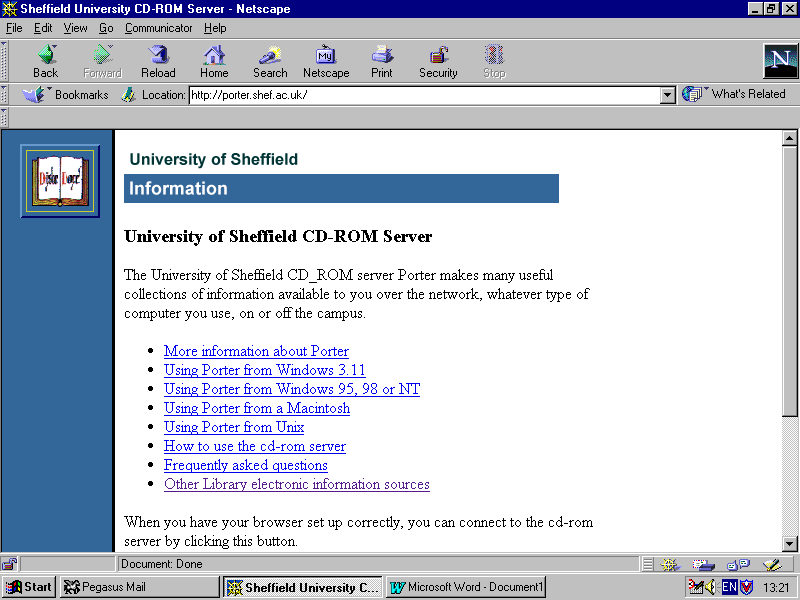
Figure 4.5: University of Sheffield CD-ROM Server
Ease of Access
This resource was easy to access as it was available to all University networked users via the campus network and RATS. It can also be accessed directly from the above page by connecting to the University's CD-ROM server. However, with some databases, for example EUREKA, the service is only available to the member of Research Libraries Group(RLG).
Ease of Use
Generally speaking, CD-ROMs are simple to use and easy to handle especially with the "help facility". The users can select the subject area that they require, with unlimited use as the service is free to the user. However, only full-text files are available in the newspaper database, there are no abstracts provided. It was found to be very time consuming to browse through full text documents to decide which were the relevant documents.
Search Function
Boolean searching (AND, OR, NOT) is offered in the CD-ROM service. It also provides advanced search and facilities to limit the search by year, publisher, etc. The keyword(s) search function is also provided in most of the CD-ROM databases.
Speed of Processing Search
The speed of processing the search on CD-ROM depends on the retrieval speed of the PC used and the University network. The PCs provided by the University are mainly P-I or P-II, and the University internal network and server are quite fast. Therefore the searching speed was quite good when the users were using the University PCs. However, the speed may slow down when the users used the "Remote Access" service.
Search Results
Accuracy and Completeness of Results
The overall performance of completeness of the search is good. Some of the databases provide a detailed reference with abstract, table of content, ISBN, shelf location, for example in the British Library. However, the newspaper database only provided the full-text file and no abstract, therefore the group found it difficult to search this database. On the other hand, the accuracy of the information searched from CD-ROMs is fairly low, more than half of the results retrieved were irrelevant. In EUREKA, most of the results were from Europe so it was difficult and time-consuming to search for documents only from the UK.
Cost
As the CD-ROM may only accessed through the University network or networked users it is free of charge to the University users, apart from the user's personal labour cost. The disadvantage is that the University itself needs to have a copyright license and suffers high annual fees.
COMPARING DIALOG, BIDS, INTERNET & CD-ROM -
Search ProcessUser Registration
There is no registration required for the Internet and CD-ROM users but registration is needed for Dialog and BIDs.
Ease of Access
In comparison with Dialog, Internet, BIDs and CD-ROM's are more convenient to access in terms of time and venue, since they could be accessed via the network, libraries and IT centre, whereas Dialog could only be accessed during the practical lesson in the On-line room.
Search Function
Boolean searching (AND, OR, NOT) can be found on Dialog, BIDs, Internet and CD-ROM. In addition, easy search, advanced search and help facilities are provided on both BIDs, the Internet and CD-ROM. Unlike the above three, format operator and bluesheet are only provided in Dialog, which lacks the important help function.
Ease of Use
In comparison with BIDs, the Internet and CD-ROMs, Dialog is hard to handle and not user-friendly to inexperienced users because there are a lot of specific commands needed, especially with no help function or search tips available. Dialog is useful to the experienced searcher though, because the search may be narrowed more easily than in the other resources.
BIDs, the Internet and CD-ROM's are more user-friendly to the in-experienced user. Users simply have to type in the keyword into the search box to specify the search. A help facility is provided by BIDs and the Internet to aid new users in their search.
Speed of Processing Search
The speed of processing search in BIDs ISI and Internet is largely dependent on the retrieval speed of the PC used and the time of the search. The overall performances of BIDs ISI and Internet are acceptable and the performance of the CD-ROMs is quite good. However, the Internet searching activity is affected by the number of users or the time of day in that speed of searching is quite low during peak hours.
The speed of processing of Dialog was very slow. The group found that some of the command processing took more than 20 seconds. Thus, the speed of processing the search was slower than BIDs, the Internet and the CD-ROMs.
Search Results
Accuracy and Completeness of Results
Generally speaking, Dialog and BIDs ISI provided results with higher precision and more complete information, making it easier for the user to decide whether a record was relevant or not. BIDs ISI and Dialog display the search results in different formats ranging from author and title only to full record including citation and extraction.
The Internet only displays the name of the web site, a sentence of brief description and the web site address. The description of the web site was too brief and sometimes incomplete. It is hard for users, especially for the beginner, to judge whether the material is relevant. All in all, the group found that the accuracy and completeness of the information given in the Internet search was low.
The precision of the information given from the CD-ROMs was quite low, over 50% of the searched results were irrelevant. For example, in Eureka, most results were from Europe, which were not relevant to our specific search.
Presence of Duplicates
It was found that there are considerable amounts of overlapping of the BIDs ISI and the CD-ROM results with those retrieved from Dialog. The most obvious reason for such overlapping is that there are only a limited number of articles for this subject area. It may be deduced from this that these sources were searched thoroughly enough for all of the relevant references to have been retrieved.
BIDs and Dialog have their own strengths and weaknesses. Even though there was overlapping, it cannot be denied that some relevant references found in BIDs could not be found in Dialog. The duplication of results from the Internet and the CD-ROMs were less than in Dialog and BIDs.
Cost
BIDs and the CD-ROMs were essentially free of charge for individual sessions and are therefore the most cost-effective searching tools, whereas there was additional service charges for each session in Dialog. When taking the charge into account, the total cost involved in Dialog was the highest among those of the four main tools. The total cost per reference retrieved of Dialog was £1.50 and for the Internet was £0.65 (The cost of the Internet is based on the telephone bill). It was not possible to calculate the cost of the CD-ROMs because the copyright license is paid by the University and BIDs is free of charge to all higher institutions. From the above data, it shows that Dialog is the most expensive search tool. Added to the cost of the Internet, for Higher Education Institutions is the charge for accessing American Sites by JANET. This was introduced last year partly because of the increased demand on JANET's resources.
Table 4.1: Comparison of the search process for Dialog, BIDs, Internet & CD-ROMs
|
Criteria |
Dialog |
BIDs |
Internet |
CD-ROM |
|
|
User registration |
Yes, demonstrators were needed to log in the system |
Yes, access to BIDs services required ATHENS registration |
No required registration |
No required registration it is available over the University network |
|
|
Ease of access |
Not easy to access and the access time was restricted |
Easy to access |
Very easy to access |
Very easy to access |
|
|
Ease of use |
Not easy to use as there is a set of specific commands needed. |
Easy to use with help document |
Easy to use with search tips |
Easy to use |
|
|
Search function |
Bluesheet, format options and Boolean operation are provided. They help users to narrow down the search e.g. by language and country |
Keyword, Boolean and Advanced search were used. The query can be limited by region, language, etc. Besides, there are a variety of options for sorting the results. |
Keyword, Boolean and search were used. |
Keyword and Boolean search were used. |
|
|
Speed of processing search |
Very slow and it is the slowest search tool compared with BIDs, the Internet and CD-ROM |
It largely depends on the PC used the speed was acceptable |
It also depends on the PC used and the number of Internet users approaching at the same time, its usually very slow in speed. |
It also depends on the PC used and the number of users logged-on at the same time, the speed is quite good. |
|
|
Query interface |
Fair, could be improved |
User-friendly and good user interface |
User-friendly |
User-friendly |
|
|
Cost of search |
Very expensive |
Free for the University users |
Free for University users |
Free for the University users |
|
Table 4.2: Comparison of the search results for Dialog, BIDs, Internet & CD-ROMs
|
Criteria |
Dialog |
BIDs |
Internet |
CD-ROM |
|
Accuracy and completeness of results |
Accuracy of Dialog is enhanced by search functions such as Boolean. The completeness of the information provided in Dialog is high, it displays the search results from basic to full record |
Accuracy of the information given is enhanced by numerous search functions and the degree of completeness of it is quite high |
The degree of completeness and accuracy was very low. It provided incomplete description and web site addresses |
The degree of completeness and accuracy was acceptable |
|
Abstracts / summary |
Yes, in total there are 9 formats of the records ranging from Dialog accession number to full record |
Yes, users can choose the format of results, like author, title and full record. |
Yes, it only provided with insufficient information |
Yes, most of the databases provided sufficient information |
|
Duplication of results |
Yes, duplicated records were found within BIDs. |
Yes, overlapping was found between Dialog and CD-ROM |
Yes, overlapping was found with BIDs and Dialog |
Yes, overlapping records were found with Dialog and BIDs |
|
Online 'Help' documents |
Poor |
Good |
Good |
Good |
Manual Sources
The
Manual sources varied in their usefulness. Pais 97 was not really relevant to this subject search. This was discovered once the search commenced by looking at the abstracts of articles. This can therefore be quite a time consuming process because you have to look at every entry for the section because there is only a keyword index. Geoabstracts had the same type of keyword index. This was easy to use. However, it was time consuming because on inspection of the abstract certain references were then found to be irrelevant. The actual retrieval was easy and the structure of the journal was such that the abstracts were easy to find. The cost of these manual sources is by subscription. The library pays once a year to receive twelve issues. This is probably quite cheap compared to the CD-ROMs and other electronic resources but paper issues have disadvantages in terms of time spent having to go through them and a limited set of keywords in the index. This may mean that the user has to know their subject very well in order to find relevant articles.
Summary
The various information sources all had their individual strengths and weaknesses. Although Dialog was both expensive and difficult to use for the inexperienced user, it enabled the user to narrow down the search more than the other resources and therefore yielded more precise results. The Internet was easy to access and use, with good help facilities, but resulted in high recall and low precision. Both the CD-ROMs and BIDs were fairly easy to use and access, but required some basic knowledge from the user in order to search effectively. These two resources had average cost, recall and precision.
There are a number of ways, on reflection that the search could have been improved. The methodology, during the trial search, was inconsistent between the group. This was discovered at the end of the trial search. This included inconsistency in the strategy for recording data related to the number of hits for each search term. However, this problem was overcome for the main search and the methodology standardised. There was also inconsistency in the use of search terms, but this was mainly because we had to use our own initiative in using the source that was being searched. For instance, if a search query produced a list of results that was too broad or too narrow then the searcher had to think about new queries that may produce a more accurate result.
The decision to use EndNotes to store the references should have been made at an earlier date. The importing of data into EndNotes proved to be quite time-consuming because of the volume of data that had to be added manually, however, it did provide an opportunity to learn how to import data into EndNotes by creating personal filters. However, it would have saved the group considerable time if the results from BIDs had been imported directly. The group felt that the first search of Dialog may have been more effective if prior to the search taking place there had been a chance to learn how to use the database. Time was wasted in actually learning how to use this database. The timing of searches proved to be an area that could have been improved. BIDs was especially slow in the afternoon but there were also problems in gaining any access at all to the database at peak times.
The group felt that some personal knowledge of the subject area would have helped in the decision over whether references were relevant or not. It was often difficult to decide this - especially because a lot of the databases searched did not include abstracts. However, after the trial search, the client ranked the references from the search from 1 (crucial to his thesis) to 5 (irrelevant). These ranked results were then used to compare new references and to consider their relevance. Personal knowledge could possibly have been gained by reading his thesis.
Variations in the source's interface allow for different data input in the search queries, which led to problems in meeting the search criteria. For example, on DIALOG, language and date could be specified but not country and our client was only interested in documents about England and Wales. This led to time spent browsing through a lot of irrelevant articles.
Our Client's Comments about the Search
LITERATURE SEARCHES CONDUCTED FOR EDWARD HOBSON
In the final results I was pleasantly surprised to find a significant majority of pieces which appeared very relevant to my subject. Some of these were revelations to me as I was totally unaware of the items. In a couple of cases these were published books but mostly they comprised grey literature such as university departmental working papers which unless you definitely know where you're looking can be all too obscure.
I had asked them in particular to look out for literature by a specific author, Peter Larkham. Again the range of materials and sources appeared impressively comprehensive ranging from published works with which I was already familiar to small reports/papers which I had not already discovered.
When presented with a list of newspaper articles it is quite difficult to discern which pieces are actually going to be relevant. It is difficult being selective - I have found that it is often sufficient to know that a piece exists thus indicating press coverage rather than being wholly concerned with the tenor of the article.
One area in particular which we had agreed to focus on was the conservation publications and interest on the web. I had been frustrated with the lack of decent conservation information, discussion and exchange on the web. The results perhaps bear out these frustrations as the main sites have been English Heritage's which have left me questioning their commitment to the media. However there are a few sites, notably Larkham's bibliography, and a couple of forums indicating conservation directions and contacts on the web.
In conclusion I believe the students successfully fulfilled the brief which we had agreed. I have not found their results to be lacking in any way".
The search itself was a success, in that the group identified the client's needs and retrieved references for the client that matched his criteria. The group's method was also successful, but lacked some degree of standardisation in the searching techniques used for the various sources. The client was satisfied with the results, which included references, which were both relevant and new to him.