All the demonstration files require various matlab DLL and LIB files.
Matlab license does not allow distribution of these files so there is no point listing them.
You have to have the matlab software installed to run these applications.
Running the stand alone executable.
Start the MatlabInterfacingEngine.exe.
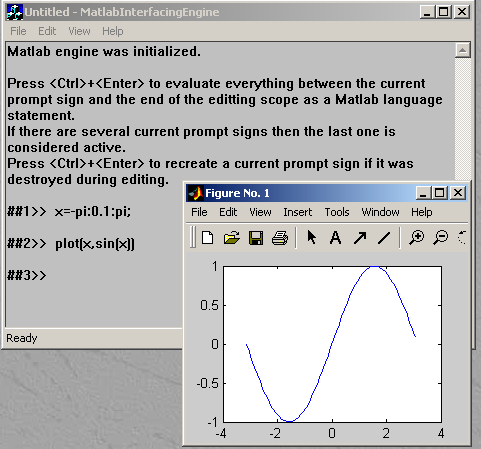
Type statements as shown on the picture. Press <Ctrl>+<Enter> as instructed.
Running Matlab in the Excel spread sheet.
-
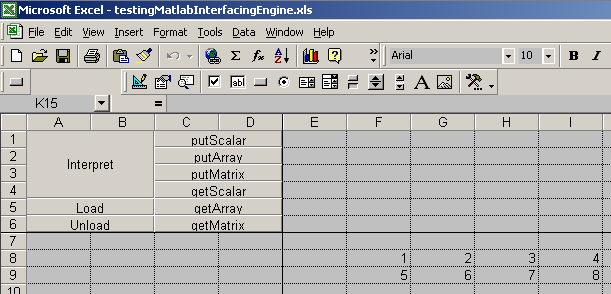
Start the file testingMatlabInterfacingEngine.xls
The buttons perform self explanatory actions on the active(highlighted) cell(s).
-
Insert the data as shown.
-
Highlight the data and press the putMatrix button.
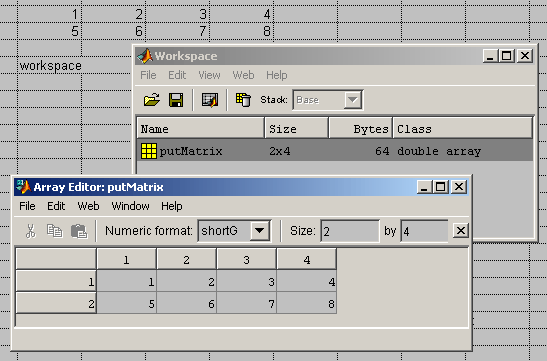
There is now a new variable in the Matlab engine workspace called putMatrix and holding the
specified matrix. One may observe it by typing
workspace
in some cell and pressing the Interpret button while such cell is the active cell.
The workspace window opens and the user can
examine the Matlab engine memory.
-
Type
a=putMatrix([1,2],[1,2])
and
eig(a)
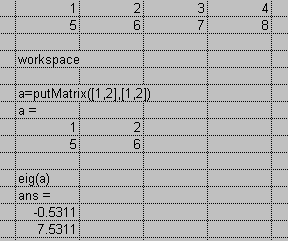
in different cells and use the Interpret button on each of the cells. The result is shown on the picture.