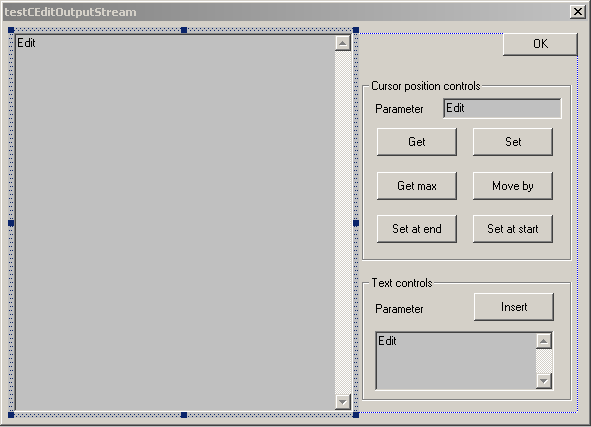
Testing the CEditStream.

  1. Use the MFC AppWizard(exe) to create a dialog based project named "testCEditOutputStream".


  2. Edit the resource of the main dialog window as shown.


  3. Set properties for the dialog components.
    Component Property name Property value
    Large editor box ID IDC_MAINEDITORBOX
    Large editor box Styles->Multiline. Checked
    Large editor box Styles->Want return Checked
    Large editor box Styles->Vertical Scroll Checked
    Small editor box in the position section ID IDC_POSITIONEDITORBOX
    Small editor box in the text section ID IDC_TEXTEDITORBOX
    Small editor box in the text section Styles->Multiline Checked
    Small editor box in the text section Styles->Want return Checked
      Styles->Vertical Scroll Checked
    "Get" button ID IDC_GET
    "Set" button ID IDC_SET
    "Get max" button ID IDC_GETMAX
    "Move by" button ID IDC_MOVEBY
    "Set at end" button ID IDC_SETATEND
    "Set at start" button ID IDC_SETATSTART
    "Insert" button  ID IDC_INSERT

  4. Assign variables to the dialog components.
    ID Type Name
    IDC_MAINEDITORBOX CEdit m_edit
    IDC_POSITIONEDITORBOX int m_position
    IDC_TEXTEDITORBOX CString m_text

  5. Setup message handlers.
    1. To prevent dialog box from closing when the user presses key anywhere in the dialog change the ID property of the OK button to ID_OKBUTTON. Add a new message handler to the "BNCLICKED" event:
      void CTestCEditOutputStreamDlg::OnOkbutton() { if (CanExit()) CDialog::OnOK(); }
      and make the function OnOK() empty:
      void CTestCEditOutputStreamDlg::OnOK() {}
    2. Assign the following message handlers to the BNCLICKED event of the control buttons
      ID Handler
      IDC_GET CTestCEditOutputStreamDlg::OnGet
      IDC_SET CTestCEditOutputStreamDlg::OnSet
      IDC_GETMAX CTestCEditOutputStreamDlg::OnGetmax
      IDC_MOVEBY CTestCEditOutputStreamDlg::OnMoveby
      IDC_SETATEND CTestCEditOutputStreamDlg::OnSetatend
      IDC_SETATSTART CTestCEditOutputStreamDlg::OnSetatstart
      IDC_INSERT CTestCEditOutputStreamDlg::OnInsert

  6. Attach the following files to the project:
    OutputStream.h
    EditorOutputStream.h
    CEditOutputStream.h
    OutputStream.cpp
    CEditOutputStream.cpp

  7. Build and run the application.


Hosted by www.Geocities.ws

1