Fanfiction.net Symbol Solution
By Toboe LoneWolf
Updated 7-20-07
NOTE: AS OF JANUARY 4TH 2008 THIS HACK NO LONGER WORKS. Boils and plagues to curse thee, fanfiction.net. On the off chance that ff.net screws around or this is a minor blip in their ever changing GUI system, this page will stay up; however, I can no longer guarantee that it will work, alas.
Yes, fanfiction.net can be a pain in the butt. And one of the major problems is this: the deletion of certain symbols. ...However! There is a way around this!
WARNING:...Then ff.net came out with this hidden dagger. In their FAQ (when they had it, but I'll bet they'll still stand by this now anyway) [emphasis mine]:
Please note that for layout purposes, FanFiction.Net will strip out most non-language relevant text and formatting.
- Most html tags. We only allow [u,b,i,p,br,hr] embedded html tags. To retain html tags, you must submit the document as a html file.
- Non-language relevant keyboard characters such as ~,_,^ are removed. Foreign language characters are not affected by this rule. For dividers, please use html HR tag, the horizonable divider within QuickEdit.
- Extended spacing beyond what is needed are removed. Double spacing is the maximum spacing allowed between paragraphs and other structural divisions.
Please avoid all fancy and gimmicky layout decorations.
Using non-language relevant characters will result in the removal of story.
- In order to prevent spamming, email addresses and links are not allowed within stories. Please put them in your personal profile.
*shrugs* So...if you wish, you can use this strategy for using symbols. You run the risk of deletion, however. I'd use this for one-shots and non-obvious usages, such scene changes or if ff.net screws up someday. Hey, it happens. As we all know, I'm sure.
This "hack," if you will, has worked ever since this ff.net-symbol-removing business has started (2005). Some minor notes come and go as ff.net does upgrades or changes, such as when it used to reduce double punctuation like [what?!?] to [what?], but yes -- this works. It does take a minor bit of effort, and will get tedious if all of a sudden you go symbol-crazy, but if you absolutely need some symbol, this will work.
Please do not abuse this hack and start using flourishing symbols all over the place. For one, that may encourage the fanbrats, and two, I have no idea if ff.net can get around this hack but I wouldn't like ff.net to try. XP I suspect that the move to strip the symbols came along when chatspeak/keyboard dialogue based/script entries were popular; since symbol usage was heavily used the removal of this ability effectively cut down on said entries. These entries/actions are still disallowed on ff.net, so do not think that you can resume writing them now.
Alrighty then? Ready to flaunt and taunt ff.net? Good.
-------------------INSTRUCTIONS---------------------
This is the basic jist: instead of using actual symbols [*], use computer code [*]. Fanfiction.net accepts word documents, text files, and HTML files, but eventually Fanfiction.net changes all of it into an HTML file, because that is what is used on the web. For some reason, ff.net strips symbols away along with other HTML tags it doesn't allow. However, if you replace the symbols with actual computer code, that is, replacing the symbols with the literal code of "ones and zeros" of computer language, you can get by ff.net's stripping.
These instructions are loose, depending on which way you upload your stuff onto ff.net. (And it's also geared towards Microsoft users. If you use a Macintosh, you may need to do some juggling to find Macintosh's equivalent.)
| 1. Write as usual, now using your accustomed symbols. (As in, whatever word processing program you usually use.) Save as usual. |
|
| 2. Now, convert whatever you have into an HTML file.
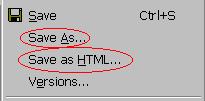
If you've already been writing this as an HTML file with tags in it already, huzzah to you. With Microsoft Word, select [Save As HTML]; OR [Save As�] and either change the document ending from [.doc] to [.html] OR change the [Save as type:] to HTML Document.
Note: Advanced versions of Microsoft Word (ie, Word 2003 onward) will give you some crazy options like wierdo XML documents and use CSS instead of regular HTML tags. I'm all for the power of CSS, but for our purposes we want old fashioned, so save as [Webpage, filtered]. |
 |
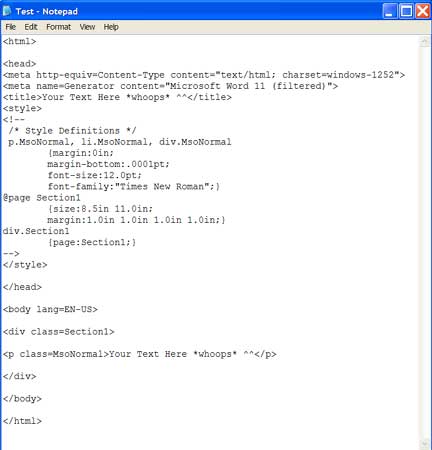
| 3. Open up the source code (computer code) for the HTML document you created.
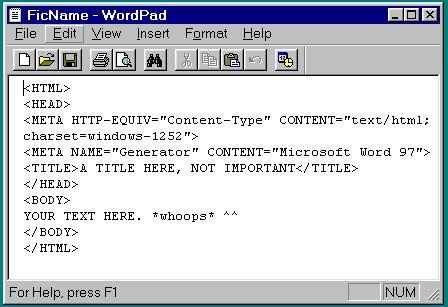
Option One: The most sure-fire way to do this is to open up your HTML file with a simple text writing program. In Microsoft, it's Notepad and/or WordPad. Eithier one works; you just need one that has a [replace] function. Choose preferably the most simplistic one. Windows 98 Wordpad works or Windows 2000 Notepad. Do this by selecting [Start], [Programs], [Accessories], [WordPad]. Then in WordPad, [Open], change [Files of Type] to [All Documents], and open the HTML document of your fanfic. This will give you its source code.
Option Two: Another way to access the source code is to [for Windows users] right-click on the HTML file, go to [Open With] and then select [Notepad] or [Wordpad].
What will pop up is the computer code for the HTML document. It should look like your regular text, but with stuff looking like <P> or <p> (stuff with angle brackets) dispersed in the text. This is HTML programming. Congratulations, you are now an amateur computer programmer. If you do not have stuff with angle brackets (notably, with a <HTML> or <html> at the top of the window) your window is "viewing" too advanced. We want primitive. Pure computer programming, not the fancy Word view stuff.
Note: If you can't get to the source code, remember, there is always a back-door way. I know of like four ways of editing HTML files; if you can't get this to work, contact me and I'll help.
Note 2: Remember, ff.net only allows the following html tags: (others will be stripped) <br> ,<u> ,<b> ,<i> ,<hr> ,<center> and <p>. So if you're getting weird tags like <span>, try saving it as [Webpage, filtered].
|
 |
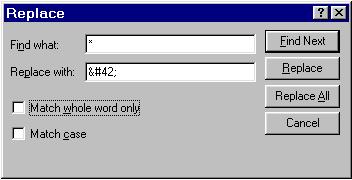
| 4. In WordPad, under [Edit] choose [Replace]. |
|
5. Under [Find what:] type in your usual symbol.
Ex: For the asterisk problem, type in [*]. (Not including the brackets.) |
|
| 6. Then, under [Replace with:] type in the literal computer code.
In HTML, this is called an entity. This is literal computer code that tells the computer (or since it's an HTML file, the web browser) to print this symbol when it encounters this bit of code. See below for list of HTML entities.
Ex: For the asterisk problem, in [Replace with:] type in [*] (Not including the brackets.) |
 |
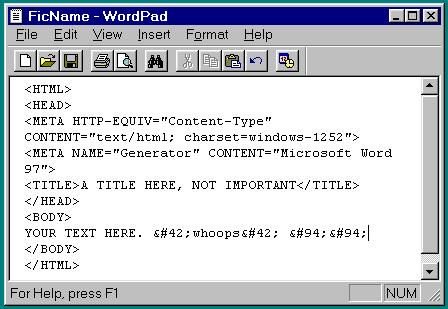
| 7. Select [Replace All]. Repeat steps 5,6,7 as needed for each symbol problem. Your Wordpad/Notepad document should look something like this: |
 |
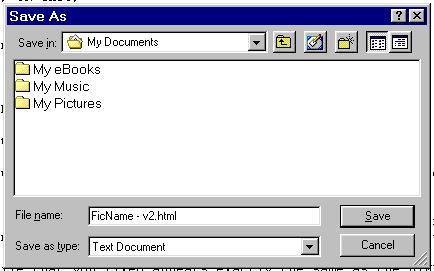
| 8. SAVE. YOU MUST SAVE IT AS AN HTML FILE. Not as a text document.
If you click on [Save As:] you must change the .txt ending to .html ending, and I would advise that you change the name so you know that this HTML is the one with correct "symbols" (unless you are used to this HTML'ing business. XD). Therefore you will have two HTML files.
If you just click on [Save] you will have only one HTML file, now with the "new" way of denoting symbols. CAUTION: May not work on older models of Windows/Notepad.
This HTML file that you fixed appears exactly the same as the HTML file with the old symbols. Open both of them (if you used [Save As:]) and they look identical; but in the source code one has computer code for symbols and the other has actual symbols. The web browser understands both ways of representing symbols; it's just that ff.net doesn't.
Note: The picture on the right shows what you would do if you did the [Save As:] concept. |
 |
| 9. Now, when you upload your document onto ff.net, choose the HTML file you "fixed." Check in the preview to make sure everything's okay, and update your fic as usual. |
|
--Entities for common symbols--
ALL entities for symbols begin with a single ampersand (&) and end in a semi-colon (;). Here are some that are commonly used and are deleted in some way or another by ff.net. If you need more, try this, or type in "HTML character entities" in a search site. Note: You need to use the "number" form to ensure that ff.net does not screw with these.
Symbol HTML Symbol HTML
* * | [ [
/ / | ] ]
: : | ~ ~
< < | ^ ^
> > | _ _
= = | � ¬
! ! | ? ?
Note: If you use curly quotes, [“speaking”], you run a slight risk. This is because curly quotes are not "standard" computer programming symbols, therefore they use computer programming symbols of [“] and [”], and thus ff.net messes with it. So...eithier you change all your curly quotes, which will most likely be tiresome/dangerous, count on ff.net to convert them for you, or simply revert back to straight quotes ["speaking"]. You can do this in Microsoft Word 98 by [Format], [AutoFormat], [Options], [Autoformat As You Type], and unclick the checkbox that says (replace) "straight quotes with smart quotes."
Note 2: One slight disadvantage to this hack is that I have yet to find what MSWord associates with a <hr>/horizontal line break. That is, I have yet to find that "if you do this in MSWord, when MSWord converts it into an HTML document it will insert a <hr> tag." Therefore if you do use the horizontal line break, you will have to add it in yourself. Personally I only use the <hr> tag once so I just manually edit the HTML file; if you use the horizontal line break multiple times you can use the Notepad/Replace All feature, and in the [Find] feature you can use some particular character-phrase you use to associate with a horizontal line break that you type in earlier, like "---" or ".oOo." or something else.
------------END INSTRUCTIONS--------------
There we go. Yes, it is slightly complicated, but hey, it works. Since ff.net's kinda jumpy on what it accepts and stuff, always check with the preview. Or, make a test document with all of the symbols you use and test which ones work and which method. If you have any problems, questions, or notes, feel free to contact me.
See ya around ff.net!
--Toboe LoneWolf
Back to Howling.