YAGMax Tutorial - Exporting Basic
A lot of newbies having difficulty in exporting GMax scene to render in yafray. First you have to know that Gmax can't export file directly, only to listener! So for every output, you have to copy and paste from listener to a text file. A handy program which written by spot call GMaxSLGRAB is very usefully and handy to do that job for you!
With YAGMax, you have two different way to export your scene!
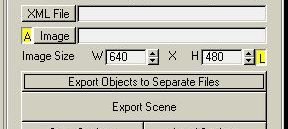
A. Export everything in one big xml text file! But you have to uncheck "Export Objects to Separate Files" like this:
| Advantage: |
Easy and hassleless! |
|
| Disadvantage: |
Problem with big scene, Gmax listener can't export more than 10k text!
Hard to read/edit manually. |
B. Export everything but all objects(meshes)
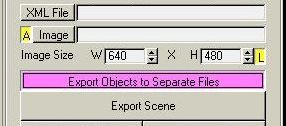
if you render this xml file in yafray, it will fail! Because all objects(meshes) it need wasn't exported yet.
What you have to do is go to the "Objects Settings" rollout. Press the "Refresh" button once. You should now have all exportable objects in the list. Select the one you need to export and press the "Export Object".
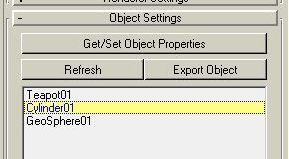
Another xml will be generated. Copy and paste it to a text file with the same name as the object.
In my case it is called Cylinder01.xml
Go through all the objects(meshes) you needed and now you can render the scene with yafray!
| Advantage: |
No size limited!
Easy to edit manually, cause you don't really need to edit the objects(meshes) files. |
|
| Disadvantage: |
Easy to miss one or two objects(meshes) files.
All objects(meshes) files are path related, so you can't move them to other place without editing the main xml.
|
